1
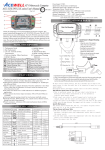
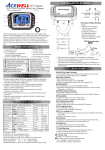
Displays
when current is higher than average speed and
indicates
when current speed is less than average speed
from last Reset operation.
Volt: Digital Voltage Gauge
It is to check bike’s battery and charging systems health.
: Fuel Meter
1. Built-in 100, 250 and 510Ω fuel sender resistance for you,
the fuel bar will disappear in case the wires does not connect
to fuel sensor before power on.
2. Have 7 bars to indicate how much fuel remains.
3. Last bar flashes to indicate low fuel level automatically.
Gear Indicator:
It compares speed and tachometer and indicates estimated
digital gear position 1, 2… or .
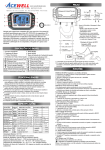
BUTTON OPERATIONS
MODE BUTTON
1.Press the MODE button to move all functions in loop sequence
from one function screen to another when the speed sensor does
not detect any signal input.
2. Press the MODE button to move partial functions in loop
sequence when speed sensor detects signal input
3. Functions of MAX Speed, MAX RPM, MAX Thermometer and
TT are hiding during riding. These data appears when stop
riding.
RESET BUTTON
1. Press MODE button to the desired screen then press RESET
button for 2 seconds to reset Trip 2, MAX, MAX thermometer
and MAX RPM data from stored values to zero individually.
2. The data of Trip 1, AVG & RT be reset at the same time when one
of the 3 data functions is being reset. The Trip 2 will be automatic
reset when fuel meter reaches the last bar and flashes the bar.
3. ODO, clock and TT data cannot be reset.
SHIFT WARNING RPM OPERATION
1.
Press MODE button to the RPM screen; pull on the throttle
until the desired shift warning RPM.
2. Press RESET button to confirm and set up the shift warning
RPM.
3. Bar-graphic tachometer and warning LED will flash to warning
you shift gear.
4. Press RESET button for 2 seconds at the RPM screen to readjust the shift warning RPM.
Thermometer Warning
1. The LCD screen will jump to temperature screen automatically
when the sensor detects temperature higher than the presetting
warning temperature.
2. The thermometer digits and warning LED flash, and both buttons
are out of function during over temperature.
3. Stop engine until temperature cooling down to below presetting
warning temperature, both buttons recover to work.
WHEEL CIRCUMFERENCE TABLE
1. The details below have been calculated using following
formula: Tire Diameter (inches) x 25.4(mm/inches) x 3.1416 =
wheel circumference (in mm).
2.
Identify the tire size of your ATV/Motorcycle when you need to
change different tire size and key in the corresponding number
shown in the following chart.
Tire Size
Circumference Tire Size
Circumference Tire Size
Circumference
number (mm)
number (mm)
number (mm)
15 inch
1197
19 inch
1516
23 inch
1835
16 inch
1277
20 inch
1596
24 inch
1915
17 inch
1357
21 inch
1676
25 inch
1995
18 inch
1436
22 inch
1756
26 inch
2075
Clock, RPM, Wheel, Unit, Temperature and fuel meter SET UP
1. Setup operations include 12/24hour clock, bar rpm scale, shift
warning RPM, numbers of engine rotation per signal, wheel
circumference, units, odometer adjustment, units of temperature
and temperature warning. These must be set up step by step.
The computer will be automatic reversion to main screen if no
button operation for 75 seconds at any setting screen.
2. Connect the fuel and thermo sensors to main unit firstly before
power on, otherwise the LCD screen does not display both
functions.
3. Press both MODE & RESET buttons to go into setting screen.
In setting screens, each press RESET button to add the flashing
digit by 1 or convert units, press MODE button to confirm the
digit setting and jump to next digit or next setting screen to be
set. Press MODE button for 2 seconds at any setting screen to
finish the setting and go to main screen.
4.
It displays "12 or 24H and XX:XX-XX" symbols as well
AM/PM in case you select 12H. Operates buttons as
descriptions of item 3 to finish clock setting and jump to
8,000/16,000rpm scale setting.
5. It displays 8,000rpm scale, press RESET button to convert
8,000 or 16,000rpm. Press MODE button to confirm the setting
and jump to shift RPM warning setting.
6.
It displays "RPM rXXX00". Follow the item 3 of button
operation to finish the shift RPM warning setting and jump to
engine specification setting.
7. It displays "SPC-X.X RPM", the default value is 1.0; there are 4
options: 1.0, 2.0, 3.0 and 0.5. It means the numbers of engine
rotation per signal. For example the value 2.0 means the engine
rotate 2 turns to output a signal.
8. Press RESET button to move in loop sequence from one to
another value of the 4 values. Press MODE button to confirm
the setting and go to wheel circumference setting screen.
9. In "cXXXX" display, "c" means "Circumference", following 4
default digits; flashing digit is digit to be set. Follow the item 2
of button operation to finish the wheel circumference setting
and jump to unit setting.
10. It displays KM/h or MPH, each press of RESET button
converts unit; press MODE button to confirm unit setting and
jump to odometer setting.
11. It displays “ODO & 00000X km”, the “X” is tested odometer in
factory, follow item 3 to setting a desired odometer and jump to
thermometer unit setting. This setting screen will disappear
when the odometer is over 30km or your setting is over 30km
and returned to main screen.
12. It displays " ℃ or ℉", each press of RESET button converts ℃
or ℉; press MODE button to confirm temperature setting and
jump to temperature warning setting.
13. It displays "XXX" and the selected unit. Follow the item 3 of
button operation to finish the temperature warning setting and
go to fuel sensor resistor setting.
14. It displays “100r” and fuel tank symbol, follow the item 3 to
select 100, 250 or 510ohm and return to the main screen. The
fuel meter bar will disappear if you do not connect the fuel
wire.
Press 2 Seconds.
Mode Button, RESET Button
INSTALLATION & PARTS
Main Unit Installation:
Spring washer
Nut
Sensor wire, Vibration Direction
RPM sensor mounting: RPM Input, Either one
1. Signal intensity from ignition coil is dependent on vehicle type.
2. Circles 2-5 turns around ignition coil, with more turns
creating steadily stronger signal, fewer turns creating weaker
signal.
3. The RPM circuit is designed for most bikes, however partial
bikes’ signal is too strong if the RPM looks like much more
than actual RPM and unstable, please serial connect the
attached 1M Ohm resistor to solve it.