1
Detailed
Description
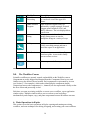
Assumptions
Director
Data
Actors
Parameters
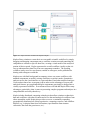
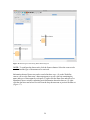
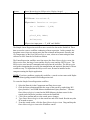
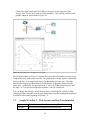
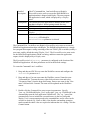
The 07-CommandLine_l.xml workflow uses Kepler's
ExternalExecution actor to execute the HelloWorld Java
application that is shipped with Kepler. The actor outputs
the application's return, which is displayed by a Display
actor.
The HelloWorld Java application is installed on the local
machine in Kepler's /demos/getting-started directory.
SDF Director
Data is generated in two Constant actors
Constant actor (CommandLine), CommandLineExec, and
Display
CommandLineExec actor:
directory=$WorkingDir
waitForProcess parameter is selected
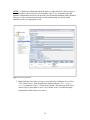
The Command Line 1 workflow uses Kepler's ExternalExecution actor to execute the
HelloWorld application that ships with Kepler. The HelloWorld application is a simple
Java program that outputs a string consisting of the text "Hello" plus a variable (usually a
user name, and by default the string "Kepler_User". The ExternalExecution actor waits
for the HelloWorld application to finish executing, and then returns the application
output, which is displayed by a Display actor.
The ExternalExecution's directory parameter is configured to the location of the
HelloWorld application. All other parameters are left at the default settings.
To create the Command Line 1 workflow:
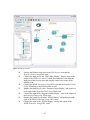
1. Drag and drop an SDF Director onto the Workflow canvas and configure the
iterations parameter to 1.
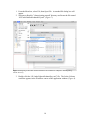
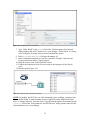
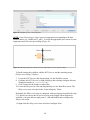
2. Drag and drop a Constant actor onto the Workflow canvas. Name the actor
"CommandLine" To name the actor, right-click each actor icon and select
"Customize Name" from the drop-down menu. Enter a new name in the "New
name" field and click Commit. The name will be updated on the Workflow
canvas.
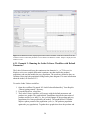
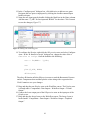
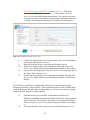
3. Double-click the CommandLine actor to open its parameters. Specify
"java -cp ./ HelloWorld Kepler_User" as the value. 'java -cp ./ HelloWorld' is the
command that runs the Java application 'HelloWorld'. The '-cp ./' part of the
command tells Java to include the current directory in the Java classpath).
'Kepler_User' is an argument passed to the command line, and its value can be
varied to as desired (e.g., Katie or Bob). Note that the surrounding quotation
marks around the entire value are required to indicate that it is a string. Click the
Commit button.
49