1
R3-50
Doc. No. 1210-PS-0011 Issue 04
February 2005
_______________________________________________________________________________________________________
1. FOREWORD.................................................................................................................. 3
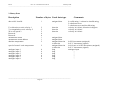
2. PACKING LIST............................................................................................................. 3
3. SYSTEM INSTALLATION ......................................................................................... 3
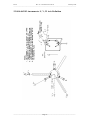
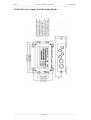
3.1 Mounting ............................................................................................................................................... 3
3.2 Alignment .............................................................................................................................................. 3
3.3 Corrosion ............................................................................................................................................... 3
3.4 Earthing ................................................................................................................................................. 3
3.5 Cabling .................................................................................................................................................. 3
4. SYSTEM OPERATION................................................................................................ 4
4. 1 Overview .............................................................................................................................................. 4
4.2 Operating modes.................................................................................................................................... 4
4.3 Measurement Mode ............................................................................................................................... 4
4.4 Sampling................................................................................................................................................ 4
4.5 Averaging .............................................................................................................................................. 4
4.6 Wind Measurement, SoS and Temperature Reporting Format.............................................................. 5
4.7 Analogue Input Reporting Formats ....................................................................................................... 5
4.8 Diagnostics ............................................................................................................................................ 5
4.9 Confidence Tone ................................................................................................................................... 5
4.10 Result Reporting .................................................................................................................................. 6
4.11 Interactive Mode.................................................................................................................................. 6
4.12 Configuration Commands.................................................................................................................... 6
4.13 Interrogation Commands ..................................................................................................................... 6
5. CONNECTION TO A PC OR OTHER DEVICE ...................................................... 7
6. USING THE ANEMOMETER WITH A PC RUNNING RCOM ............................ 8
6.1 PC Requirement..................................................................................................................................... 8
6.2 Installing RCOM ................................................................................................................................... 8
6.3 Starting RCOM...................................................................................................................................... 8
6.3.1 Command Line Options.................................................................................................................. 8
6.3.2 Procedure if no anemometer is found. ............................................................................................ 9
6.4 Main Menu .......................................................................................................................................... 10
6.5 Trend Display ...................................................................................................................................... 10
6.6 Trend Options...................................................................................................................................... 10
6.7 Display Micro-met Parameters ............................................................................................................ 10
6.8 Micro-met Parameter Options ............................................................................................................. 10
6.9 Tabular Display ................................................................................................................................... 10
6.10 Configure Anemometer ..................................................................................................................... 11
6.11 Options .............................................................................................................................................. 11
6.12 Exit to DOS ....................................................................................................................................... 11
6.13 Trend Display .................................................................................................................................... 11
6.14 Display Micro-met Parameters .......................................................................................................... 12
6.15 Micro-met Parameter Options ........................................................................................................... 13
6.16 Tabular Display ................................................................................................................................. 14
6.17 Configure Anemometer ..................................................................................................................... 15
6.18 Options .............................................................................................................................................. 16
6.19 Storage of settings ............................................................................................................................. 17
6.20 RCOM Error Messages ..................................................................................................................... 17
6.21 Instructions For Using The Convert 3 Binary To ASCII Conversion Utility .................................... 18
7. USING THE ANEMOMETER WITH A PC RUNNING RCOM II ...................... 19
7.1 PC Requirement................................................................................................................................... 19
7.2 Installing RCOM II.............................................................................................................................. 19
7.3 Starting RCOM II ................................................................................................................................ 19
7.4 Using RCOM II ................................................................................................................................... 19
8. USING THE ANEMOMETER WITH A PC RUNNING YOUR SOFTWARE ... 20
8.1 Digital Serial Output Format ............................................................................................................... 20
8.1.1 Binary Result Message Format..................................................................................................... 20
8.1.2 ASCII Result Message Format ..................................................................................................... 21
8.1.4 Software commands ..................................................................................................................... 25
9. USING THE ANALOGUE INPUTS OF THE SENSOR INPUT UNIT ................ 29
10. USING THE PRT INPUT ......................................................................................... 30
11. USING THE ANALOGUE OUTPUTS ................................................................... 31
___________________________________________________________________________________________
Page 1