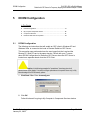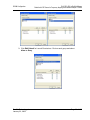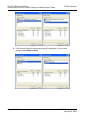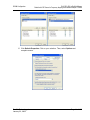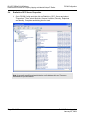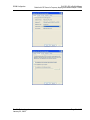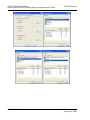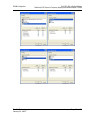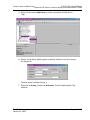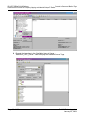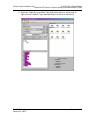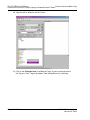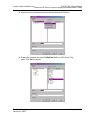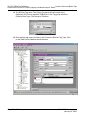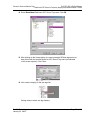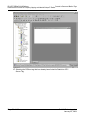
1
RLX-OPC-SRV ProSoft Software RadioLinx® OPC Server for Frequency Hopping and Industrial Hotspot™ Radios January 22, 2009 USER MANUAL Please Read This Notice The use and configuration of this software requires a reasonable working knowledge of the involved protocols and the application in which they are to be used. For this reason, it is important that those responsible for implementation satisfy themselves that the combination will meet the needs of the application without exposing personnel or equipment to unsafe or inappropriate working conditions. This manual is provided to assist the user. Every attempt has been made to assure that the information provided is accurate and a true reflection of the product's functionality. In order to assure a complete understanding of the operation of the product, the user should read all applicable ProSoft documentation on the operation of the module and protocol driver. Under no conditions will ProSoft Technology, Inc. be responsible or liable for indirect or consequential damages resulting from the use or application of the product. Reproduction of the contents of this manual, in whole or in part, without written permission from ProSoft Technology, Inc. is prohibited. Information in this manual is subject to change without notice and does not represent a commitment on the part of ProSoft Technology, Inc. Improvements and/or changes in this manual or the product may be made at any time. These changes will be made periodically to correct technical inaccuracies or typographical errors. Your Feedback Please We always want you to feel that you made the right decision to use our products. If you have suggestions, comments, compliments or complaints about the product, documentation or support, please write or call us. ProSoft Technology 1675 Chester Avenue, Fourth Floor Bakersfield, CA 93301 +1 (661) 716-5100 +1 (661) 716-5101 (Fax) http://www.prosoft-technology.com Copyright © ProSoft Technology, Inc. 2009. All Rights Reserved. RLX-OPC-SRV User Manual January 22, 2009 ProSoft Technology ®, ProLinx ®, inRAx ®, ProTalk® and RadioLinx ® are Registered Trademarks of ProSoft Technology, Inc. Contents RLX-OPC-SRV ♦ ProSoft Software RadioLinx® OPC Server for Frequency Hopping and Industrial Hotspot™ Radios Contents Please Read This Notice 2 Your Feedback Please........................................................................................................................ 2 1 Start Here 1.1 1.2 1.3 1.4 2 5 About the RadioLinx OPC Server ............................................................................. 5 Tags That Can Be Read............................................................................................ 6 System Requirements ............................................................................................. 15 Set Up Network ....................................................................................................... 15 Installing the Server 2.1 2.2 3 Choosing the Right RadioLinx OPC Server Project for Your Application ............... 17 Installation Process ................................................................................................. 18 Configuring the Server 3.1 3.2 3.3 3.4 3.5 3.6 3.7 3.8 3.9 3.10 3.11 3.12 3.13 4 4.1 35 Password Protection for the Server ........................................................................ 35 DCOM Configuration 5.1 5.2 5.3 5.4 6 19 Opening the Configuration Tool .............................................................................. 19 Creating a Configuration ......................................................................................... 21 Loading Your Configuration .................................................................................... 25 Validating Your Configuration ................................................................................. 26 Adding a Channel.................................................................................................... 27 Channel Settings ..................................................................................................... 28 Adding a Radio........................................................................................................ 30 Radio Settings ......................................................................................................... 31 Adding Tags ............................................................................................................ 31 Changing the Server's Update Rate........................................................................ 32 Adjusting an Existing Radio or Channel.................................................................. 32 OPC Reset Tags / Commands................................................................................ 32 Description of OPC "Commands" ........................................................................... 33 Security and Password Protection 5 17 37 DCOM Configuration ............................................................................................... 37 My Computer Properties Checks ............................................................................ 38 Component Services ............................................................................................... 44 RadioLinx OPC Server Properties .......................................................................... 50 Connect to Server and Monitor Tags 6.1 6.2 6.3 ProSoft Technology, Inc. January 22, 2009 57 Matrikon Example.................................................................................................... 57 RSView Example..................................................................................................... 65 WonderWare Example ............................................................................................ 86 Page 3 of 108 Contents RLX-OPC-SRV ♦ ProSoft Software RadioLinx® OPC Server for Frequency Hopping and Industrial Hotspot™ Radios 7 Support, Service & Warranty 99 7.1 7.2 7.3 How to Contact Us: Technical Support................................................................... 99 Return Material Authorization (RMA) Policies and Conditions ............................. 100 LIMITED WARRANTY .......................................................................................... 101 Index 107 Page 4 of 108 ProSoft Technology, Inc. January 22, 2009 Start Here 1 RLX-OPC-SRV ♦ ProSoft Software RadioLinx® OPC Server for Frequency Hopping and Industrial Hotspot™ Radios Start Here In This Chapter About the RadioLinx OPC Server............................................................ 5 Tags That Can Be Read.......................................................................... 6 System Requirements ........................................................................... 15 Set Up Network ..................................................................................... 15 For most applications, the following installation and configuration steps will work without additional programming. ProSoft Technology strongly recommends that you complete the steps in this chapter before developing a custom application. This manual will walk you through the following tasks. 1 2 3 4 5 1.1 Setting up your network (page 15) Install the server (page 17) Configuring the server (page 19) Security issues (page 35) Setting up OPC client to monitor radios (page 57) About the RadioLinx OPC Server OPC is OLE for Process Control. OPC is open connectivity in industrial automation and the enterprise systems that support industry. The purpose of the RadioLinx OPC Server is to seamlessly link customer applications to RadioLinx radios. It will allow any application that can act as an OPC Client, such as an HMI, to interact with most RadioLinx radios to get signal strength, serial number, limited throughput information as well as other useful statistics. ProSoft Technology, Inc. January 22, 2009 Page 5 of 108 RLX-OPC-SRV ♦ ProSoft Software RadioLinx® OPC Server for Frequency Hopping and Industrial Hotspot™ Radios Start Here The RadioLinx OPC Server operates in the background on any PC. It independently manages all requests from OPC Clients for information on RadioLinx radios. The clients can be programs running either on the same PC as the OPC Server or on a separate PC connected via a network connection. 1.2 Tags That Can Be Read The RadioLinx OPC Server manages querying the RadioLinx radios over the appropriate connections. It is configured by the user to query RLX-FH, RLX-IH, RLX2-IHx, and RLX2-IFHx radios over the appropriate Ethernet port on the PC running the RLX OPC Server. The user defines a "connection" within the RLX OPC Server for a particular Ethernet port. They then simply associate as many RLX and RLX2 Ethernet radios with that port. The OPC Server then knows to direct any queries of those radios over that connection. Note: For RLX-FHS radios, the connection will be done through the serial port. The RadioLinx OPC Server is software provided by ProSoft Technology to assist in using RadioLinx products. The following sections we will guide you in installation of prerequisites, RLX OPC Server software, RLX OPC Configuration Tool, setting up the network, installing Server, configuring Server and connecting to Server, and how to monitor tags. Page 6 of 108 ProSoft Technology, Inc. January 22, 2009 Start Here RLX-OPC-SRV ♦ ProSoft Software RadioLinx® OPC Server for Frequency Hopping and Industrial Hotspot™ Radios Notes: Only one process can communicate to a radio at the same time. Attempting to communicate with more than one process at a time can cause unpredictable results. In order to prevent multiple processes from communicating to a radio at the same time, switch the RadioLinx OPC Server into pause mode while running ControlScape. In addition, the validation option on the server will be disabled when the server is running. 1.2.1 RadioLinx Industrial Hotspot Radios RLX-IH RLX-IHW RLX-IHW-66 RLX2-IHx RLXIB-IHW RLXIB-IESC Tag Name Contracted name Data Type RSSI RSSI Integer Firmware Version FirmVersion String SSID SSID String MAC ID MACID String Up Time UpTime Unsigned Integer Parent MAC ParentMAC String Number of Associations Associations Integers Total Bytes TX TotBytTX Integer Soft Reset* SoftReset Integer Total Good Packs TX TotGoodPacksTX Integer Total Failed Packs TX TotFailPacksTX Integer * Are also write tags. TX = Transmitted ProSoft Technology, Inc. January 22, 2009 Page 7 of 108 RLX-OPC-SRV ♦ ProSoft Software RadioLinx® OPC Server for Frequency Hopping and Industrial Hotspot™ Radios Start Here 1.2.2 RadioLinx Frequency Hopping Radios RLX-FHS RLX-FHE RLX-FHES RLX2-IFHx Tag Name Contracted name Data Type RSSI RSSI Integer Signal-to-Noise Ration SignalToNoise Integer Associations Associations Integer Bit error Rate BitErrRate Floating Point Reset Statistics* Reset_stats Integer Serial Number SerialNum String Parent Address ParentAdd Integer Total Bytes Forward TotBytFwd Integer Total Bytes Reverse TotBytRev Integer TX Packet Errors TxPackErrs Integer Total Good Packets TotGoodPacks Integer * Are also write tags. TX = Transmitted 1.2.3 RLX-IFHE Tag Name Description RSSI Receive Signal Strength Indicator measurement. Unit Description Radio name IP Address The IP Address of the current radio. Unit Address: The unit address is, and must be, a unique identifier of each modem in a network. VALUES Retransmissions 1 Master 65535 Broadcast This register determines the maximum amount of times that a packet will be retransmitted (in addition to the initial transmission). VALUES 0-255 Destination Address This register specifies the ultimate destination for the data. VALUES 1-65535 Roaming This feature allows a Remote unit to synchronize with a specified ‘upstream’ unit (either Master or Repeater). VALUES: 65535 full roaming 1-254 specific (fixed) unit address (Master or Repeater) with which to associate Serial Number Serial number of radio (RF) module. Version Firmware version within radio module. Page 8 of 108 ProSoft Technology, Inc. January 22, 2009 Start Here RLX-OPC-SRV ♦ ProSoft Software RadioLinx® OPC Server for Frequency Hopping and Industrial Hotspot™ Radios Tag Name Description Temperature Temperature as measured within the radio module. Voltage Supply voltage as measured on motherboard. VSWR Voltage Standing Wave Ratio. Ideally 1:1 (or 1.00), this value gives an indication of how much power is being reflected back to the radio from the antenna relative to how much is being transmitted. SoftwareVersion Core radio firmware version (.mhx file) Operation Mode: The selected mode of operation: Master, Repeater, or Remote. Link Rate: This is the RF communications Link Rate. A lower link rate offers better receive sensitivity performance; a higher link rate, better throughput. All IFHx radios in a network must use the same Link Rate. RF Output Power: This setting establishes the transmit power level which will be presented to the antenna connector at the rear of a IFHx network. Unless required, the RF Output Power should be set not for maximum, but rather for the minimum value required to maintain. FCC regulations allow for up to 36dBi effective isotropic radiated power (EIRP). The sum (in dBm) of the transmitted power, the cabling loss, and the antenna gain cannot exceed 36dBi. Network Type: Type of RADIO network: Point-to-MultiPoint network (PMP), Point-ToPoint network (PTP), Peer-to-Peer (P2P), or Everyone-to-Everyone (E2E) VALUES: Channel Mode Point-to-Multipoint Point-to-Point Peer-to-Peer Everyone-to-Everyone PMP with ACK This option applies only to COM 1. Determines which serial interface shall be used to connect to external devices: RS232, RS485, or RS422. When an interface other than RS232 is selected, the DE9 port will be inactive. VALUES Data Baud Rate RS232 RS485 RS422 The serial baud rate is the rate at which the modem is to communicate with the attached local asynchronous device. NOTE: Most PCs do not readily support serial communications greater than 115200bps. VALUES: bits per second (bps) 230400, 115200, 57600, 38400, 28800, 19200, 14400, 9600, 460800 and 921600 may be selected for RS422 or RS485 Channel Modes. Data Format This setting determines the format of the data on the serial port. The default is 8 data bits, No parity, and 1 Stop bit. VALUES: 8N1, 8N2, 8E1, 8O1, 7N1, 7N2, 7E1, 7O1, 7E2, 7O2 ProSoft Technology, Inc. January 22, 2009 Page 9 of 108 RLX-OPC-SRV ♦ ProSoft Software RadioLinx® OPC Server for Frequency Hopping and Industrial Hotspot™ Radios Start Here Tag Name Description Flow Control Used to enhance the reliability of serial data communications, particularly at higher baud rates. VALUES Hardware If the attached device supports hardware handshaking. None If the attached device does not support hardware handshaking. CTS Framing Uses the CTS signal to gate the output data on the serial. Ethernet Received Bytes Specifies the number of bytes received by the Ethernet port. Ethernet Received Packets Specifies the number of packets received by the Ethernet port. Ethernet Received Multi-Cast Specifies the number of multi-cast packets that are received by the Ethernet port. Ethernet Transmitted Bytes Specifies the number of bytes transmitted by the Ethernet port. Ethernet Transmitted Packets Specifies the number of packets transmitted by the Ethernet port. Ethernet Collisions The number of invalid packets caused from multiple devices transmitting Ethernet data at the same time. Radio Received Bytes Number of bytes received by the Radio (RF). Radio Received Packets Number of packets received by the Radio (RF). Radio Received Errors Number of errors received by the Radio (RF). Radio Received Dropped Packets Number of received dropped packets recorded by the Radio (RF). Radio Transmitted Bytes Number of bytes transmitted by the Radio (RF). Radio Transmitted Packets Number of packets transmitted by the Radio (RF). Radio Transmitted Errors Number of Radio(RF) transmission errors. Radio Collisions The number of invalid packets caused from multiple devices transmitting RF data at the same time. COM1 Received Bytes Number of bytes received by the Serial port. COM1 Received Packets Number of packets received by the Serial port. COM1 Transmitted Bytes Number of bytes transmitted on the Serial port. COM1 Transmitted Packets Number of packets transmitted on the Serial port. Page 10 of 108 ProSoft Technology, Inc. January 22, 2009 Start Here RLX-OPC-SRV ♦ ProSoft Software RadioLinx® OPC Server for Frequency Hopping and Industrial Hotspot™ Radios 1.2.4 RLX-IFHS Tag name Description RSSI This register displays the average signal strength received over the previous 4 hop intervals. Should the downstream unit(s) fail, a Master will maintain the last RSSI reading display. VALUES: 110 to –55dBm (maximum reading) Temperature Temperature as measured within the radio module. Unit Address The unit address is, and must be, a unique identifier of each IFHS radio in a network. The address value is 16-bits in length. The Master has by default, and must retain, a unit address of 1; 65535 is the broadcast address. VALUES 2-65534 Destination Address As the name implies, this register specifies the ultimate destination for a modem’s data. Different network topologies dictate the configuration of Destination Address: PMP: Master Destination Address = 65535, Remote Destination Address =1 PTP : Master Destination Address = UA of Remote, Remote Destination Address =1 P2P : Master Destination Address =65535, Destination Address of each (of 2 / pair) Remote radio is the UA of the other E2E : Destination Address of all radios=65535 (broadcast) VALUES 1-65535 Retransmissions This register determines the maximum amount of times that a packet will be retransmitted (in addition to the initial transmission), noting the following specific behaviors in various network topologies: PMP: Master will retransmit each data packet the exact number of times specified; Slave will retransmit only if necessary, and then only until a given packet is acknowledged or the value of the Slave’s retransmissions is reached (after which it will discard the packet if retransmission not successful). PTP: Modem will retransmit to its counterpart only if necessary, and to a maximum number of the value in retransmissions. Packet is discarded if retransmissions are not successful. Recipients of packets will discard any duplicates. In a PMP system, set retransmissions to the minimum value required as, effectively, the data throughput from Master to Remote is divided by 1 plus the number stored in retransmissions. VALUES 0-255 Roaming Roaming dictates which radio (by Unit Address (UA)) a Remote unit will ’look’ or ’attach to’ for its upstream signal path. This feature allows a Remote unit to synchronize with a specified ‘upstream’ unit (either Master or Repeater). The options are as follows: Roaming=65535: With this value in its roaming register, a Remote will synchronize with an ProSoft Technology, Inc. January 22, 2009 Page 11 of 108 RLX-OPC-SRV ♦ ProSoft Software RadioLinx® OPC Server for Frequency Hopping and Industrial Hotspot™ Radios Tag name Start Here Description upstream unit which has the same network address and static mask as the Remote. Should that upstream unit fail, this Remote will attempt to synchronize with another ’upstream’ unit within the same network. This ability is particularly well-suited to mobile applications. Roaming=1-254: In most static (fixed) networks, where there are no Repeaters, the default value of 1 is maintained: All Slaves synchronize to the Master (whose unit address (UA) is 1). In networks where Repeaters are present, the value of a Remote’s roaming value corresponds to the particular upstream radio, with which a particular Remote is intended to communicate. ( e.g. A Slave with a UA=3 may have Roaming=2, where the radio with a UA=2 is a Repeater between the Slave and the Master; the Repeater will have Roaming=1.) When setting up 3 radios for a Master-Repeater-Slave link, be sure to set the Slave’s Roaming to the UA of the Repeater, and the Repeater’s Roaming to the UA of the Master(1). This will ensure that data is routed from the Slave through the Repeater to the Master; otherwise, if the Slave’s Roaming is left at the default value of 1, the Slave will communicate directly with the Master and bypassing the Repeater altogether. VALUES: 65535 Full Roaming 1-254 Specific (fixed) UA of Master or Repeater with which to associate Voltage Supply voltage as measured on motherboard. VSWR Voltage Standing Wave Ratio. Ideally 1:1 (or 1.00), this value gives an indication of how much power is being reflected back to the radio from the antenna relative to how much is being transmitted. Operation Mode The operating mode defines the role of a radio. An IHFS radio may be configured for any role required within a radio network. This is convenient for reasons of familiarity with any/all units, as well as for hardware sparing purposes. The default operating mode is dependent on which factory default option is selected. MASTER: Only one per network. In all network types data either originates at, is destined to, or ‘passes through’ the Master. REPEATER: May act simply as a ‘Repeater’ to store and forward data to/from an upstream unit to/from a downstream unit (e.g. when there is a long distance between the latter units), or, may act as a Repeater/Slave in which case the above function is performed AND the unit may also exchange data as a Slave within the network. SLAVE: Interfaces with remote devices and communicates with Master either directly or via Repeater(s). Communications between 2 or more Slaves is possible - through the Master. A ‘Remote’ (non-Master) modem is either a Repeater or a Slave. If a Repeater is not being used as a Repeater/Slave (i.e. there is no device attached to its local data port), leave its handshaking OFF (&K0) and set the serial baud rate (S102) to 115200bps. VALUES: Master Repeater Slave Page 12 of 108 ProSoft Technology, Inc. January 22, 2009 Start Here RLX-OPC-SRV ♦ ProSoft Software RadioLinx® OPC Server for Frequency Hopping and Industrial Hotspot™ Radios Tag name Description Link Rate This register determines the rate at which RF communications will occur over a given network. All radios within a particular network must be configured with the same wireless link rate. Faster link rates result in greater throughput, however, for each ’step’ increase in link rate, there is an approximately 1dB reduction in sensitivity. VALUES RF Output Power bits per second (bps) 19200 115200 172800 230400 270000 340000 This setting establishes the transmit power level which will be presented to the antenna connector at the rear of the radio. Unless required Output Power should be set not for maximum, but rather for the minimum value required to maintain an adequate system fade margin. FCC regulations allow for up to 36dBi effective isotropic radiated power (EIRP). The sum (in dBm) of the transmitted power, the cabling loss, and the antenna gain cannot exceed 36dBi. VALUES Network Type dBm (mW equivalent) 20 (100) 21 (125) 22 (160) 23 (200) 24 (250) 25 (320) 26 (400) 27 (500) 28 (630) 29 (800) 30 (1000) Defines the type of network: point-to-multipoint, point-to-point, peer-to-peer, or everyone-to-everyone In a point-to-multipoint (PMP) network, the Master broadcasts data to all units, and all remote units send their data (ultimately) to the Master. A point-to-point (PTP) network involves a Master and a Slave (with 0 or more Repeaters in-between). Peer-to-Peer involves either communication between 2 (typically remote) units (P2P) or between all units (everyone-to-everyone - E2E). ALL modems in a network must have the SAME value for Network Type. VALUES Point-to-Multipoint Point-to-Point Peer-to-Peer or Everyone-to-Everyone ProSoft Technology, Inc. January 22, 2009 Page 13 of 108 RLX-OPC-SRV ♦ ProSoft Software RadioLinx® OPC Server for Frequency Hopping and Industrial Hotspot™ Radios Start Here Tag name Description Channel Mode Defines the physical serial interface which will be used for data communications. VALUES RS-232 half-duplex RS-485 full-duplex RS-485 Data Baud Rate The serial baud rate is the rate at which the modem is to communicate with the attached local asynchronous device. VALUES bits per second (bps) 300, 600, 1200, 2400, 3600, 4800, 7200, 9600, 14400, 19200, 28800, 38400, 57600, 115200, 230400 Data Format This value determines the format of the data on the serial port. The default is 8 data bits, No parity, and 1 Stop bit. VALUES 8N1 8N2 8E1 8O1 7N1 7N2 7E1 7O1 7E2 7O2 Radio Received Bytes Number of bytes received by the Radio(RF). Radio rEceived Packets Number of packets received by the Radio(RF). Radio Transmitted Bytes Number of bytes transmitted by the Radio(RF). Radio Transmitted Packets Number of packets transmitted by the Radio(RF). Repeaters in System This setting applies to the Master only. The default value is No, stating there are no Repeaters in the network. If there are 1 or more Repeaters in the network, configure this setting as Yes. Page 14 of 108 ProSoft Technology, Inc. January 22, 2009 Start Here 1.3 RLX-OPC-SRV ♦ ProSoft Software RadioLinx® OPC Server for Frequency Hopping and Industrial Hotspot™ Radios System Requirements The following system requirements are the recommended minimum specifications to successfully install and run RadioLinx OPC Driver. 1.4 Microsoft Windows compatible PC Windows XP Professional with Service Pack 2 or higher, Windows VISTA, or Windows 2003 Microsoft .NET Framework version 3.0 or higher 300 mHz Pentium processor (or equivalent) 128 megabytes of RAM 300 megabytes of available disk space Set Up Network See the ProSoft Technology documentation on your radio. ProSoft Technology, Inc. January 22, 2009 Page 15 of 108 RLX-OPC-SRV ♦ ProSoft Software RadioLinx® OPC Server for Frequency Hopping and Industrial Hotspot™ Radios Page 16 of 108 Start Here ProSoft Technology, Inc. January 22, 2009 Installing the Server 2 RLX-OPC-SRV ♦ ProSoft Software RadioLinx® OPC Server for Frequency Hopping and Industrial Hotspot™ Radios Installing the Server In This Chapter 2.1 Choosing the Right RadioLinx OPC Server Project for Your Application17 Installation Process ............................................................................... 18 Choosing the Right RadioLinx OPC Server Project for Your Application 1 2 Go to www.prosoft-technology.com, or use the ProSoft Technology supplied CD to retrieve RLX OPC software! Open setup file and follow the install directions. The install process will copy the RLX OPC Server and OPC Configuration Tool onto your PC. Note: Before installing, verify that you have the Microsoft .NET Framework (version 3.0 or greater) already installed. If you don’t then download this from Microsoft.com and continue installing RadioLinx OPC Server. Select the ServerInstaller.msi file to install. This is an example of the Tree structure you will see. See descriptions below and select the version for your system. The Window XP Service RadioLinx OPC Server is the recommended version. Windows XP Service RadioLinx OPC Server This is the primary server project. The configuration tool will also be installed. ProSoft Technology, Inc. January 22, 2009 Page 17 of 108 RLX-OPC-SRV ♦ ProSoft Software RadioLinx® OPC Server for Frequency Hopping and Industrial Hotspot™ Radios 2.2 Installing the Server Installation Process 1 Launch the ServerInstaller.msi file to begin the installation process. You will be asked for a directory to install to. Select a directory that Windows will have access to for all user accounts and you would like to make the project available to. A registry entry will be placed in the Windows Run folder in order to load some applications at Windows start up. These applications can only be launched by a Windows session if the current user account has access to the directory where the applications reside. 2 During the server installation process, you will be asked to install the OPC Core Components 2.00 Redistributable. Note: Unless you are 100% sure that you already have these "Core" components installed, it is highly recommended that you complete this install as well. 3 When the installation is complete, you must restart your computer. If you choose not to install the OPC Core Components and then later change your mind, you can find the setup file for the core components in the "\Setup" subdirectory of the main RadioLinx OPC Server folder. Page 18 of 108 ProSoft Technology, Inc. January 22, 2009 Configuring the Server 3 RLX-OPC-SRV ♦ ProSoft Software RadioLinx® OPC Server for Frequency Hopping and Industrial Hotspot™ Radios Configuring the Server In This Chapter 3.1 Opening the Configuration Tool............................................................. 19 Creating a Configuration........................................................................ 21 Loading Your Configuration................................................................... 25 Validating Your Configuration................................................................ 26 Adding a Channel .................................................................................. 27 Channel Settings ................................................................................... 28 Adding a Radio...................................................................................... 30 Radio Settings ....................................................................................... 31 Adding Tags .......................................................................................... 31 Changing the Server's Update Rate ...................................................... 32 Adjusting an Existing Radio or Channel ................................................ 32 OPC Reset Tags / Commands .............................................................. 32 Description of OPC "Commands" .......................................................... 33 Opening the Configuration Tool When you first install the server and configuration tool, the server will not be configured to monitor your wireless radio network. The server is configured using a separate utility. The first step in the configuration process is to open the server and this utility. Start OPC Monitor) 1 Click Start / Programs / RadioLinx OPC Server / RadioLinx OPC Monitor -or- 2 Double-click on desktop icon for server Start OPC Configuration Tool - to open as a Client 1 Click Start / Programs / RadioLinx OPC Server / RadioLinx OPC Configuration Tool -or- Double-click on RadioLinx OPC Monitor system tray icon, ProSoft Technology, Inc. January 22, 2009 Page 19 of 108 RLX-OPC-SRV ♦ ProSoft Software RadioLinx® OPC Server for Frequency Hopping and Industrial Hotspot™ Radios Configuring the Server Or right click on icon, then select Configure Server. One of the above processes brings up the RadioLinx OPC Server Configuration screen shown below. Page 20 of 108 ProSoft Technology, Inc. January 22, 2009 Configuring the Server 3.2 RLX-OPC-SRV ♦ ProSoft Software RadioLinx® OPC Server for Frequency Hopping and Industrial Hotspot™ Radios Creating a Configuration There are two methods for configuring the server. You can connect to the server and then configure it directly, or you can save your configuration to disk and then load it into the server manually. 3.2.1 Configure to Server Mode When you use the Configure to Server mode, you will connect to a server running on the same machine as the Configuration Tool. The Configure to Server will save your work to the server. The status bar (bottom of box) should now say "Configuring to file." When you connect to local or remote server it will change to "Configuring to server." Note: If you have not created and saved a file for your radio, please follow the instructions in Configure to File Mode for Adding a Channel (page 27), Radio (page 30) and Tags. (page 31) Local Server Procedure 1 Click File / Configure to Server / Connect to Server / Local Server The RadioLinx OPC Server Configuration box appears with Channel and Radio (upper left panel), Tags (upper right) and Server Time Log on bottom. If you right click on a date in Time Log, you can view details of that incident. You can also configure a server that is running on another machine. ProSoft Technology, Inc. January 22, 2009 Page 21 of 108 RLX-OPC-SRV ♦ ProSoft Software RadioLinx® OPC Server for Frequency Hopping and Industrial Hotspot™ Radios Configuring the Server Remote Server Procedure 1 Click File / Configure to Server / Connect to Server / Remote Server Enter the IP address or the name of the computer that the remote server is running on. You can choose to attempt a secure remote connection, or not. Note: If the IP address is not valid, you will receive a "Connection Failed" message. Secure connections require certain Windows security options to be in place before they will work. The unsecured remote connection is a lot more reliable, but it is possible for others to intercept and interpret the messages that are sent. 2 Click OK button. 3.2.2 Configure to File Mode This section details how to create a custom configuration for your server. Note: Do not connect to a server using the Configuring to Server method. If you are connected to the server, disconnect before proceeding. 1 Select File / Configure to Server / Disconnect from Server. The status bar (bottom of screen) should now say "Configuring to file." 2 Add a Channel. Select Edit / Add Channel 3 Choose a Channel name and Channel type. Page 22 of 108 ProSoft Technology, Inc. January 22, 2009 Configuring the Server RLX-OPC-SRV ♦ ProSoft Software RadioLinx® OPC Server for Frequency Hopping and Industrial Hotspot™ Radios 4 Click Next. FHS is for serial connections. 5 A dialog box will appear for connection timeout. Default is 2000 milliseconds, but you can decide your speed. Click OK. Add a Radio. Select Edit / Add Radio. 6 - or 7 Now that you have a Channel, you can right click on your Channel name and select Add Radio. This will bring up the dialogue box below. 8 9 Choose a Name and give it your specific IP address. Click OK to accept. Add or Remove Tags. Select Edit / Add/Remove Tags - or - 10 You can right click on your Radio name and select Add/Remove Tags. ProSoft Technology, Inc. January 22, 2009 Page 23 of 108 RLX-OPC-SRV ♦ ProSoft Software RadioLinx® OPC Server for Frequency Hopping and Industrial Hotspot™ Radios Configuring the Server 11 To Add or Remove tags, click on appropriate button. Then, click OK. 12 Click File / Configure to File / Save to File 13 Choose a directory and file name and click Save. The Status bar shows utility in "Configuring to file". If you want more detailed information on the procedures above please go to Adding a channel, Adding a radio, Adding tags, and adjusting an existing radio or channel in this manual. Page 24 of 108 ProSoft Technology, Inc. January 22, 2009 Configuring the Server 3.3 RLX-OPC-SRV ♦ ProSoft Software RadioLinx® OPC Server for Frequency Hopping and Industrial Hotspot™ Radios Loading Your Configuration When you are finished creating and saving your configuration in the RLX OPC Configuration Tool, you should Close it. Note: If you saved your configuration to file, you will now need to load it into the RLX OPC Server. If you chose the Configure to server method, none of the following steps are necessary. Skip to "Validating Your Configuration." 1 Right click on the RLX OPC Server system tray icon and make sure that the server is stopped. If Stop is checked, the server is stopped. 2 3 If the server is running, select Stop to stop the server. Right-click on the RLX OPC Server system tray icon and select Load Configuration. The "Select Configuration" box opens. Navigate to the directory where you saved your file and open it. 4 When the configuration is finished loading, the Configuration Results dialog will appear. ProSoft Technology, Inc. January 22, 2009 Page 25 of 108 RLX-OPC-SRV ♦ ProSoft Software RadioLinx® OPC Server for Frequency Hopping and Industrial Hotspot™ Radios Configuring the Server The Configuration Results dialog describes the configuration that was loaded into the server. Items that are listed green were successfully configured. Red items could not be configured. Select an item in order to see more details about why it could not be loaded. 3.4 Validating Your Configuration Before you attempt to connect to the server with your OPC client, you may want to test your configuration and make sure everything is configured properly. 1 Right-click on the RLX OPC Server system tray icon and select View Configuration. The view pane on the left of the dialog shows you what channels and radios are configured. The view pane on the right shows what tags are configured for each radio. 2 Click Validate to test the configuration. The server will attempt to communicate to your wireless radios. After a pause, the items in the two view panes will turn green or red. Green items were contacted successfully. Red items could not be contacted. Page 26 of 108 ProSoft Technology, Inc. January 22, 2009 Configuring the Server RLX-OPC-SRV ♦ ProSoft Software RadioLinx® OPC Server for Frequency Hopping and Industrial Hotspot™ Radios Radios or channels that remain white have no tags associated with them. No attempt is made to contact these items. Notice that the current values of the tags are also displayed after validating. Note: You can re-verify you are connected by pressing validate again. This will update the values. 3 Click Close when you are finished. Notes: Only one process can communicate to a radio at the same time. Attempting to communicate with more than one process at a time can cause unpredictable results. In order to prevent multiple processes from communicating to a radio at the same time, switch the RadioLinx OPC Server into pause mode while running ControlScape. In addition, the validation option on the server will be disabled when the server is running. 3.5 Adding a Channel Wireless radio networks are composed of RadioLinx radios of the same type configured to communicate together. In the server, these networks are represented by channels. A channel is a communications stream for communicating to a specific type or model of radio. The first step in configuring the server is to add a channel for your wireless network. 1 Click Edit / Add Channel -orRight click on top left pane and select Add Channel from the context menu. ProSoft Technology, Inc. January 22, 2009 Page 27 of 108 RLX-OPC-SRV ♦ ProSoft Software RadioLinx® OPC Server for Frequency Hopping and Industrial Hotspot™ Radios Configuring the Server A dialog opens. 2 3 4 Enter a custom name for the channel. Select the RadioLinx product that the channel will communicate to from the drop down list. Click OK. Another dialog opens. 5 Enter the settings specific to your radio network into this dialog. (See also: Channel Settings) 6 Click OK. A channel with the given name appears in the top left view pane. 3.6 Channel Settings Connection Timeout: The time the server will wait for a response from the radio. 3.6.1 RLX-IH Channel Page 28 of 108 ProSoft Technology, Inc. January 22, 2009 Configuring the Server RLX-OPC-SRV ♦ ProSoft Software RadioLinx® OPC Server for Frequency Hopping and Industrial Hotspot™ Radios 3.6.2 RLX-FHE Channel 3.6.3 RLX-FHS Channel Name of COM port: The label of COM port that you are using to communicate to the radio. Baud rate: The baud rate of the COM port. Parity: The parity settings for the COM port. Data bits: The number of data bits used for communication via the COM port. Stop bits: The number of stop bits used for communication via the COM port. Handshaking: The flow control used by the COM port. Timeout: The number of milliseconds that the server will wait for a response from the radio. Note: The settings can be copied from the properties window of the COM port that you are using to connect to the radio network. Note: The settings you enter for your FHS channel must be compatible with your com port. ProSoft Technology, Inc. January 22, 2009 Page 29 of 108 RLX-OPC-SRV ♦ ProSoft Software RadioLinx® OPC Server for Frequency Hopping and Industrial Hotspot™ Radios Configuring the Server 3.6.4 RLX-IFHE Channel 3.6.5 RLX-IFHS Channel 3.7 Adding a Radio Purpose: Add radios that are part of your network to server configuration so that OPC clients can monitor radio tags. 1 2 Select appropriate channel. Click Edit / Add Radio. -orRight click on appropriate channel / Add Radio… "Add Radio" dialog opens. 3 4 Enter a custom name for the radio. Enter settings for communicating to radio. See Radio Settings for more details. Page 30 of 108 ProSoft Technology, Inc. January 22, 2009 Configuring the Server 3.8 RLX-OPC-SRV ♦ ProSoft Software RadioLinx® OPC Server for Frequency Hopping and Industrial Hotspot™ Radios Radio Settings 3.8.1 IH Radios IP: The IP address of the IH radio to connect to. For more details, browse for radios using the RadioLinx IH Browser. Port: Defaults to 161. Only change if you have good reason for doing so. Community: The SNMP community of this radio. Defaults to public. Enter a new value if you have changed the SNMP community of any of your radios. 3.8.2 FHE Radios IP: The IP address of the FHE radio to connect to. For more details, inspect your ControlScape wireless network settings. Port: Defaults to 4000. Only change if you have good reason for doing so. 3.8.3 FHS Radios Radio address: The radio address of the radio to communicate to. For more details, inspect your ControlScape wireless network settings. 3.8.4 IFHE Radios IP: The IP address of the FHE radio to connect to. For more details, inspect your ControlScape wireless network settings. Port: Defaults to 4000. Only change if you have good reason for doing so. 3.8.5 IFHS Radios Radio address: The radio address of the radio to communicate to. For more details, inspect your ControlScape wireless network settings. 3.9 Adding Tags Purpose: To select specific values to present to OPC clients. 1 2 Select radio. Click Edit / Add/Remove Tags. -orRight click on radio or top right pane and select Add/Remove Tags. The Add/Remove Tags dialog opens. 3 4 5 6 Select the tags you wish to allow clients to monitor and click the ADD button. Select the tags you no longer want clients to monitor and click Remove. Click Add All or Remove All to add or remove all tags. Click OK for tag changes to be accepted. ProSoft Technology, Inc. January 22, 2009 Page 31 of 108 RLX-OPC-SRV ♦ ProSoft Software RadioLinx® OPC Server for Frequency Hopping and Industrial Hotspot™ Radios 3.10 Configuring the Server Changing the Server's Update Rate Purpose: To change the update rate of the server. 1 2 3 Click Edit / Server settings… Enter a new refresh rate. Click OK. Warning: It is not advisable to set the refresh rate lower than 3 to 5 seconds. 3.11 Adjusting an Existing Radio or Channel 3.11.1 Removing Items 1 2 3 Select item to remove. Click Edit / Remove Item. Confirm removal. -orRight-click on item to remove and select Remove… from drop down menu. 4 Confirm removal. -orClick File / Clear All to remove all items from the configuration. 3.11.2 Properties Purpose: To change the settings or rename an existing item. 1 2 3 4 Select an item. Click View / Properties. The Properties dialog opens. Make necessary changes. Click OK. -orRight-click on an item and select Properties. 3.12 OPC Reset Tags / Commands The following OPC tags behave differently than the rest: ResetStats SoftReset These OPC tags are referred to as commands. They are used for sending messages to radios instead of monitoring values. Commands have 3 possible values: -1, 0, 1. The default value is 0. -1 indicates that an error occurred when trying to send a message to a radio. Page 32 of 108 ProSoft Technology, Inc. January 22, 2009 Configuring the Server RLX-OPC-SRV ♦ ProSoft Software RadioLinx® OPC Server for Frequency Hopping and Industrial Hotspot™ Radios 0 indicates success when trying to send a message to a radio. 1 instructs the server to send the message to the radio. The value of a command is solely driven by write requests from OPC clients. This value will not be updated except in response to write requests. To send a specific message to a radio, write a 1 to the respective OPC tag. The server will forward the request to the radio and will then assign the OPC tag a value of 0 or -1. 0 if the request was completed successfully, -1 if it failed. You can set or clear the status of a command by writing a 0 or -1 value to it. The server will only send the specified message to the radio when the command is set to 1. 3.13 Description of OPC "Commands" 3.13.1 ResetStats (RLX-FH radios) Clears the following radio values to zero: TotBytFwd TotBytRev TotGoodPacks TXPackErrs 3.13.2 SoftReset (RLX-IH radios) SoftReset causes the RLX-IH radio to reboot. The radio will be temporarily unavailable while rebooting. It is normal for other tags from this radio to change to quality "OPC_QUALITY_LAST_KNOWN" while the radio is unavailable. After 5 to 30 seconds this situation should right itself automatically. Any attempt to send a SoftReset command while the radio is rebooting will fail and SoftReset will get a -1 value from the server. Rebooting RLX-IH radios causes the following tags to be reset to zero: TotBytTX TotFailPacksTX TotGoodPacksTX ProSoft Technology, Inc. January 22, 2009 Page 33 of 108 RLX-OPC-SRV ♦ ProSoft Software RadioLinx® OPC Server for Frequency Hopping and Industrial Hotspot™ Radios Page 34 of 108 Configuring the Server ProSoft Technology, Inc. January 22, 2009 Security and Password Protection 4 RLX-OPC-SRV ♦ ProSoft Software RadioLinx® OPC Server for Frequency Hopping and Industrial Hotspot™ Radios Security and Password Protection In This Chapter 4.1 Password Protection for the Server ....................................................... 35 Password Protection for the Server 4.1.1 Password Protecting the Server You can create a password for the server in order to prevent anyone from modifying your configuration. 1 2 Right-click on the system tray icon for the ProSoft OPC Server. On the context menu that appears, select Password Protect Server… A dialog opens. 3 4 Enter a password for the server and then retype the password in the confirmation box. Click OK. A confirmation dialog pops up. You will now be required to enter this password whenever you wish to make any changes to the server. 4.1.2 Removing Server Protection Password After creating a password for the server, you can choose to remove the password to allow easier access to the server, either temporarily or permanently. 1 2 Right-click on the system tray icon for the ProSoft OPC Server. On the context menu that appears, select Password Protect Server. A dialog opens requesting the current server protection password to continue. 3 4 Enter your server protection password. Remember, this value is case sensitive. Click OK. The Password Protection dialog opens. 5 Click Clear Password to remove password protection. A confirmation dialog will appear. ProSoft Technology, Inc. January 22, 2009 Page 35 of 108 RLX-OPC-SRV ♦ ProSoft Software Security and Password Protection RadioLinx® OPC Server for Frequency Hopping and Industrial Hotspot™ Radios Page 36 of 108 ProSoft Technology, Inc. January 22, 2009 DCOM Configuration 5 RLX-OPC-SRV ♦ ProSoft Software RadioLinx® OPC Server for Frequency Hopping and Industrial Hotspot™ Radios DCOM Configuration In This Chapter 5.1 DCOM Configuration ............................................................................. 37 My Computer Properties Checks........................................................... 38 Component Services ............................................................................. 44 RadioLinx OPC Server Properties ......................................................... 50 DCOM Configuration The following are instructions that will enable an OPC client in Windows XP and Windows Vista to connect to the Local or Remote RadioLinx OPC Server. This connection was performed where the user logged into the Local and the Remote PC. Both PCs are in the same domain. Consult with your IT person about DCOM Configuration for RadioLinx OPC Server when the OPC Server is located on a separate domain from the OPC Client. Caution: In the following examples the "permissions" have been given to all potential users on the domain. You need to configure permissions to the specific users only, to fully take advantage of the DCOM security options. 1 Click Start / Run. Enter dcomcnfg.exe 2 Click OK. Follow this branch for going to My Computer in Component Services window. ProSoft Technology, Inc. January 22, 2009 Page 37 of 108 RLX-OPC-SRV ♦ ProSoft Software RadioLinx® OPC Server for Frequency Hopping and Industrial Hotspot™ Radios DCOM Configuration 3 Console Root / Component Services / Computers / My Computer 4 Right click on My Computer. Select Properties. This will bring up the My Computer Properties screen. Note: Verify with your network administrator regarding Allow and Deny checks for each of the following steps. 5.2 My Computer Properties Checks 1 2 The next tasks will be to click on each tag, General, Options, Default Properties, Default Protocols, MSDTC and COM Security. Each one will have Allow and Deny checks that need to be made. Select COM Security. Notice the two fields in dialog box. Click Edit Default for Access Permissions. Select Allow or Deny per your installation / application requirements. Unsure? Contact your IT or network administrator. Page 38 of 108 ProSoft Technology, Inc. January 22, 2009 DCOM Configuration 3 RLX-OPC-SRV ♦ ProSoft Software RadioLinx® OPC Server for Frequency Hopping and Industrial Hotspot™ Radios Click Edit Default for Launch Permissions. Click on each group and select Allow or Deny. ProSoft Technology, Inc. January 22, 2009 Page 39 of 108 RLX-OPC-SRV ♦ ProSoft Software RadioLinx® OPC Server for Frequency Hopping and Industrial Hotspot™ Radios 4 DCOM Configuration Click Security Limits for Access and Launch Permissions. Click on each group to select Allow or Deny. Page 40 of 108 ProSoft Technology, Inc. January 22, 2009 DCOM Configuration 5 RLX-OPC-SRV ♦ ProSoft Software RadioLinx® OPC Server for Frequency Hopping and Industrial Hotspot™ Radios Click Default Properties. Click on your selection. Then, select Options and complete menus. ProSoft Technology, Inc. January 22, 2009 Page 41 of 108 RLX-OPC-SRV ♦ ProSoft Software RadioLinx® OPC Server for Frequency Hopping and Industrial Hotspot™ Radios 6 DCOM Configuration Select MSDTC, Default Protocols and General and complete each. Page 42 of 108 ProSoft Technology, Inc. January 22, 2009 DCOM Configuration ProSoft Technology, Inc. January 22, 2009 RLX-OPC-SRV ♦ ProSoft Software RadioLinx® OPC Server for Frequency Hopping and Industrial Hotspot™ Radios Page 43 of 108 RLX-OPC-SRV ♦ ProSoft Software RadioLinx® OPC Server for Frequency Hopping and Industrial Hotspot™ Radios 5.3 DCOM Configuration Component Services 1 Go to DCOM Config folder and right click on OpcEnum and select "Properties." 2 Select and complete General and Location tabs. Page 44 of 108 ProSoft Technology, Inc. January 22, 2009 DCOM Configuration 3 RLX-OPC-SRV ♦ ProSoft Software RadioLinx® OPC Server for Frequency Hopping and Industrial Hotspot™ Radios Select Security tab. For each of the three areas, select Customize and Edit. For each, you will check Allow or Deny according to your needs. ProSoft Technology, Inc. January 22, 2009 Page 45 of 108 RLX-OPC-SRV ♦ ProSoft Software RadioLinx® OPC Server for Frequency Hopping and Industrial Hotspot™ Radios Page 46 of 108 DCOM Configuration ProSoft Technology, Inc. January 22, 2009 DCOM Configuration ProSoft Technology, Inc. January 22, 2009 RLX-OPC-SRV ♦ ProSoft Software RadioLinx® OPC Server for Frequency Hopping and Industrial Hotspot™ Radios Page 47 of 108 RLX-OPC-SRV ♦ ProSoft Software RadioLinx® OPC Server for Frequency Hopping and Industrial Hotspot™ Radios Page 48 of 108 DCOM Configuration ProSoft Technology, Inc. January 22, 2009 DCOM Configuration ProSoft Technology, Inc. January 22, 2009 RLX-OPC-SRV ♦ ProSoft Software RadioLinx® OPC Server for Frequency Hopping and Industrial Hotspot™ Radios Page 49 of 108 RLX-OPC-SRV ♦ ProSoft Software RadioLinx® OPC Server for Frequency Hopping and Industrial Hotspot™ Radios 5.4 DCOM Configuration RadioLinx OPC Server Properties 1 Go to DCOM Config and right click on RadioLinx_OPC_Server and select "Properties." Then, select each tab; General, Location, Security, Endpoints and Identity. Complete each dialog box for each. Note: As you walk yourself through each dialog box, verify decisions with your IT person or administrator for your environment. Page 50 of 108 ProSoft Technology, Inc. January 22, 2009 DCOM Configuration ProSoft Technology, Inc. January 22, 2009 RLX-OPC-SRV ♦ ProSoft Software RadioLinx® OPC Server for Frequency Hopping and Industrial Hotspot™ Radios Page 51 of 108 RLX-OPC-SRV ♦ ProSoft Software RadioLinx® OPC Server for Frequency Hopping and Industrial Hotspot™ Radios Page 52 of 108 DCOM Configuration ProSoft Technology, Inc. January 22, 2009 DCOM Configuration ProSoft Technology, Inc. January 22, 2009 RLX-OPC-SRV ♦ ProSoft Software RadioLinx® OPC Server for Frequency Hopping and Industrial Hotspot™ Radios Page 53 of 108 RLX-OPC-SRV ♦ ProSoft Software RadioLinx® OPC Server for Frequency Hopping and Industrial Hotspot™ Radios Page 54 of 108 DCOM Configuration ProSoft Technology, Inc. January 22, 2009 DCOM Configuration ProSoft Technology, Inc. January 22, 2009 RLX-OPC-SRV ♦ ProSoft Software RadioLinx® OPC Server for Frequency Hopping and Industrial Hotspot™ Radios Page 55 of 108 RLX-OPC-SRV ♦ ProSoft Software RadioLinx® OPC Server for Frequency Hopping and Industrial Hotspot™ Radios Page 56 of 108 DCOM Configuration ProSoft Technology, Inc. January 22, 2009 Connect to Server and Monitor Tags 6 RLX-OPC-SRV ♦ ProSoft Software RadioLinx® OPC Server for Frequency Hopping and Industrial Hotspot™ Radios Connect to Server and Monitor Tags In This Chapter Matrikon Example.................................................................................. 57 RSView Example................................................................................... 65 WonderWare Example .......................................................................... 86 This chapter provides a few examples of software programs and using the RLX OPC server. They show typical installation and helpful steps. 6.1 Matrikon Example 6.1.1 Connections The following procedure will be for a Local Connection. For the Remote Connection, the user will expand the Network Neighborhood branch and select the appropriate computer in the Network that contains the RadioLinx OPC Server. Then follow the identical sequence as in creating a Local Connection. 2 Select a local (Localhost\\...) or remote (Network Neighborhood) branch to expand. ProSoft Technology, Inc. January 22, 2009 Page 57 of 108 RLX-OPC-SRV ♦ ProSoft Software Connect to Server and Monitor Tags RadioLinx® OPC Server for Frequency Hopping and Industrial Hotspot™ Radios 3 The expanded branch displays the installed and available OPC Servers in the selected computer. 4 Select RadioLinx_OPC_Server. Right-click and select Connect to create a connection between Matrikon OPC Client and the RadioLinx_OPC_Server. Page 58 of 108 ProSoft Technology, Inc. January 22, 2009 Connect to Server and Monitor Tags RLX-OPC-SRV ♦ ProSoft Software RadioLinx® OPC Server for Frequency Hopping and Industrial Hotspot™ Radios 5 Right-click and select Add Group to create a group that will hold Server Tags. 6 Enter a Group Name. Modify options as desired, and then click OK to accept the Selections. The new group is created (Group_1). 7 Right click on Group_1 and select Add Items. This will enable specific Tag selection. ProSoft Technology, Inc. January 22, 2009 Page 59 of 108 RLX-OPC-SRV ♦ ProSoft Software Connect to Server and Monitor Tags RadioLinx® OPC Server for Frequency Hopping and Industrial Hotspot™ Radios 8 Expand the branches in the "Available Items in Server 'RadioLinx_OPC_Server':" field to display the available Server Tags. Page 60 of 108 ProSoft Technology, Inc. January 22, 2009 Connect to Server and Monitor Tags 9 RLX-OPC-SRV ♦ ProSoft Software RadioLinx® OPC Server for Frequency Hopping and Industrial Hotspot™ Radios Right click (Highlight) on Available Tags field empty section to add All tags, or right click over a specific Tag to add specifically it to the list for monitoring. ProSoft Technology, Inc. January 22, 2009 Page 61 of 108 RLX-OPC-SRV ♦ ProSoft Software Connect to Server and Monitor Tags RadioLinx® OPC Server for Frequency Hopping and Industrial Hotspot™ Radios 10 Tags that will be added to the OPC client. 11 Click on the Clipboard icon to Validate the Tags. A green checkmark next to the Tag icon in the "Tags to be added:" field indicates that it is a Valid tag. Page 62 of 108 ProSoft Technology, Inc. January 22, 2009 Connect to Server and Monitor Tags RLX-OPC-SRV ♦ ProSoft Software RadioLinx® OPC Server for Frequency Hopping and Industrial Hotspot™ Radios 12 Click the Red X icon to Close the Item Browser and add the Selected Items to the Client Monitor. ProSoft Technology, Inc. January 22, 2009 Page 63 of 108 RLX-OPC-SRV ♦ ProSoft Software Connect to Server and Monitor Tags RadioLinx® OPC Server for Frequency Hopping and Industrial Hotspot™ Radios 13 The selected RadioLinx OPC Server tags are being monitored by Matrikon OPC Explorer. There is one Tag that may be controlled from the Matrikon OPC Explorer. That tag is labeled "SoftReset". This is the example on how to activate the SoftReset tag. 1 Right-Click over the SoftReset Tag. Select the Write Values option. Page 64 of 108 ProSoft Technology, Inc. January 22, 2009 Connect to Server and Monitor Tags 2 6.2 RLX-OPC-SRV ♦ ProSoft Software RadioLinx® OPC Server for Frequency Hopping and Industrial Hotspot™ Radios Enter 1 into the New Value field and Click OK. This action will reset the values of the Following Tags: (TAG1, TAG2…) RSView Example 6.2.1 Connections The following procedure will be for a Local Connection. For the Remote Connection, refer to Step 5. Then follow the identical sequence as in creating a Local Connection. ProSoft Technology, Inc. January 22, 2009 Page 65 of 108 RLX-OPC-SRV ♦ ProSoft Software Connect to Server and Monitor Tags RadioLinx® OPC Server for Frequency Hopping and Industrial Hotspot™ Radios 1 In this example the SE Stand-alone is being demonstrated. Click on Continue button. 2 Enter a desired OPC Client name into the "Application Name:" field. Click on Create. Page 66 of 108 ProSoft Technology, Inc. January 22, 2009 Connect to Server and Monitor Tags RLX-OPC-SRV ♦ ProSoft Software RadioLinx® OPC Server for Frequency Hopping and Industrial Hotspot™ Radios 3 After about a minute the following window is generated by RSView Studio program. 4 Right Click over the RadioLinx_OPC_Client branch to select the RadioLinx OPC Server. ProSoft Technology, Inc. January 22, 2009 Page 67 of 108 RLX-OPC-SRV ♦ ProSoft Software Connect to Server and Monitor Tags RadioLinx® OPC Server for Frequency Hopping and Industrial Hotspot™ Radios 5 Enter a desired name for the OPC Data Server. Select Local server host, then click on Browse button to select RadioLinx OPC Server in installed in the Local Computer. - or Select Remote server host, then click on Browse button to select RadioLinx OPC Server in installed in the Remote Computer. 6 Select the RadioLinx_OPC_Server and Click OK. Page 68 of 108 ProSoft Technology, Inc. January 22, 2009 Connect to Server and Monitor Tags 7 RLX-OPC-SRV ♦ ProSoft Software RadioLinx® OPC Server for Frequency Hopping and Industrial Hotspot™ Radios Proper OPC Server has been browsed for and selected. Click OK. The appropriate OPC Server has been added to the project. ProSoft Technology, Inc. January 22, 2009 Page 69 of 108 RLX-OPC-SRV ♦ ProSoft Software Connect to Server and Monitor Tags RadioLinx® OPC Server for Frequency Hopping and Industrial Hotspot™ Radios 8 Right click over Tags to start creating RSView tags that will be connected to the RadioLinx OPC Server. Select Open. Page 70 of 108 ProSoft Technology, Inc. January 22, 2009 Connect to Server and Monitor Tags ProSoft Technology, Inc. January 22, 2009 RLX-OPC-SRV ♦ ProSoft Software RadioLinx® OPC Server for Frequency Hopping and Industrial Hotspot™ Radios Page 71 of 108 RLX-OPC-SRV ♦ ProSoft Software Connect to Server and Monitor Tags RadioLinx® OPC Server for Frequency Hopping and Industrial Hotspot™ Radios 9 Enter the desired tag name into "Name:" field. Select the RSView Tag Type. Click on the Data Source Address selection button. Page 72 of 108 ProSoft Technology, Inc. January 22, 2009 Connect to Server and Monitor Tags RLX-OPC-SRV ♦ ProSoft Software RadioLinx® OPC Server for Frequency Hopping and Industrial Hotspot™ Radios 10 Right-click over the selected branch and select Refresh All Folders. 11 Expand the branches and select TotBytFwd RadioLinx OPC Server Tag name. Click OK to continue. ProSoft Technology, Inc. January 22, 2009 Page 73 of 108 RLX-OPC-SRV ♦ ProSoft Software Connect to Server and Monitor Tags RadioLinx® OPC Server for Frequency Hopping and Industrial Hotspot™ Radios 12 The RSView Tag name Total_Bytes_Forward has been linked to the RadioLinx OPC Server tag name TotBytFwd. In the Tag group select the (Default) Data Type. Click Accept to Continue. 13 Enter another tag name into Name: field. Select the RSView Tag Type. Click on the Data Source Address selection button. Page 74 of 108 ProSoft Technology, Inc. January 22, 2009 Connect to Server and Monitor Tags RLX-OPC-SRV ♦ ProSoft Software RadioLinx® OPC Server for Frequency Hopping and Industrial Hotspot™ Radios 14 Select ResetStats RadioLinx OPC Server Tag name. Click OK. 15 After clicking on the Accept button, the second sample RSView tag name has been linked with the second RadioLinx OPC Server Tag name (as indicated in this screen capture). Click Close. 16 Let's create a display for the two tags link. Getting ready to create two tag displays. ProSoft Technology, Inc. January 22, 2009 Page 75 of 108 RLX-OPC-SRV ♦ ProSoft Software Connect to Server and Monitor Tags RadioLinx® OPC Server for Frequency Hopping and Industrial Hotspot™ Radios 17 Selecting the RSView tag that has already been linked its RadioLinx OPC Server Tag. Page 76 of 108 ProSoft Technology, Inc. January 22, 2009 Connect to Server and Monitor Tags RLX-OPC-SRV ♦ ProSoft Software RadioLinx® OPC Server for Frequency Hopping and Industrial Hotspot™ Radios 18 Formatting the appearance of the RSView Tag. ProSoft Technology, Inc. January 22, 2009 Page 77 of 108 RLX-OPC-SRV ♦ ProSoft Software Connect to Server and Monitor Tags RadioLinx® OPC Server for Frequency Hopping and Industrial Hotspot™ Radios 19 Formatting of the RSView Text Property. Page 78 of 108 ProSoft Technology, Inc. January 22, 2009 Connect to Server and Monitor Tags RLX-OPC-SRV ♦ ProSoft Software RadioLinx® OPC Server for Frequency Hopping and Industrial Hotspot™ Radios 20 One Tag's label and RadioLinx OPC Server link has been created. ProSoft Technology, Inc. January 22, 2009 Page 79 of 108 RLX-OPC-SRV ♦ ProSoft Software Connect to Server and Monitor Tags RadioLinx® OPC Server for Frequency Hopping and Industrial Hotspot™ Radios 21 Select the appropriate RSView tag to display the RadioLinx OPC tag's value. 22 In this example the value must be set to 1. Page 80 of 108 ProSoft Technology, Inc. January 22, 2009 Connect to Server and Monitor Tags RLX-OPC-SRV ♦ ProSoft Software RadioLinx® OPC Server for Frequency Hopping and Industrial Hotspot™ Radios 23 Either Press Action or Release Action may be used. ProSoft Technology, Inc. January 22, 2009 Page 81 of 108 RLX-OPC-SRV ♦ ProSoft Software Connect to Server and Monitor Tags RadioLinx® OPC Server for Frequency Hopping and Industrial Hotspot™ Radios 24 Appearance of the Total Bytes Forward tag's appearance and the Reset Statistics button appearance in the Edit window. Page 82 of 108 ProSoft Technology, Inc. January 22, 2009 Connect to Server and Monitor Tags RLX-OPC-SRV ♦ ProSoft Software RadioLinx® OPC Server for Frequency Hopping and Industrial Hotspot™ Radios 25 Activating the Run Mode. Observe the display of the Total bytes Forward Tag's value as polled by the RSView's OPC Client Run window from the RadioLinx OPC Server communicating to RLX-FHE radio. Click on the Reset Statistics button to reset the value of the Total Bytes Forward tag. ProSoft Technology, Inc. January 22, 2009 Page 83 of 108 RLX-OPC-SRV ♦ ProSoft Software Connect to Server and Monitor Tags RadioLinx® OPC Server for Frequency Hopping and Industrial Hotspot™ Radios 26 The question marks may or may not show up for a few seconds. It will depend on the Ethernet traffic. Page 84 of 108 ProSoft Technology, Inc. January 22, 2009 Connect to Server and Monitor Tags RLX-OPC-SRV ♦ ProSoft Software RadioLinx® OPC Server for Frequency Hopping and Industrial Hotspot™ Radios 27 After a few seconds notice the lower value for the Total Bytes Forward tag. We are not able to observe a value of 0 (zero) because, by the time RLXFHE radio receives the Command to reset its statistics to the time the Radio receives the pole request from RSView OPC Client to display the reset value, the radio has already incremented it's Total Bytes Forward count. ProSoft Technology, Inc. January 22, 2009 Page 85 of 108 RLX-OPC-SRV ♦ ProSoft Software Connect to Server and Monitor Tags RadioLinx® OPC Server for Frequency Hopping and Industrial Hotspot™ Radios 6.3 WonderWare Example 1 Select or expand the DAServer Manager. 2 Start a new Node Group 3 Give the Node Group a name. Page 86 of 108 ProSoft Technology, Inc. January 22, 2009 Connect to Server and Monitor Tags RLX-OPC-SRV ♦ ProSoft Software RadioLinx® OPC Server for Frequency Hopping and Industrial Hotspot™ Radios 4 Start the selection of a Node (PC in the network) in the Group. 5 Click Browse to see the available Nodes (PCs in the network) that will contain the RadioLinx OPC Server. 6 Select the desired Node, and then click OK to make the connection to the selected Node. ProSoft Technology, Inc. January 22, 2009 Page 87 of 108 RLX-OPC-SRV ♦ ProSoft Software Connect to Server and Monitor Tags RadioLinx® OPC Server for Frequency Hopping and Industrial Hotspot™ Radios 7 Expand the Node Tree and right-click on the "Add OPC Client." 8 Name the configuration in the left pane and in the right pane for the 'Server Name:' field select RadioLinx_OPC_Server. Then click on the blue floppy icon to save the configuration. Page 88 of 108 ProSoft Technology, Inc. January 22, 2009 Connect to Server and Monitor Tags 9 RLX-OPC-SRV ♦ ProSoft Software RadioLinx® OPC Server for Frequency Hopping and Industrial Hotspot™ Radios Add an OPCGroup Object to the newly created configuration. 10 New OPC group has been created. Click on the 'Browse OPC Items' button to select tags from the RadioLinx OPC Server. ProSoft Technology, Inc. January 22, 2009 Page 89 of 108 RLX-OPC-SRV ♦ ProSoft Software Connect to Server and Monitor Tags RadioLinx® OPC Server for Frequency Hopping and Industrial Hotspot™ Radios 11 Expand the Selected OPC Server Tree. In the upper right pane, select all Tags and right-click to add the OPC Server Tags to the Basket. 12 Click OK to add the Tags in the Basket to the Device Items. Page 90 of 108 ProSoft Technology, Inc. January 22, 2009 Connect to Server and Monitor Tags RLX-OPC-SRV ♦ ProSoft Software RadioLinx® OPC Server for Frequency Hopping and Industrial Hotspot™ Radios Tags have been added to the OPC group. 13 Rename the desired OPC Server Tag names with more descriptive names. This completes the RadioLinx OPC Connection to the Wonderware OPC Client that is to be developed next. 14 Activate the InTouch Application manager. ProSoft Technology, Inc. January 22, 2009 Page 91 of 108 RLX-OPC-SRV ♦ ProSoft Software Connect to Server and Monitor Tags RadioLinx® OPC Server for Frequency Hopping and Industrial Hotspot™ Radios 15 Select where to develop the new application. 16 Create a Directory name for the OPC Client application. 17 Create the new application name. Page 92 of 108 ProSoft Technology, Inc. January 22, 2009 Connect to Server and Monitor Tags RLX-OPC-SRV ♦ ProSoft Software RadioLinx® OPC Server for Frequency Hopping and Industrial Hotspot™ Radios 18 The application new name has been created. Start Window Maker application. 19 In WindowMaker open up the Tagname Dictionary and crate an appropriate InTouch tag name for connecting to the RadioLinx OPC Server tag name. 20 In the "Topic Name:" field enter the name as shown in "Device Group Name:" in the OPC Group tab. ProSoft Technology, Inc. January 22, 2009 Page 93 of 108 RLX-OPC-SRV ♦ ProSoft Software Connect to Server and Monitor Tags RadioLinx® OPC Server for Frequency Hopping and Industrial Hotspot™ Radios 21 Select the appropriate Access Name. 22 The InTouch Tag name to the RadioLinx OPC Server tag name. 23 Create a display that links the InTouch tag name to the RLX OPC Server tag name. Page 94 of 108 ProSoft Technology, Inc. January 22, 2009 Connect to Server and Monitor Tags RLX-OPC-SRV ♦ ProSoft Software RadioLinx® OPC Server for Frequency Hopping and Industrial Hotspot™ Radios 24 Click on the selected Analog button. 25 Double-click in the Expression: field. 26 Select the desired InTouch Tag name. The selected tag enters the expression field. ProSoft Technology, Inc. January 22, 2009 Page 95 of 108 RLX-OPC-SRV ♦ ProSoft Software Connect to Server and Monitor Tags RadioLinx® OPC Server for Frequency Hopping and Industrial Hotspot™ Radios 27 Connecting the button to the Reset_Statistics tag. 28 Create button and the link from InTouch Client tag to RadioLinx OPCServer tag. 29 Double-Click in the large empty field. Select the appropriate InTouch tag. Page 96 of 108 ProSoft Technology, Inc. January 22, 2009 Connect to Server and Monitor Tags ProSoft Technology, Inc. January 22, 2009 RLX-OPC-SRV ♦ ProSoft Software RadioLinx® OPC Server for Frequency Hopping and Industrial Hotspot™ Radios Page 97 of 108 RLX-OPC-SRV ♦ ProSoft Software Connect to Server and Monitor Tags RadioLinx® OPC Server for Frequency Hopping and Industrial Hotspot™ Radios 30 Set the controlling tag to a value of 1 that will issue the resetting command to the radio. 31 Run-Time view of the two tags. You are finished. Page 98 of 108 ProSoft Technology, Inc. January 22, 2009 Support, Service & Warranty 7 RLX-OPC-SRV ♦ ProSoft Software RadioLinx® OPC Server for Frequency Hopping and Industrial Hotspot™ Radios Support, Service & Warranty In This Chapter How to Contact Us: Technical Support.................................................. 99 Return Material Authorization (RMA) Policies and Conditions............. 100 LIMITED WARRANTY......................................................................... 101 ProSoft Technology, Inc. (ProSoft) is committed to providing the most efficient and effective support possible. Before calling, please gather the following information to assist in expediting this process: 1 2 3 Product Version Number System architecture Network details If the issue is hardware related, we will also need information regarding: 1 Module configuration and contents of file o Module Operation o Configuration/Debug status information o LED patterns 2 Information about the processor and user data files as viewed through and LED patterns on the processor. Details about the serial devices interfaced, if any. 3 7.1 How to Contact Us: Technical Support Internet Web Site: http://www.prosoft-technology.com/support E-mail address: [email protected] Asia Pacific +603.7724.2080, [email protected] Languages spoken include: Chinese, English Europe (location in Toulouse, France) +33 (0) 5.34.36.87.20, [email protected] Languages spoken include: French, English North America/Latin America (excluding Brasil) (location in California) +1.661.716.5100, [email protected] Languages spoken include: English, Spanish For technical support calls within the United States, an after-hours answering system allows pager access to one of our qualified technical and/or application support engineers at any time to answer your questions. Brasil (location in Sao Paulo) +55-11-5084-5178 , [email protected] Languages spoken include: Portuguese, English ProSoft Technology, Inc. January 22, 2009 Page 99 of 108 RLX-OPC-SRV ♦ ProSoft Software RadioLinx® OPC Server for Frequency Hopping and Industrial Hotspot™ Radios 7.2 Support, Service & Warranty Return Material Authorization (RMA) Policies and Conditions The following RMA Policies and Conditions (collectively, "RMA Policies") apply to any returned Product. These RMA Policies are subject to change by ProSoft without notice. For warranty information, see "Limited Warranty". In the event of any inconsistency between the RMA Policies and the Warranty, the Warranty shall govern. 7.2.1 All Product Returns: a) In order to return a Product for repair, exchange or otherwise, the Customer must obtain a Returned Material Authorization (RMA) number from ProSoft and comply with ProSoft shipping instructions. b) In the event that the Customer experiences a problem with the Product for any reason, Customer should contact ProSoft Technical Support at one of the telephone numbers listed above (page 99). A Technical Support Engineer will request that you perform several tests in an attempt to isolate the problem. If after completing these tests, the Product is found to be the source of the problem, we will issue an RMA. c) All returned Products must be shipped freight prepaid, in the original shipping container or equivalent, to the location specified by ProSoft, and be accompanied by proof of purchase and receipt date. The RMA number is to be prominently marked on the outside of the shipping box. Customer agrees to insure the Product or assume the risk of loss or damage in transit. Products shipped to ProSoft using a shipment method other than that specified by ProSoft or shipped without an RMA number will be returned to the Customer, freight collect. Contact ProSoft Technical Support for further information. d) A 10% restocking fee applies to all warranty credit returns whereby a Customer has an application change, ordered too many, does not need, etc. 7.2.2 Procedures for Return of Units Under Warranty: A Technical Support Engineer must approve the return of Product under ProSoft's Warranty: a) A replacement module will be shipped and invoiced. A purchase order will be required. b) Credit for a product under warranty will be issued upon receipt of authorized product by ProSoft at designated location referenced on the Return Material Authorization. 7.2.3 Procedures for Return of Units Out of Warranty: a) Customer sends unit in for evaluation b) If no defect is found, Customer will be charged the equivalent of $100 USD, plus freight charges, duties and taxes as applicable. A new purchase order will be required. Page 100 of 108 ProSoft Technology, Inc. January 22, 2009 Support, Service & Warranty RLX-OPC-SRV ♦ ProSoft Software RadioLinx® OPC Server for Frequency Hopping and Industrial Hotspot™ Radios c) If unit is repaired, charge to Customer will be 30% of current list price (USD) plus freight charges, duties and taxes as applicable. A new purchase order will be required or authorization to use the purchase order submitted for evaluation fee. The following is a list of non-repairable units: o 3150 - All o 3750 o 3600 - All o 3700 o 3170 - All o 3250 o 1560 - Can be repaired, only if defect is the power supply o 1550 - Can be repaired, only if defect is the power supply o 3350 o 3300 o 1500 - All 7.2.4 Purchasing Warranty Extension: a) ProSoft's standard warranty period is three (3) years from the date of shipment as detailed in "Limited Warranty (page 101)". The Warranty Period may be extended at the time of equipment purchase for an additional charge, as follows: • • • 7.3 Additional 1 year = 10% of list price Additional 2 years = 20% of list price Additional 3 years = 30% of list price LIMITED WARRANTY This Limited Warranty ("Warranty") governs all sales of hardware, software and other products (collectively, "Product") manufactured and/or offered for sale by ProSoft, and all related services provided by ProSoft, including maintenance, repair, warranty exchange, and service programs (collectively, "Services"). By purchasing or using the Product or Services, the individual or entity purchasing or using the Product or Services ("Customer") agrees to all of the terms and provisions (collectively, the "Terms") of this Limited Warranty. All sales of software or other intellectual property are, in addition, subject to any license agreement accompanying such software or other intellectual property. ProSoft Technology, Inc. January 22, 2009 Page 101 of 108 RLX-OPC-SRV ♦ ProSoft Software RadioLinx® OPC Server for Frequency Hopping and Industrial Hotspot™ Radios Support, Service & Warranty 7.3.1 What Is Covered By This Warranty a) Warranty On New Products: ProSoft warrants, to the original purchaser, that the Product that is the subject of the sale will (1) conform to and perform in accordance with published specifications prepared, approved and issued by ProSoft, and (2) will be free from defects in material or workmanship; provided these warranties only cover Product that is sold as new. This Warranty expires three years from the date of shipment (the "Warranty Period"). If the Customer discovers within the Warranty Period a failure of the Product to conform to specifications, or a defect in material or workmanship of the Product, the Customer must promptly notify ProSoft by fax, email or telephone. In no event may that notification be received by ProSoft later than 39 months. Within a reasonable time after notification, ProSoft will correct any failure of the Product to conform to specifications or any defect in material or workmanship of the Product, with either new or used replacement parts. Such repair, including both parts and labor, will be performed at ProSoft's expense. All warranty service will be performed at service centers designated by ProSoft. b) Warranty On Services: Materials and labor performed by ProSoft to repair a verified malfunction or defect are warranteed in the terms specified above for new Product, provided said warranty will be for the period remaining on the original new equipment warranty or, if the original warranty is no longer in effect, for a period of 90 days from the date of repair. 7.3.2 What Is Not Covered By This Warranty a) ProSoft makes no representation or warranty, expressed or implied, that the operation of software purchased from ProSoft will be uninterrupted or error free or that the functions contained in the software will meet or satisfy the purchaser's intended use or requirements; the Customer assumes complete responsibility for decisions made or actions taken based on information obtained using ProSoft software. b) This Warranty does not cover the failure of the Product to perform specified functions, or any other non-conformance, defects, losses or damages caused by or attributable to any of the following: (i) shipping; (ii) improper installation or other failure of Customer to adhere to ProSoft's specifications or instructions; (iii) unauthorized repair or maintenance; (iv) attachments, equipment, options, parts, software, or user-created programming (including, but not limited to, programs developed with any IEC 61131-3, "C" or any variant of "C" programming languages) not furnished by ProSoft; (v) use of the Product for purposes other than those for which it was designed; (vi) any other abuse, misapplication, neglect or misuse by the Customer; (vii) accident, improper testing or causes external to the Product such as, but not limited to, exposure to extremes of temperature or humidity, power failure or power surges; or (viii) disasters such as fire, flood, earthquake, wind and lightning. Page 102 of 108 ProSoft Technology, Inc. January 22, 2009 Support, Service & Warranty RLX-OPC-SRV ♦ ProSoft Software RadioLinx® OPC Server for Frequency Hopping and Industrial Hotspot™ Radios c) The information in this Agreement is subject to change without notice. ProSoft shall not be liable for technical or editorial errors or omissions made herein; nor for incidental or consequential damages resulting from the furnishing, performance or use of this material. The user guide included with your original product purchase from ProSoft contains information protected by copyright. No part of the guide may be duplicated or reproduced in any form without prior written consent from ProSoft. 7.3.3 Disclaimer Regarding High Risk Activities Product manufactured or supplied by ProSoft is not fault tolerant and is not designed, manufactured or intended for use in hazardous environments requiring fail-safe performance including and without limitation: the operation of nuclear facilities, aircraft navigation of communication systems, air traffic control, direct life support machines or weapons systems in which the failure of the product could lead directly or indirectly to death, personal injury or severe physical or environmental damage (collectively, "high risk activities"). ProSoft specifically disclaims any express or implied warranty of fitness for high risk activities. 7.3.4 Intellectual Property Indemnity Buyer shall indemnify and hold harmless ProSoft and its employees from and against all liabilities, losses, claims, costs and expenses (including attorney's fees and expenses) related to any claim, investigation, litigation or proceeding (whether or not ProSoft is a party) which arises or is alleged to arise from Buyer's acts or omissions under these Terms or in any way with respect to the Products. Without limiting the foregoing, Buyer (at its own expense) shall indemnify and hold harmless ProSoft and defend or settle any action brought against such Companies to the extent based on a claim that any Product made to Buyer specifications infringed intellectual property rights of another party. ProSoft makes no warranty that the product is or will be delivered free of any person's claiming of patent, trademark, or similar infringement. The Buyer assumes all risks (including the risk of suit) that the product or any use of the product will infringe existing or subsequently issued patents, trademarks, or copyrights. a) Any documentation included with Product purchased from ProSoft is protected by copyright and may not be duplicated or reproduced in any form without prior written consent from ProSoft. b) ProSoft's technical specifications and documentation that are included with the Product are subject to editing and modification without notice. c) Transfer of title shall not operate to convey to Customer any right to make, or have made, any Product supplied by ProSoft. d) Customer is granted no right or license to use any software or other intellectual property in any manner or for any purpose not expressly permitted by any license agreement accompanying such software or other intellectual property. ProSoft Technology, Inc. January 22, 2009 Page 103 of 108 RLX-OPC-SRV ♦ ProSoft Software RadioLinx® OPC Server for Frequency Hopping and Industrial Hotspot™ Radios Support, Service & Warranty e) Customer agrees that it shall not, and shall not authorize others to, copy software provided by ProSoft (except as expressly permitted in any license agreement accompanying such software); transfer software to a third party separately from the Product; modify, alter, translate, decode, decompile, disassemble, reverse-engineer or otherwise attempt to derive the source code of the software or create derivative works based on the software; export the software or underlying technology in contravention of applicable US and international export laws and regulations; or use the software other than as authorized in connection with use of Product. f) Additional Restrictions Relating To Software And Other Intellectual Property In addition to compliance with the Terms of this Warranty, Customers purchasing software or other intellectual property shall comply with any license agreement accompanying such software or other intellectual property. Failure to do so may void this Warranty with respect to such software and/or other intellectual property. 7.3.5 Disclaimer of all Other Warranties The Warranty set forth in What Is Covered By This Warranty (page 102) are in lieu of all other warranties, express or implied, including but not limited to the implied warranties of merchantability and fitness for a particular purpose. 7.3.6 Limitation of Remedies ** In no event will ProSoft or its Dealer be liable for any special, incidental or consequential damages based on breach of warranty, breach of contract, negligence, strict tort or any other legal theory. Damages that ProSoft or its Dealer will not be responsible for included, but are not limited to: Loss of profits; loss of savings or revenue; loss of use of the product or any associated equipment; loss of data; cost of capital; cost of any substitute equipment, facilities, or services; downtime; the claims of third parties including, customers of the Purchaser; and, injury to property. ** Some areas do not allow time limitations on an implied warranty, or allow the exclusion or limitation of incidental or consequential damages. In such areas, the above limitations may not apply. This Warranty gives you specific legal rights, and you may also have other rights which vary from place to place. 7.3.7 Time Limit for Bringing Suit Any action for breach of warranty must be commenced within 39 months following shipment of the Product. Page 104 of 108 ProSoft Technology, Inc. January 22, 2009 Support, Service & Warranty RLX-OPC-SRV ♦ ProSoft Software RadioLinx® OPC Server for Frequency Hopping and Industrial Hotspot™ Radios 7.3.8 No Other Warranties Unless modified in writing and signed by both parties, this Warranty is understood to be the complete and exclusive agreement between the parties, suspending all oral or written prior agreements and all other communications between the parties relating to the subject matter of this Warranty, including statements made by salesperson. No employee of ProSoft or any other party is authorized to make any warranty in addition to those made in this Warranty. The Customer is warned, therefore, to check this Warranty carefully to see that it correctly reflects those terms that are important to the Customer. 7.3.9 Allocation of Risks This Warranty allocates the risk of product failure between ProSoft and the Customer. This allocation is recognized by both parties and is reflected in the price of the goods. The Customer acknowledges that it has read this Warranty, understands it, and is bound by its Terms. 7.3.10 Controlling Law and Severability This Warranty shall be governed by and construed in accordance with the laws of the United States and the domestic laws of the State of California, without reference to its conflicts of law provisions. If for any reason a court of competent jurisdiction finds any provisions of this Warranty, or a portion thereof, to be unenforceable, that provision shall be enforced to the maximum extent permissible and the remainder of this Warranty shall remain in full force and effect. Any cause of action with respect to the Product or Services must be instituted in a court of competent jurisdiction in the State of California. ProSoft Technology, Inc. January 22, 2009 Page 105 of 108 RLX-OPC-SRV ♦ ProSoft Software RadioLinx® OPC Server for Frequency Hopping and Industrial Hotspot™ Radios Page 106 of 108 Support, Service & Warranty ProSoft Technology, Inc. January 22, 2009 Index RLX-OPC-SRV ♦ ProSoft Software RadioLinx® OPC Server for Frequency Hopping and Industrial Hotspot™ Radios M Matrikon Example • 57 My Computer Properties Checks • 38 Index N No Other Warranties • 105 A About the RadioLinx OPC Server • 5 Adding a Channel • 21, 27 Adding a Radio • 21, 30 Adding Tags • 21, 31 Adjusting an Existing Radio or Channel • 32 All Product Returns: • 100 Allocation of Risks • 105 C Changing the Server's Update Rate • 32 Channel Settings • 28 Choosing the Right RadioLinx OPC Server Project for Your Application • 17 Component Services • 44 Configure to File Mode • 22 Configure to Server Mode • 21 Configuring the Server • 5, 19 Connect to Server and Monitor Tags • 5, 57 Connections • 57, 65 Controlling Law and Severability • 105 Creating a Configuration • 21 D DCOM Configuration • 37 Description of OPC • 33 Disclaimer of all Other Warranties • 104 Disclaimer Regarding High Risk Activities • 103 F FHE Radios • 31 FHS Radios • 31 H How to Contact Us Technical Support • 99, 100 I IFHE Radios • 31 IFHS Radios • 31 IH Radios • 31 Installation Process • 18 Installing the Server • 5, 17 Intellectual Property Indemnity • 103 L Limitation of Remedies ** • 104 LIMITED WARRANTY • 101 Loading Your Configuration • 25 Local Server Procedure • 21 ProSoft Technology, Inc. January 22, 2009 O OPC Reset Tags / Commands • 32 Opening the Configuration Tool • 19 P Password Protecting the Server • 35 Password Protection for the Server • 35 Please Read This Notice • 2 Procedures for Return of Units Out of Warranty: • 100 Procedures for Return of Units Under Warranty: • 100 Properties • 32 Purchasing Warranty Extension: • 101 R Radio Settings • 31 RadioLinx Frequency Hopping Radios • 8 RadioLinx Industrial Hotspot Radios • 7 RadioLinx OPC Server Properties • 50 Remote Server Procedure • 22 Removing Items • 32 Removing Server Protection Password • 35 ResetStats (RLX-FH radios) • 33 Return Material Authorization (RMA) Policies and Conditions • 100 RLX-FHE Channel • 29 RLX-FHS Channel • 29 RLX-IFHE • 8 RLX-IFHE Channel • 30 RLX-IFHS • 11 RLX-IFHS Channel • 30 RLX-IH Channel • 28 RSView Example • 65 S Security and Password Protection • 5, 35 Set Up Network • 5, 15 SoftReset (RLX-IH radios) • 33 Start Here • 5 Support, Service & Warranty • 99 System Requirements • 15 T Tags That Can Be Read • 6 Time Limit for Bringing Suit • 104 V Validating Your Configuration • 26 W What Is Covered By This Warranty • 102, 104 Page 107 of 108 RLX-OPC-SRV ♦ ProSoft Software RadioLinx® OPC Server for Frequency Hopping and Industrial Hotspot™ Radios Index What Is Not Covered By This Warranty • 102 WonderWare Example • 86 Y Your Feedback Please • 2 Page 108 of 108 ProSoft Technology, Inc. January 22, 2009