1
Radiolinija, 17 Jasinskio str., Vilnius LT-01111, Lithuania, Tel: +37052685565, Fax: +37052122757, http://www.efichip.com, [email protected]
Installation
All required software and drivers should be provided by our representatives.
If not so, please, request them by Your's device serial number. It is visible even
with no drivers installed, using built-in Windows applications.
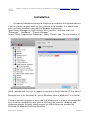
Open Device Manager by right-clicking “My Computer” and after that click
“Properties” - “Hardware” - “Device Manager”.
Select “IR Key Programmer-Properties”. Select “Details” tab, “Device Instance id”.
Value, marked with red color on above screenshot is Serial Number of Your device.
Example here is for Windows XP, but on Windows Vista or Windows 7 it is similar.
Choice of operating system is up to You, but Windows XP is always recommended
for it's native compatibility with most of USB devices, used for hardware and
engineering tasks. Anyway, stable version of USB libraries are provided by
Microsoft for Windows Vista and Windows 7.
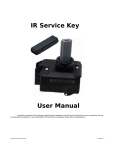
IR Key Programmer User Manual
Revision 1.0