1
Wave Arts Master Restoration Suite
detector that will trigger on note onsets. When the bypass onsets option is
engaged, the crackle processing will by bypassed during note onsets.
5.3 Using MR Click
MR Click Display
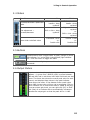
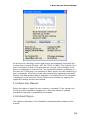
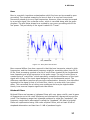
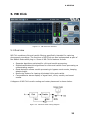
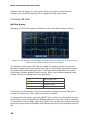
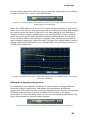
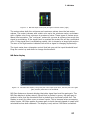
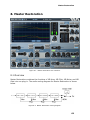
Operation of MR Click is greatly facilitated by the event display shown below:
Figure 5-5. Click and Crackle event display. The green plot shows signal level, red lines are clicks,
yellow lines are crackle, and grey lines are onset events.
The display is active when MR Click is enabled. The display shows the past few
seconds of signal history and scrolls from right to left as audio playback proceeds.
The green plot shows input signal level. Red lines indicate detected click events.
Yellow lines indicate detected crackle events. White lines indicate detected onset
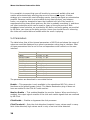
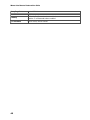
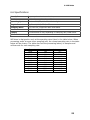
events. These are summarized in the table below.
Green
Input signal level
Red
Click events
Yellow
Crackle events
Grey
Onset events
Click events are shown only if the click processor is enabled. Crackle and onset
events are shown only if the crackle processor is enabled.
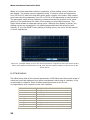
To change the time range, right-click (SHIFT-click on Mac) the horizontal time axis
and a popup menu will appear with different choices for the time range in seconds.
To change the vertical range, right-click (SHIFT-click on Mac) the vertical amplitude
axis and a popup menu will appear with different choices for the amplitude range in
dB.
36