1
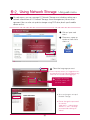
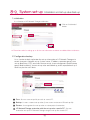
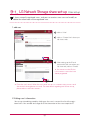
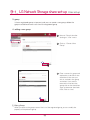
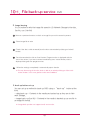
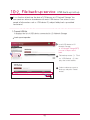
Safety warning
!
Note
1
Do not place any objects within 15cm of the unit.
The unit reaches high temperatures creating the risk of burn injuries.
2
Only use compatible devices with the system ports, or the system and devices risk being damaged.
3
Do not use damaged disks. Product can be damaged.
4
Do not dismantle or change the structure of the system in any way. This may cause electric shock.
5
When dealing with system components, strictly abide by the instruction manual. Physical contact with the
soldering on the backside of components may cause severe injury.
6
When transporting the system, first turn off the system and disconnect the unit from the power source.
Sudden tension in cables can cause severe damage to the system. Loose cables can cause injury.
7
Take caution when handling the system so as not to corrupt the hard disk data.
- Take caution not to bump or expose the system to extreme temperatures, as it may damage the sensitive
hard disk.
- Take caution when turning on the electricity, as during this time any external bumps to the system may
corrupt the hard disk data.
- The manufacturer disclaims all responsibility for loss of hard disk data.
8
Related to damage to the HDD and data:
- during installation or disconnection of the system, ensure that the system does not experience any
external physical shocks.
- During the operation of the HDD, short surges and stoppages of power may cause the system to turn off
and on quickly.
- there may be a sudden stoppage of electricity during operation
- avoid moving the system during operation of the HDD, which may cause external physical shock
- during the configuration of new volumes.
i) if during use, existing volumes are deleted and new volumes are created, data will be lost.
ii) Before configuration of new volumes, each user must back up data, as well as when creating new
volumes, to ensure the possibility of restoration.
– e.g. virus infections.
※ Always back up hard disk data to avoid accidental data loss.
9
In the event of the administrator forgetting the password, restoration is impossible. Hence safeguard the
password.
※ To create a new password, the system must be re-initialized. In this case, all data will be lost, and data
recovery will be impossible, for security reasons. The manufacturer disclaims all responsibility in the event
of this occurrence.
10
In the event of the cover being removed during operation, the user risks electric shock, injury, and damage
to the system.
Ⅰ
Safety warning
!
Warning
1
Do not use damaged electrical cords. This may cause electric shock, and is a fire hazard.
2
Use a grounded cord and grounded socket to avoid electric shock and damage to components.
3
Do not handle the electrical cord with wet hands, as this may cause shock and injury.
4
When removing the plug from the socket, ensure that the plug is handled and not the cord. Otherwise this
may cause damage to the plug and even fire.
5
Always check and use correct voltage to avoid electric shock, severe damage to the system, and fire.
6
Always use grounded cords and grounded sockets with correct capacity (voltage / current) to avoid the
danger of damage, electric shock, and injury.
7
In the event of noise emanating from the electrical cords or sockets, to avoid fire and injury immediately
disconnect, and contact the service centre.
8
Ensure that electrical cords are correctly plugged into the sockets to avoid fire.
9
Ensure that electrical cords are not damaged or do not have heavy objects placed on them. Keep electrical
cords away from children and pets. Damaged cords may cause electrical shock or fire.
10
Keep the power cords and sockets clean at all times to avoid fire and electrical shock.
11
In the event of moisture entering the system, immediately disconnect the power and contact the service
centre, to avoid the danger of system damage, electrical shock, and fire.
12
Do not block vents, as this will cause system damage.
13
Prior to cleaning the system, always disconnect the power, to avoid damage and electric shock.
14
In the event of lighting and thunderstorms, immediately physically disconnect the system from any power
source, to avoid damage to the system.
15
In the event of dropping the system, contact the service centre for advice and possible service. Not doing
this creates the risk of damage, fire and electric shock.
16
Keep the system away from direct sunlight to avoid overheating, and melting of the case, which may
eventuate in fire and injury.
17
Do not place flammable objects, candles or cigarettes on the system, as this may cause fire
18
In the event of a burning smell or smoke emanating from the system, immediately disconnect the power,
and contact the service centre.
19
Keep heating devices and other electrical components at a distance from the system to avoid case melting, and hence the danger of damage, fire, and electric shock.
20
Before disassembling the system, always ensure physical disconnection of the electrical cable from the
socket.
Ⅱ
Safety warning
!
Warning
21
Do not disassemble the power supply, to avoid the danger of electric shock.
22
Keep children away from the system, as consuming any parts will cause serious injury. In the event of swallowing any parts, such as screws, immediately seek medical treatment.
23
Ensure that multipoint power sockets are not overloaded, to avoid the danger of fire and electric shock.
Ensure that cords are always neatly arranged and are not trapped under the system or other heavy objects.
When connecting and disconnecting the electrical cord, take care in handling the socket to avoid the
danger of electric shock.
24
Ensure that there are no loose or exposed metallic objects inside the case, to avoid the danger of damage,
fire and electric shock.
25
Ensure that hands are never used, to avoid damaging the system and electric shock. Always use screw
drivers for work inside the system.
Ⅲ
Table of contents
05
1. Product Introduction
- 1 Product features
- 2 Product components and support OS
- 3 Name of the product parts
05
06
07-08
09
2. LED panel and using button
- 3 ODD back-up
09
10
11
3. Mode switch
12
- 1 LED panel
- 2 USB back-up
- 1 Mode switch set-up
- 2 Connecting an external HDD
- 3 Using an external HDD
- 4 Removing an external HDD
- 5 Changing a capacity of an external HDD
- 6 Connecting an external ODD
- 7 Using an external ODD
- 8 Removing an external ODD
4. Product Installation - Installing a network storage
12
13-14
15
16
17
18-19
20
21
22-24
25
5. Installing a program
- 2 Installing a NAS Detector
25
26
6. Using a network storage
27
- 1 Features and support OS environment
27-29
30
31
32-33
- 1 Using a NAS Detector
- 2 Using a web menu
- 3 Using a network folder
- 4 Using a NAS Monitor
34
7. Using a network
34-35
36-37
38-39
- 1 Connecting on Windows OS
- 2 Connecting on MAC OS
- 3 Connecting on Linux OS
02
8. System set-up
40
- 1 Network set-up
- 2 Remote access
- 3 Setting up date and time
- 4 Hard drive set-up
- 5 Bad sector recovery (Active BSR)
- 6 Power supply management
- 7 Language set-up
- 8 Firmware
- 9 Initialization and configuration value back-up
-10 Email alerting service set-up
-11 Confirming states and information set-up
-12 Checking a log
9. LG Network Storage share set-up
- 1 User set-up
- 2 Folder creation/deletion/editing/authority set-up
40-42
43-44
45
46
47
48-49
50
51
52
53
54-55
56
57
57-58
59
60
10. File back-up service
60-61
62-66
67
- 1 DVD
- 2 USB back-up set-up
- 3 Time machine
68
11. File share service
68-69
70
71-73
- 1 File server
- 2 Torrent
- 3 Network printer
74
12. Multimedia service
74-77
78
- 1 DLNA
- 2 iTunes
79
13. The top menu
79-80
81
- 1 File viewer
- 2 My information
03
14. Network storage management and self-diagnosis function 82-83
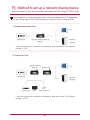
15. Setting up method of a network sharing device
84-85
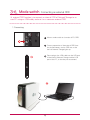
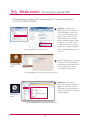
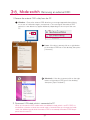
16. To Install in PC without Optical Disc Device
86
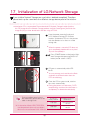
17. Initialization of LG Network Storage
87
18. Supplement: Open source software information
04
88-90
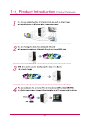
1-1. Product Introduction Product features
05
1-2. Product introduction
Product components and support OS
Thank you for purchasing a LG NETWORK STORAGE.
Please verify that if there are the components are present as follows.
Network Storage
Pedestal
Product Warranty
PC S/W Installer
Multimedia User Guide
Quick Installation Guide
Power supply cord and
adaptor
LAN cable
USB cable
Pictures or photographs used in the user manual are subject to change in accordance with
the components of the model.
Support OS LG Network Storage
- Windows XP, Server 2003, Vista, Windows 7
- Mac OS 10.x or higher
- Linux (Fedora, Suse, Ubuntu)
PC S/W
PC S/W
Support OS
NAS Detector
Windows XP, Server 2003, Vista, Mac OS 10.x or higher, Windows 7
NAS Monitor
Windows XP, Server 2003, Vista, Windows 7
Nero BackItUp & Burn
Windows XP(SP2 or higher), Server 2003, Vista, Windows 7
Acrobat Reader
Windows, Mac
Flash Player
Windows, Mac
06
1-3. Product introduction Name of the product parts
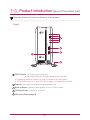
Please be familiar with names of the parts of the product.
(Front)
ODD Slot hole : This is where you insert the disc.
You should insert the disc having the writing side as a data side.
※ Supporting media are subject to change in accordance with the product.
※ N1T1 model contains a slot-type DVD drive and does not support Blu-ray media.
Pedestal : You can place a Network Storage mainframe safely.
Back-up button : A button to back-up data of a disc or USB onto NAS.
ODD eject button : A button to eject a disc
LED panel (Refer to page 9)
07
1-3. Product introduction Name of the product parts
(Back)
Fan
Power button : A button to switch on and off the power supply
Mode changing switch
USB port : USB 2.0 interface
LAN port : This is where you connect a LAN cable.
DC port : This is a port where you connect a power supply adaptor.
Adaptor cable holder : This helps to fix an adaptor cable and prevents it from falling out.
Kensington Lock : This is an antitheft lock ring.
08
2-1. LED panel and using button LED panel
Please check LED panel.
(Front)
HDD : This displays states of action when hard disk reads/writes.
It blinks upon the action of reading/writing.
LAN : This displays a connection state of a network. It is switched on when it becomes active
with network connection and switched off when it becomes inactive. It is switched off when
using external hard disk or optical disc drive and this means that the network has become
inactive.
ODD : This displays action states of reading/writing of an optical disc drive, disc recognition
and back-up. It is switched on disc recognition and displays states of disc reading/writing
including back-up through blinking. In addition, it is switched on when using an optical disc
drive.
USB : This displays USB device recognition as well as action states related to back-up. It is
switched on when USB device is connected and blinks when back-up is in progress.
POWER : This displays states of the power supply.
Switching on/off the power supply
(POWER button on the back side)
Switching on the power supply
When you press POWER button, which is located on
the back side, LG Network Storage starts and an alarm
sound rings when it becomes available to use.
Switching off the power supply
(Back)
Switching off progress starts when you press the power
supply button on the back side until you hear beep
sound.
09
2-2. LED panel and using button USB back-up
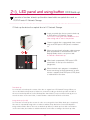
You can back-up USB data onto the Network Storage hard disk with operation
of a back-up button.
1. Back-up the data of a mobile storage device (USB) to LG Network Storage.
A
Insert USB onto the Network Storage.
B
Press the back-up button.
When ODD media (CD/DVD) and USB are simultaneously connected, back-up is progressed
for the device, that is recognized at the latest.
USB part of the LED panel blinks and it displays
that back-up is in progress.
Once back-up is completed, alarm sound rings
and USB part of the LED panel stops blinking
simultaneously, and a folder is created with
the name of the manufacturer of the storage
device in service/backup/usb folder. This makes
it be distinct from other devices in the future.
In addition, a lower folder according to the backup date is created and the whole content of the
USB device is saved in LG Network Storage.
Folder name is automatically created as in the following.
Storage location
Name of the created folder
service/backup/usb
Name of the manufacturer of the storage device, serial
number/type of file back-up/dates on which the folder
is created
※ In case of a simple back-up when the same storage device is backed up more than
several times, all of the data that is backed up at the latest are saved in Last Backup
folder. When you back-up more than twice on the same date, serial number is attached at the back of the date. In a folder that is created for the first time, all of the
data of an external storage device are saved. In folders created afterwards, added
folders and files when compared to the data backed up at the latest are saved.
※ Please refer to 10-2. File back-up service USB back-up set-up for more details.
10
2-3. LED panel and using button ODD back-up
It provides a function to back-up the data stored within an optical disc such as
CD/DVD onto LG Network Storage.
2. Back-up the data of an optical disc to LG Network Storage.
A
Insert an optical disc that you want to back-up
to DVD drive of LG Network Storage.
※ Push it in having the arrow direction as the
data writing side as seen in the picture.
B
Once an optical disc is recognized, alarm sound
rings and ODD part of LED panel is switched
on.
When you press back-up button, data or image
back-up proceeds in accordance with ODD
Backup Mode, which is set up on a web.
※ Default is data back-up.
When back-up proceeds, ODD part of LED
panel blinks so that you can check the
progression.
When the back up in progress is completed,
alarm sound rings and simultaneously an optical disc is ejected. And ODD part of LED panel
is switched off at this time.
Data back-up
It is a function to back up the content of the disc as original onto LG Network Storage. When you
choose the data back-up function, folders are created according to the back-up date and data of
the user is backed up below /service/backup/disc-data folder. If you proceed the back-up process
more than twice on the same date, a serial number is attached at the back of the date.
Image back-up (iso file)
It is a function to back-up the content of a disc as iso image file form. When back-up is completed,
file name is sequentially assigned in accordance with back-up date below /service/backup/discimage folder and the data of the user are backed-up. When you back-up more than several times
on the same date, the number is added at the back of the date according to the back-up order.
11
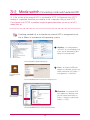
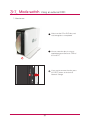
3-1. Mode switch Mode switch set-up
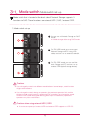
Mode switch that is located at the back side of Network Storage supports 3
functions to NAS. These functions are external HDD / NAS / external ODD.
1. Mode switch set-up
A
You can use as Network Storage on ‘NAS’
mode.
※ Mode change while using ‘NAS’mode
B
On ‘EX. HDD’ mode, you can connect
Network Storage and PC using USB
cable, and use it as an external hard disk.
On ‘EX. ODD’ mode, you can use Network Storage and PC, and use it as an
external ODD (optical storage device).
Cautions
※ If you change the switch into different mode before a buzzer beeps, switch function
might not be efficient.
※ If you change the switch during an operation, the pertinent operation fails and the
pertinent mode switch function is performed. For example, if you change the mode
switch on NAS mode during web burning, back-up or x-hdd format, a pertinent
operation may fail or malfunction.
Cautions when using external HDD / ODD
※ A maximum capacity of external HDD and external ODD supports at USB 2.0.
12
3-2. Mode switch Connecting an external HDD
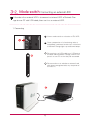
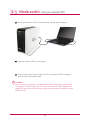
A function of an external HDD is to connect an internal HDD of Network Storage to user PC with USB cable, then use it as an external HDD.
1. Connecting
A
Have a mode switch on a location of EX. HDD.
B
Once a preparation of a functioning action is
completed, a pertinent function icon at the front
of Network Storage lights up and buzzer beeps.
Please plug in an USB cable to an USB port at
the back side of Network Storage, and an USB
port of an user PC so that they are connected.
Please confirm as to whether an external hard
disk drive is recognized within my computer of
the user PC.
13
3-2. Mode switch Connecting mode switch external HDD
※ A file system of an external HDD is initialized to NTFS. In Macintosh only NTFS
reading is supported therefore you need to install a separate utility to write NTFS.
If you format with FAT32, a problem might be generated when you return to NAS
mode later on.
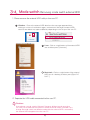
Checking methods of as to whether an external HDD is recognized or not
are as follows in accordance with operating systems.
A
Windows : It is recognized as
“LG-NAS” on my computer, and
it can also be checked on [disc
drive] of an control panel.
<An external HDD recognized in Windows XP>
B
Linux : An external HDD icon
appears on desktop, and you can
check information at [system ->
management -> disc tool].
<An external HDD
recognized in Ubuntu
desktop>
<An external HDD information at Ubuntu disc management tool>
Macintosh : An external HDD
icon appears on desktop, and
you can check information at
[utility -> View the system information -> USB].
<An external HDD recognized in desktop>
<An external HDD information in view the system information>
14
3-3. Mode switch Using an external HDD
A
Please check that the USB connects Network Storage and PC properly.
B
Open the external HDD in my computer.
Drag or copy and paste data of the user PC to the external HDD. Or delete or
read the data of the external HDD.
Cautions
※ You must wait until a transfer is completed when data transfer to the external HDD
is in progress. The data of the user PC or data of the external HDD might be damaged if you take out the USB cable or change the mode switch of Network Storage
during transfer.
15
3-4. Mode switch Removing mode switch external HDD
1. Please remove the external HDD safely in the user PC.
A
Windows : Choose the external HDD drive from the message appeared when
clicking on an icon of notification region, and remove it. Message of external HDD
removal seen below may appear differently depending on the set-up of the user PC.
B
Linux : Click on a right button of the external HDD
icon and then press [Unmount].
Macintosh : Click on a right button of the external
HDD icon of a desktop, and then press [Eject “LG
NAS” ].
2. Separate the USB cable connected to the user PC.
Cautions
※ If you change a mode switch of Network Storage to different mode apart from
EX. HDD, it is converted to the function at which the mode switch is located. If you
change the mode switch into different mode while the external HDD is connected,
the external HDD disappears from the user PC.
16
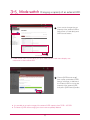
3-5. Mode switch Changing a capacity of an external HDD
A
A
If you want to change the use
capacity of the external HDD or
format from a ‘Hard drive’, press
‘HDD format’ button.
<external HDD information>
※ x-hdd volume seen in [Hard drive] set-up of administrator’s web menu displays use
information of the external HDD.
B
Choose [HDD format range]
from a pop-up window of HDD
format, and move a slide bar of
the ‘External HDD’ to set up the
capacity of the external HDD,
then press [HDD format] button.
※ It is possible to set up the range of the external HDD capacity from 10GB ~ 400GB.
※ The data of [HDD format range] you choose are completely deleted.
17
3-6. Mode switch
Connecting an external ODD
※ external ODD function is to connect an internal ODD of Network Storage to an
user PC using an USB cable, and use it as a common external ODD.
1. Connecting
A
Move a mode switch to a location of EX. ODD.
B
Once a preparation of the external ODD function, buzzer beeps, and an ODD icon at the
front of Network Storage lights up.
Please plug in the USB cable into the USB port
of the back of Network Storage and the USB
port of the PC, so that they are connected.
18
3-6. Mode switch
Connecting an external ODD
2. Please check the external ODD drive from the PC. Name of the model is
“HL-DT-ST DVDRAM GA31N”.
A
Windows : Windows XP is
recognized in my computer as
“DVD-RAM drive”, Windows 7/
Vista as “DVD RW drive”, and
you can check it from [DVD/
CD-ROM drive] of a control
panel. However, the drive might
be seen as “CD drive” due to
a presence of the disc on connection or an interface problem
with an applied program of the
user PC.
< An external ODD recognized in Windows XP>
B
Linux : When the disc is present,
an external ODD icon appears
on desktop and the information
can be checked in [system>management->disc tool].
< An external ODD
recognized in Ubuntu
desktop>
< An external ODD information from Ubuntu disc management tool >
Macintosh : If the disc is
present, the external ODD icon
appears on desktop, and the
information can be checked in
[utility->view system information
-> burning disc].
바탕화면에 인식된
<< An
external
외장형
ODD > in
ODD
recognized
desktop>
시스템 정보 보기에서 외장형 ODD 정보 >
<<An
external ODD information in view the system information>
19
3-7. Mode switch
Using an external ODD
1. How to use
A
After inset the CD or DVD disc, wait
until recognition is completed.
B
You can record or play it using an
applied program relevant to ODD of
the user PC.
If you want to remove the disc, press
an EJECT button at the front of
Network Storage.
20
3-8. Mode switch
Removing an external ODD
1. Remove the external ODD safely from the PC.
A
Windows : Choose the external ODD drive from a message appeared when clicking
on an icon of notification region, and remove it. The message of the external ODD
removal as seen below may appear differently depending on the set-up of the user
PC.
B
Linux : If the disc is present, click on a right button
of the external ODD icon of the desktop, then press
[Unmount]
Macintosh : If the disc is present, click on the right
button of the external ODD icon of the desktop,
then press [Eject “Untitled 1”].
2. Disconnect USB cable, which is connected to PC.
When you convert the NAS mode switch into different mode, which is not EX. ODD, it is
tranfered to a function at which the mode switch is located. When you change the mode
switch into different mode while the external ODD is connected, the external ODD disappears from the user PC.
21
4. Product installation
Installing Network Storage
In an environment where there is DHCP server, after connecting Network Storage
to IPnetwork sharing device/switch/hub, choose receiving IP automatically, then
the network information will be retrieved from DHCP server. In case you use a
specific IP address assigned from network IP administrator, you can easily install
if you prepare by receiving assignment of IP address, sub-net mask, standard
gateway, DNS information.
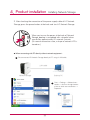
1. Connect LAN port of Network Storage with LAN port of a network equipment (IP network sharing device / router / hub / switch) using a LAN cable
enclosed, or directly connect the LAN port of the PC.
When using the network equipment (IP network sharing device/switch/hub) :
Connect LG Network Storage to user’s PC using hub/switch/router as in the following.
* network sharing device
(Shapes may vary depending
on the network sharing device.)
* Network Storage
22
4. Product installation
Installing Network Storage
2. After checking the connection of the power supply cable of LG Network
Storage, press the power button at the back and start LG Network Storage.
When you turn on the power at the back of Network
Storage, booting is completed with a cheerful alarm
sound after approximately 40 seconds~1minute.
(On normal connection state, a shape of network LED is
turned on.)
When connecting with PC directly without network equipment :
A
Please connect LG Network Storage directly to PC using a LAN cable.
LAN cable
Network Storage
Desktop PC
B
23
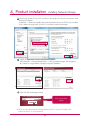
Start -> Settings -> Network connection -> click on the right button
of the on local area connection ->
Properties
4. Product installation
Installing Network Storage
Please change the IP of the PC as follows if the window of local area connection state
popsup. (Example)
properties -> When you double-click internet protocol Version4 (TCP/IPv4), a window
that is able to change the IP of the PC, and then it makes the change.
Please change the IP of NAS using a NAS Detector.
NAS Detector -> Change Network Info -> Click on ‘apply change’ after changing
(6-1. Refer to Using Network Storage Using NAS Detector)
Click OK after entering password.
Enter the password,
‘admin’
※ When you connect Network Storage directly with PC using a LAN cable, wire
internet of the PC is not connected
24
5-1. Program installation
Features and support OS environment
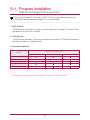
“LG Network Storage PC Software Installer” CD that is provided on purchasing
LG Network Storage provides programs as in the following.
1. NAS Detector
“NAS Detector” provides a function of easily and quickly finding LG Network Storage present on the user’s network.
2. NAS Monitor
“NAS Monitor” provides a function of checking the state of LG Network Storage in
real time as well as a simple control.
3. Nero backitup&burn
Supporting operating system
Program
Windows
Mac
Acrobat Reader
Flash Player
NAS Detector
NAS Monitor
Nero backitup&burn
※ Program you can install varies in accordance with the user’s OS environment.
25
Linux
5-2. Program installation
NAS Detector installation
The name of Network Storage is ‘LG Network Storage’ on web UI.
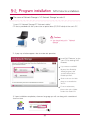
1. Insert “LG Network Storage PC Software Installer”
CD that is provided with the system into an optical drive (CD/DVD drive) of the user’s PC.
Cautions
※ You should not put in‘Network
Storage’.
2. A pop-up as below appears due to automatic operation.
A
A
Install ‘NAS Detector’ on the
user’s PC by clicking ‘NAS
Detector’.
If you want to install NAS
Monitor, Nero BackItUp
& Burn program, click
on NAS Monitor, Nero
BackItUp & Burn.
Click on the icon if a flash
player is not installed on
the PC
For more information,
please refer to the ‘Multimedia User Guide’ CD.
3. Upon installation completion, choose a language you will use along with a creatioin of
short-cut icon.
26
6-1. Using Network Storage
Using NAS Detectorlation
This explains about how to use NAS Detector and NAS Monitor.
About detailed explanation in regard to using bundle program, please refer to
manual within the program itself after program installation. (Nero backitup&burn)
1. After checking there has been a correct network connection of the PC, operate the
program by double-clicking on a ‘NAS Detector’ icon created on a desktop.
2. ’NAS Detector’ automatically finds LG Network Storage, which is connected to the
user’s network currently. Once the search is completed, it shows resulted ‘MAC address’, ‘IP
address’, ‘Host name’ of LG Network Storage in order.
A
A
B
MAC address : It is a unique
number of each product of LG
Network Storage, and displayed
on the label at the back of a
mainframe.
B
Host name : LG-NAS-N1T1
※ In case you cannot find LG Network Storage you want to connect, search once more
by clicking on ‘Search network’ button. If you cannot search with ’NAS Detector’,
please check the state of network connection. As for a method to set-up an IP address
manually, please refer to 8-1. System set-up [Network set-up].
27
6-1. Using Network Storage
Using NAS Detectorlation
3. When you choose LG Network Storage information that is searched, basic network
information of Network Storage such as sub-net mask, standard gateway, DNS etc. and
‘Network information change’, ‘Open Web menu’, ‘Open Network folder’ buttons are
displayed.
※ For“NAS Detector” program to be normally operated, the user’s PC should be connected to the same IP network sharing device / switch / hub as LG Network Storage.
4. You can change relevant information such as IP address etc. with a click on ‘Change
Network Info’ button.
※ In case of an environment of IP network
sharing device or a presence of DHCP
server on the network, option for the
choice of DHCP appears. If you do not
have specially assigned IP address, you
can either use the IP address “NAS
Detector” found or choose DHCP option
and receive an automatic assignment of
the IP address.
28
6-1. Using Network Storage
Using NAS Detectorlation
5. You can access a web menu of LG Network Storage when you click on ‘Open Web
Menu’.
6. You can access LG Network Storage network folder when you click on ‘Open Network
Folder’.
7. When you click on ‘Open Web Menu’ or ‘Open Network Folder’, you can choose ‘yes’
on a message window that pops up and add a short-cut icon on the desktop. Afterwards, you can have an easier access to Network Storage web menu or network folder
using the short-cut icon.
NAS web menu short-cut
NAS network folder short-cut
29
6-2. Using Network Storage
Using web menu
On web menu, you can manage LG Network Storage use including setting up a
network information of LG Network Storage, share management, service management. You can also set up data storage using DVD drive, back-up of mobile
device on this.
A
B
A
Click on ‘open web
menu’
B
Choose on a pop-up
window of ‘web menu
short-cut’.
LG-NAS_We
bMENU
Select the language you want
※ Due to security reason, it is logged out automatically in case you do not perform any
action for 20 minutes after logging in.
Logging in by entering
an user ID, ‘admin’, and a
password, ‘admin’.
※ You can change a set-up of
Network Storage.
※ Please change the password
for security.
(web menu -> administrator
account -> user -> change
password after clicking on
‘admin’
30
6-3. Using Network Storage
Using network folder
It is possible to share and store files through Network Storage as other hard disk
connected to PC.
1. Double-click on a short-cut icon of LG Network Storage network folder.
2. DVD drive of LG Network Storage, ‘cdrom’ and standard folder, ‘service’ /‘volume1_public’
/ ‘x-hdd’ are displayed.
3. To see the content of the disc inserted on LG Network Storage, double-click on
‘cdrom’ and to access hard disk of LG Network Storage, double-click on ‘ volume1_public’
or ‘x-hdd’ folder.
※ If the content of the cdrom of LG Network Storage is not properly displayed, please
refresh.
※ Initial ID of LG Network Storage is admin and a password is admin.
※ volume1_public, x-hdd, service folder shows provided that the volume is adequately
organized.
31
6-4. Using Network Storage
Using NAS Monitor
NAS Monitor provides several functions for users to easily use LG Network Storage.
For example, when opening a network folder or trying to access web page, one
can perform the action easily by clicking on a menu of NAS monitor.
32
A
Basically NAS monitor brings
in IP address information while
automatically communicating
with LG Network Storage. Therefore even when the IP address is
changed, the user is able to access open network folder or web
without a specific set-up.
B
When NAS monitor is activated,
it is operated as a form of tray
icon of the window, and you
can check this on the bottom
of the right side of the screen.
The screen below is the menu
screen, which appears when you
click on the right button of the
mouse.
6-4. Using Network Storage
Using NAS Monitor
- Web menu
It is a menu used to access a web page.
- Network folder
It is used when opening network folder. When you double-click on an icon with a left button
of the mouse, open network folder operates basically.
- FTP server
It is used to connect to FTP server.
- NAS detectorr
It is a menu used to operate NAS detector program, which is used to change IP address
of LG Network Storage. In order to use this menu, NAS detector needs to be installed in
advance.
- NAS selection
When one LG Network Storage is being used, IP address information of NAS monitor is
automatically set up. However when several LG Network Storage are being used, many
messages may be transferred to NAS monitor, and it cannot be known which LG Network
Storage order is sent on menu selection. Consequently it helps to assign one LG Network
Storage and makes you take care of the information of LG Network Storage you want.
- viewing a recently received message.
It shows message sent at the latest.
- turning off the message sign
it does not show message being sent from LG Network Storage.
33
7-1. Using network
Connecting in Windows OS
file share service is the most important function of LG Network Storage. In this
chapter, a method to use LG Network Storage as a network drive for different OS
such as Windows, Mac, Linux is explained.
1. PC applied program use
After installing the NAS detector program of LG Network Storage PC Software
Installer disc, run the program and click on “Open Network Folder” button. Then you
can connect to the share folder of LG Network Storage.
2. Use a ‘run’ function of Windows OS
When you click on “run” on the start menu of Windows OS and enter ‘\\IPaddress’,
then you can connect to LG Network Storage. Please refer to 6-1. Using Network
Storage [Using NAS Detector] if you do not know IP address.
34
7-1. Using network
Connecting in Windows OS
3. Using a function of Windows file share
Open the search engine of Windows, and enter ‘\\IPaddress’ in the address window.
You can access to the server after logging in. Please refer to 6-1. Using Network Storage
[Using NAS Detector] if you do not know IP address.
Set-up as a network drive after Tip server connection.
※ If you set up as a network drive, you can connect to LG Network Storage more conveniently
next time.
A
“tool” -> network drive connection” or click on network drive
using the right button of the
mouse.
B
After assigning drive letter and
connection folder on the ‘network drive connection’ window,
click on ‘finish’.
Logging in by entering
an user ID, ‘admin’, and a
password, ‘admin’.
After creating the drive in my
computer, it can be simultaneously used with the hard disk.
35
7-2. Using network
Connecting in MAC OS
You can add LG Network Storage share folder to Mac server list, and manually
add the pertinent folder to search engine.
A
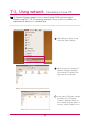
After clicking on “Go” on the
menu bar, select “connect to
server”.
B
Enter the IP address of LG
Network Storage as a format
of {smb://LG Network Storage
IPaddress}in a ‘server address’
field, and then click on a ‘connect’ button. Please refer to
6-1. Using Network Storage
[Using NAS Detector] if you do
not know the IP address of LG
Network Storage.
Enter the log in ID and password,
and then click on ‘allow’ button.
On initial release, it is setup as
ID: admin, password: admin. It
is recommended to change the
password by connecting to a
web administrator page later on
for the security reason.
36
7-2. Using network
Connecting in MAC OS
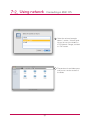
Select the volume (example:
cdrom / service / volume1_public) you will use in the folder list
of LG Network Storage, and click
on “OK” button.
The pertinent share folder opens
and you can see the content of
the folder.
37
7-3. Using network
Connecting in Linux OS
LG Network Storage supports Linux system through SMB service on top of
Windows and MAC OS. A connecting method in Linux system is as follows. It is
explained with ubuntu as a standard here.
A
After clicking on ‘Place’ on the
menu bar, select ‘Network
B
When you click on ‘network’, LG
Network Storage is displayed.
Please select LG Network Storage name to connect here.
If you select LG Network Storage,
the folder list of LG Network
Storage is displayed. Please select a volume (example: cdrom /
service / volume1_public) to use.
38
7-3. Using network
Connecting in Linux OS
You can connect to LG Network
Storage when you enter the ID
and password. It is set up as
ID: admin, password: admin on
initial release. It is recommended
to change the password after
connecting to the web administrator page later on for the
security reason.
After logging in, LG Network
Storage share folder is displayed.
F After setting up of the network,
marked icon is created on the
desktop.
39
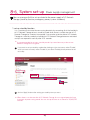
8-1. System set-up
Network set-up
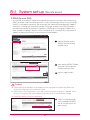
In a ‘network set-up’ menu, you make an important configuration to connect
LG Network Storage to the network. Please be cautious in setting up as a fault
generated in set-up may create a problem in connection.
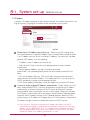
1. system name
A
click on ‘system name’ tab at the ‘network’
Enter the system name of LG Network Storage. For system name, you can use a
minimum of 3 letters to a maximum of 12 letters, and combine alphabets (A-Z or
a-z),numbers (0-9), hyphen(-) as you want, however numbers or hyphen cannot be
placed at the very front. Special characters cannot be used.
Name that can be used : LG-NAS, LGNAS-123
Name that can not be used : LG_NAS, -LGNAS, 123-LG, LG-#, LG/N
Enter the explanation of the system. For the explanation of the system, you can use
a maximum of 24 letters with a combination of alphabet, numbers, under bar (_),
hyphen (-), space. This set-up only affects a client.
B
click on ‘Apply’ button .
40
8-1. System set-up
Network set-up
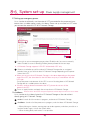
2. IP address
It assigns a IP address property of the network interface. You need to be careful in setting up since this might give a limitation to the connection of the system.
A
When there is IP address you wish to use : Select ‘manual IP setting’ when
you have received an assigned IP address from a network administrator, or there
is an IP address you wish to use. And enter IP address, sub-net mask, standard
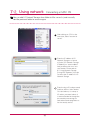
gateway, DNS address as in the following.
- IP address: enter IP address you wish to use
- Sub-net mask: Enter a sub-net mask appropriate for a current network
B
B
environment.
- Default gateway address: It assigns a route to go outside
When there is no standard gateway present on the network, enter the IP address.
- DNS server address(Primary): DNS server takes care of the conversion between domain name and IP address. If An adequate DNS is not set up, email,
DDNS and domain function cannot operate normally.
- DNS server address(Secondary): enter the address of assistant DNS server.
If you wish to be assigned IP address automatically : Select ‘Obtain an IP address automatically(DHCP)’ if you want to receive an assignment of IP address
automatically. In case of a presence of DHCP server (or internet IP network
sharing device) within the network, you can use this option. When you activate a
DHCP option, a connection with a web menu is disconnected. Therefore please
check the new IP address through a NAS Detector program. Because DHCP
actively renews its IP address on a regular basis, this may create an unintentional
IP address change. Hence you need to be careful use DHCP set-up.
※ If you set up an automatic assignment of IP address but there is no DHCP
server within the network, you will receive an automatic assignment of a link local
address such as 169.254.XXX.XXX . It is available when you directly connect PC
with the network cable, and in this case IP address set-up of the PC should be
selected as ‘Obtain an IP address automatically ’ as well.
41
8-1. System set-up
Network set-up
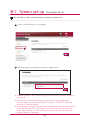
3. Workgroup
A
Set up a name of the Workgroup Windows network supports.
You can access LG Network Storage share folder on Windows through this.
B
click on `Apply` button
42
8-2. System set-up
Remote access
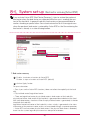
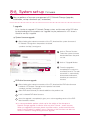
1. [UPnP]
It is possible that LG Network Storage directly receives the request being sent to network
sharing device connected LG Network Storage using UPnP port forwarding. When connecting
LG Network Storage from the outside via DDNS, it should be set up in a way that the request
being sent to the network sharing device is transferred to LG Network Storage by changing
the set-up of network sharing device. You can make the network sharing device perform a
transferring action without network sharing device set-up through this function.
A
click on Network menu -> move to Remote access (DDNS) tab
B
When the address of the network sharing device is displayed normally, activation of the Port forwarding function of the network sharing device is displayed.
Select UpnP port forwarding ‘Enable’.
click on `Apply` button
※ It might not perform an adequate action when the network sharing device does not
support UPnP port forwarding or the function is inactivated.
43
8-2. System set-up
Remote access
2.DDNS (Dynamic DNS)
You are able to connect LG Network Storage with the domain name from the outside using
DDNS..(example : http://myname.lgnas.com , or ftp://myname.lgnas.com) In case of using a
fixed IP, it is possible to connect to the server from the internet by remembering IP address.
However in a changing IP environment where IP changes at certain time, DDNS provides a
convenient connection environment. It performs monitoring of a changing IP address realtime, and does mapping in domain name. Consequently it is not necessary to memorize IP
address changing continuously, and you will have a fixed address.
A
move to Remote access
(DDNS) tab after clicking
Network menu.
B
after selecting DDNS ‘Enable’
enter the name of domain
and password you want.
Click on ‘apply’ button.
Cautions
※ Please enter (only alphabets and numbers can be used) without special characters and
space when registration of the domain name.
※ After domain name registration, if you select ‘not use’, a previous domain is deleted. Therefore you can register and use the pertinent domain name in other Network Storage.
※ Please be cautious not to lose password.
‘DDNS is working corrctly’
on a completion of DDNS
set-up. Phrase and IP address set-up
44
8-3. System set-up
Date & time set-up
It sets up the time of the system. It is necessary to accurately set up the current
time for the correct time display of the file uploaded within the share folder and
the log file.
1. date & time set-up
A
If you want to change date
and time, click on `Time`
button
B
Click on ‘Edit’ button
You can assign the region in
which LG Network Storage
is currently installed using
‘time zone’. You should enter
a correct value as a correct
time zone set-up may have
an impact on NTP action.
Click ‘Apply’ button
※ You can bring in the current time of my computer using an ‘Use Local Time’ button.
2. NTP set-up
Network Time Protocol (NTP) performs a regular synchronization of the system time by
obtaining the correct time from the time server from the outside. It is recommended to
activate this for the correct time to be maintained. If you use a standard NTP server, time is
obtained through pool.ntp.org server.
45
8-4. System set-up
Hard drive set-up
When organizing a volume, certain section of the hard disk is assigned as
a system section of LG Network Storage. Consequently a capacity of the
volume after the volume organization appears smaller than the capacity of
the hard disk.
※ When you first purchase the product, the volume is already organized.
Therefore please use this menu only when you wish to change the volume
organization set-up.
1. Volume format
Please perform following steps to format the volume. When you format the volume, all
of the user’s data of the formatting sector are deleted, and they become unusable.
A
Currently organized volume name and further explanation appear on the top.
B
You can control a formatting range and the size of an external HDD with a click on
“HDD format” button.
- You can select external HDD sector at 10 units from 10G TO 400G.
- external HDD sector is basically set up as 10% of the whole capacity of the hard
disk, and you can change the size through an administrator web page. Because the
data of the external HDD sector are formatted on changing the size, please adjust
the external HDD sector to be adequate for the use type, and then use it.
2. empty trashbox
If you delete file or folder while working in the network drive, trashbox is created and deleted
files are temporarily moved here. If you wish to restore the deleted data, you can find the
file or folder you wish to restore from the trashbox and move it to the location you want.
Because the trashbox is created at the every uppermost folder, if there have been a lot of
user folders created, the same number of the trashbox is created. In this case, if you need
to empty all the trashboxes due to insufficient capacity of the hard disk, you can empty the
whole contents of the trashbox by clicking on a trashbox icon on a volume web screen.
※ You can select the trashbox function at “administrator account” -> “folder” menu for
the usage of each folder.
46
8-5. System set-up
Bad sector recovery(Active BSR)
If you activate Active BSR (Bad Sector Recovery), it tries to restore the pertinent
bad sector when the bad sector was detected while the user is reading the content of the hard disk. In general hard disk, bad sector can be generated due to
careless handing or power failure. You cannot restore the file as the original even
when the pertinent bad sector is restored by Active BSR as the file containing the
bad sector is already in a state of being broken.
1. Bad sector recovery
A
Enable : it activates a function of Active BSR.
Disable : it stops a function of Active BSR. (default)
B
click on ‘Apply’ button
For your information:
- Even if you use the Active BSR function, it does not affect the capability of the hard
disk.
- Physical bad sector/Logical bad sector
- There are logical bad sector physical bad sector in bad sectors of the hard disk.
physical bad sector bad sector of the hard disk is generated due to defect of the hard
disk itself, deterioration, shock etc. When the physical bad sector is generated, it is better
to replace the hard disk.
logical bad sector bad sector of the hard disk is when a faulty is generated in the status
information of the pertinent sector, and it can be restored through a separate operation.
- Active BSR cannot restore physical bad sector. If the physical bad sector is detected,
leave it on the system log and quit more of an attempt of restoration.
47
8-6. System set-up
Power supply management
You can manage all of the set up related to the power supply of LG Network
Storage (stand-by function, emergency power, system shutdown).
1. set-up stand by function
It is a function to minimize the consuming electricity by converting all of the hard disks
of LG Network Storage to be in stand-by mode when there is no data transfer of LG
Network Storage for a certain time period. If you read or write the data of LG Network
Storage on stand-by mode, the hard disk of LG Network Storage becomes activated
and you can operate it normally after 3-15 seconds.
※ It is recommended to set up a stand-by mode if you are often away or do not use
Network Storage for a long time.
A
If you want to set up stand-by mode after clicking on the start menu, select ‘Enable’,
and if you want to cancel, select ‘Disable’. If you select ‘Enable’, please proceed to the
next step
B
click on ‘Apply’ button after setting up stand by time you want.
※ When there is no data transfer of LG Network Storage for an assigned period of time,
it converts to power saving mode. You can set up the time at an interval of 30/60/120
minutes.
48
8-6. System set-up
Power supply management
2. Setting up emergency power
It is a function to efficiently use the external UPS connected for the purpose of protection from a sudden power supply shut down. Please set up an action of UPS when
you connect the external UPS to LG Network Storage.
A
If you wish to set me emergency power, select ‘Enable’, and if you want to cancel it,
select ‘Disable’. In case of selecting ‘Enable’, please proceed to the next step.
※ LG Network Storage supports USB UPS affiliated with APC only.
Select as to whether you will shut down LG Network Storage after an assigned
period of time, or you will shut down LG Network Storage depending on the power
state of the UPS.
※ When you set up so that LG Network Storage is shut down depending on the power
state of the UPS, the time taken for the shut down may vary in accordance with the
UPS type.
Set up the power maintenance of the UPS in case of shutting down of LG Network
Storage due to a sudden power shut down.
※ If there is another device connected to the UPS, please do not turn off the
power of the UPS
Press an ‘apply’ button and apply the set-up value to LG Network Storage.
B
3. shutdown
※Please refer to 14. Network storage management and self-diagnosis function for more details.
It is a function to shut down/restart the LG Network Storage on the web without
directly going to LG Network Storage.
A
restart : It ends all of the actions in progress, and restarts LG Network Storage.
B
shutdown : It ends all of the processes in progress, and shut down LG Network Storage.
- When clicking on a button, warning pop-up window appears, and when you click on a
‘confirm’ button again, it shuts the system down.
- When shutting down, web access is not possible.
49
8-7. System set-up
Language set-up
You are able to select standard display language of web menu.
A
Click on the ‘Edit’ button to set language.
B
After checking the language you want, press ‘Apply’ button.
※ Selected language is the standard language seen when the user access the web for
the first time.
※ If you set up to use cookie on browser set-up, the information regarding the
language used in the pertinent computer at the latest is saved, and it shows that
language on a next connection.
※ Client language: Select the language, which is appropriate for the client environment
of the user. (example: FTP use) In order to use various languages simultaneously,
please select Unicode. In case of selecting the Unicode, the user should use the
program Unicode is supported.
50
8-8. System set-up
Firmware
You can perform a firmware management of LG Network Storage (upgrade,
initialization, set-up value back-up / restoration)
1. upgrade
It is a function to upgrade LG Network Storage system and firmware of the DVD drive
by downloading from the product site. Upgrade may be performed in a PC where a
firewall or security is applied.
System firmware upgrade
A
After checking the internet connection of the PC, download the system firmware of
LG Network Storage from the product site linked.
- product site http://www.lg.com
B
click on “Browse” buttonSelect the system firmware
downloaded from the product site.
click on “Upgrade”button
Once the upgrade is
completed, the system automatically restarts. The web
connection is automatically
disconnected afterwards,
therefore you need to reconnect.
DVD drive firmware upgrade
A
After checking the internet connection of the PC, download the DVD drive firmware
installed in LG Network Storage from the product site linked.
- product site http://www.lg.com
B
select DVD drive firmware you downloaded from the product site.
install a selected DVD drive firmware.
when the upgrade is completed, it gives you a notice regarding version of the DVD
drive firmware installed.
※ It is recommended to perform a back-up for the stability of the data prior to
Network Storage upgrade. Installation time may take 1 minute ~ several minutes.
When you upgrade the firmware, please stop other actions, and be careful that the
power is not turned off. In addition, warn in advance so that the client user does not
access LG Network Storage during firmware upgrade.
51
8-9. System set-up
Initialization and set-up value back-up
1. initialization
It is a function of LG Network Storage initialization.
A
Click on ‘Initialization’
button
※ Please be careful in setting up as all the user information and data are deleted after initialization.
2. Configuration backup
It is a function to back up/restore the set-up information of LG Network Storage at a
certain time point. Network set-up (system name, IP address, operation group), time
set-up (date/time, NTP), email alert service set-up, share management (administrator,
group, folder authority), service set-up value are backed up, and a separate back-up is
necessary for the user’s data.
A
Save : You can save set-up file you wish to save in PC.
B
Backup : It saves a current set-up value..(It can save a maximum of 5 back-up file)
Restore : It re-organizes the set-up value at a time point of restoration.
LG Network Storage restoration with the set-up value saved in PC : You can
restore the set-up of LG Network Storage using the set-up file saved in PC.
52
8-10. System set-up
Email alert service set-up
You can check the usage of LG Network Storage periodically using the email
alert service. In addition, it is possible to let the pertinent user know of the registration result after the new user registration.
Select ‘enable’ to use a function of email alert service. In case of selecting ‘enable’,
please proceed to steps as in the following.
Enter the server address of the email server. Please obtain help from the network
administrator, or refer to the introduction page of the email service in use, and enter
the correct value. (example: smtp.mail.yahoo.com)
If the port number the mail server is using is set up at a random value which is not
a default (25), please enter the port number. Generally the case of selecting SMTP
SSL falls into this category.
There is a server that requires a process of logging in when sending emails in accordance with the type of servers. If your mail server requires a certification, please
activated it and enter an user ID and password. (example, web mail SMTP server
such as smtp.mail.yahoo.com requires a process of certification as compulsory.
Please refer to help of the web mail service you are using)
At times it is being sent with encoding of the logging in certification information
according to the type of the mail server.. (example, it is compulsory to have SSL
certification in case of smtp.gmail.com. Please refer to help of the web mail service
you are using.)
F
Enter the address of the administrator who will receive the mail.
G Set up as to whether you are to periodically receive the information regarding the
amount of usage of the hard disk. If you do not wish to receive message periodically,
cancel the option.
H You can determine the sending cycle of information regarding the amount of usage
of the hard disk. (daily/weekly/monthly)
53
8-11. System set-up
Checking states information set-up
It views the state of the network, volume and other equipments of LG Network
Storage. When you need rather detailed information or editing, you can move to
the pertinent web page by clicking on icons on the bottom.
Network : It displays information
including MAC address, IP address,
sub-net mask, gateway, DNS server,
size of Ethernet frame, speed of the
link etc.
Volume : It displays the organized
volume list, the amount of the usage, states information etc.
Hard disk : It displays information of
all of the hard disks installed in LG
Network Storage.
54
8-11. System set-up
Checking states information set-up
DVD : It displays information of all
of the DVD drives installed in LG
Network Storage.
USB : It displays information of all of
the USB devices connected to LG
Network Storage.
F
Access Status : It displays the present condition of the users who are
currently using LG Network Storage.
(SMB , FTP)
55
8-12. System set-up
Checking a log
It is a function to mark/save the history of the service relevant to LG Network
Storage.
System Log : it shows the history of
the system.
Samba Log : it shows the usage
history of the share folder through
Samba.
FTP Log : it shows the usage history
of FTP.
DVD Log : it shows the history of
the DVD.
Self-diagnosis : It performs a
self-diagnosis and after a while, it
displays the result.
- For the normal action, the service
code category is displayed as [SVC
CODE :00_00].
※ When clicking on a ‘save’ button, it saves the log of the selected tab in the client’s PC.
56
9-1. LG Network Storage share set-up User set-up
It shows currently registered users, and you can create a new user and modify or
delete the information of the registered user.
1. add user
click on ‘User’
click on `Create User` whom you
will share it with.
After setting up the ID and
password of the user whom you
will share with, click on ‘Create’.
※ You cannot use the ID that
is the same as users who have
already registered.
※ Enter the user’s email. When the mail server set-up is in a correct state, you can send
the result of the registration via email. For more details regarding mail server set-up,
please refer to <mail alert service>.
2. Editing user’s information
You can go into editing mode by clicking on the user’s name of the list of the registered users. You are able to change all of the information of the user except for ID.
57
9-1. LG Network Storage share set-up User set-up
3. group
It shows registered groups at present, and you can create a new group, delete the
group and add or remove users from the registered group.
4. adding a new group
Move to `Group` tab after
clicking on `User` menu
Click on ‘Create a New
Group’
Enter a name of a group and
explanation, and click on the
check box of the user you
wish to include in the group,
and select. If you want to
remove the user from the
group, click on the check box
again and remove the check
mark. Click on ‘save’.
5. Editing Groups
When you click on the group name of the list of the registered group, you can modify the
property of the pertinent group.
58
9-2. LG Network Storage share set-up
Folder creation/deletion/editing/authority set-up
It displays the folder currently registered, and you can create/change/delete the
folder for file share and set up the authority set-up of the created folder.
1. adding a new folder
It displays the group currently registered, and you can create a new group, delete the
group, and add or remove users from the registered group.
enter a name of the share folder.
enter a name of the group.
enter an explanation for the folder.
When you have organized several volumes, please assign a volume in which a folder
is to be created.
Select the permission of the folder share through SMB, AFP, FTP protocol.
- Windows: It activates folder access using SMB protocol (network drive) in Windows
/ Mac / Unix. For more detailed method of connection, please refer to 7-1. Using
network.
- AFP(Mac): It activates folder access through AFP of the Mac client.
- FTP: It activates folder access through FTP client.
F
You can make folders currently in share be invisible on network search
When you select ‘hide’ option, it is impossible to share the pertinent folder using
AFP/FTP.
G Create a trashbox within the pertinent folder. When the trashbox deletes the content
of the activated folder, the pertinent file is moved the “trashbox” folder within the
share folder.
H Select the possibility of the access limit of the folder. You are able to connect/use
without the user limitation in case of selecting ‘not use’.
I
You can assign users/group who will use the folder. Users who are not selected cannot access the folder.
2. folder property editing
When you click on the folder name from the folder list registered, you can
modify all the information of the pertinent folder except for the folder name.
59
10-1. File back-up service
DVD
You can save data within a hard disk of LG Network Storage into an optical disc
using an internal DVD drive. Such method enables a secondary back-up of the
data, therefore you can manage the date in more safe and efficient way.
1. Burning data disc
It is a function to burn the file saved in LG Network Storage onto the optical
disc.
: Move to a folder of a higher level.
: Refresh a folder currently chosen.
: Move to either a chosen file from the left folder window or a right folder
to organize the list to record the folder.
: Delete the chosen file or folder from the right side list, which has been
organized to record.
Move to a location in which a folder or file you wish to save is saved.
Organize the list of the data to record by choosing a folder or file to record and moving it to the right side.
Assign a name of the disc to record in a ‘disc name’ window.
Check if the disc is able to record, from the disc state window by clicking on ‘refresh’
button.
Start the record with a click on ‘burn’ button. Progression bar is displayed with the
start of the action. If you want a record cancellation, press ‘cancel’ button, which is
displayed along with the progression bar.
F
When the burning is completed, it automatically ejects the disc.
60
10-1. File back-up service
DVD
2. Image burning
It is a function to write the image file saved in LG Network Storage to the disc.
(iso file, cue / bin file)
Move to a pertinent location in which an image file you wish to record is present.
Select image file to write
Check if the disc is able to record, from the disc state window by clicking on ‘refresh’
button.
Start the record with a click on ‘burn’ button. Progression bar is displayed with the
start of the action. If you want a record cancellation, press ‘cancel’ button, which is
displayed along with the progression bar.
. When the writing is completed, it automatically ejects the disc
※ You can do erasing of the disc, which is able to re-write by clicking on ‘disc initialization’ button. In this case, previous data are all deleted.
3. back-up button set-up
You can set up a method to back up ODD using a “back-up” button at the
front.
- data back-up : Contents in the media are backed up as they are to Network Storage.
- image back-up (iso file) : Contents in the media is backed up as one file in
an image file format.
※ Image back-up does not support multi-session disc.
61
10-2. File back-up service
USB back-up set-up
It is a function to back up the data of USB device to LG Network Storage. You
can create an action in accordance with each USB device. One action is composed of information such as USB device ID, subject folder, back-up method
and interval.
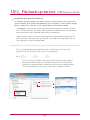
1. Current USB list
It displays the list of USB device connected to LG Network Storage
back-up set-up order
Install USB device to LG
Network Storage
※ LG Network Storage(N1T1)
has one USB port at the
back.
File backup service ->‘Click
on ‘USB Backup’ -> It displays the list with refresh.
Select a device you want to
back up, and press ‘Create’
button.
62
10-2. File back-up service
USB back-up set-up
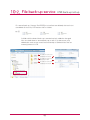
Name : Save the operation name. (Automatic creation)
Description : Enter the action explanation.
Control Number : The unique ID of the installed device is displayed. The unique ID is
created automatically from the manufacturer information and product information etc.
(automatic creation) .
Destination : Assign a subject folder that is backed up. It automatically creates a
standard folder on selecting a device. You can assign a specific folder, which is not a
standard folder.
USB auto sync : Every time USB is installed, it automatically recognizes, and automatically performs back-up operation according to the set-up information. Consequently it
is not necessary to press button as with One Touch back-up.
Backup Method : It assigns a back-up type
- Incremental: back-up is performed for added information to the original since the
previous back-up only.
- Full : back-up is performed for the whole original file.
- Please refer to [Incremental back-up & Full back-up] of the back page for more
detailed information.
click on ‘Apply’ button
USB synchronization set-up
You can display an action list currently set up and edit or delete.
63
10-2. File back-up service
USB back-up set-up
Incremental back-up and Full back-up
LG Network Storage supports two types namely, incremental back-up and full backup for the back-up of mobile storage device. For the location in which mobile storage
device is backed up, there are user assigned folder and last backup folder.
- Incremental : All of the data of the assigned mobile storage device are backed up in
the Last Backup folder. In the folder user assigned, only added contents are backed up
when compared to the last backup folder previously backed up.
- Full : It performs back-up for the whole original file. Unlike incremental back-up, full
back-up contains the whole back-up contents in the folder user assigned..(It does not
save separately in the Last Backup folder)
This is an example about Incremental back-up and Full back-up. On first backup(January 1st 2009), USB contains files as in the following.
ex 1)
in this case, when USB back-up proceeds with Incremental type, folder of
the pertinent date of back-up is created and above files are saved. At the
same time, last backup folder is created and all of the files currently present
in USB are backed up. At this time, system folder is created as follows.
In a folder of a lower level
a.txt/b.txt/c.txt created
In a folder of a lower level
a.txt/b.txt/c.txt created
64
10-2. File back-up service
USB back-up set-up
On second back-up, (January 2nd 2009), a.txt and b.txt are deleted, d.txt and e.txt
are added. At this time, USB contains files as follows.
ex 2)
A folder with the date of back-up is created and only added or changed
files are saved there on second back-up as well. As in above case, only
added d.txt and e.txt are saved. And last backup is filled with files that are
currently present in USB.
In a folder of a lower level
a.txt/b.txt/c.txt created
In a folder of a lower level
d.txt/e.txt/ created
In a folder of a lower level
c.txt/d.txt/e.txt created
65
10-2. File back-up service
USB back-up set-up
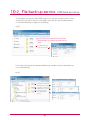
On third back-up (January 3rd 2009) it opens e.txt, edit the content and then saves.
At this time, only e.txt is saved in a new folder. And c.txt, d.txt, e.txt currently present
in USB are backed up as original in last backup.
ex 3)
※ ex 2) 20100413 folder, 20100414 folder,
Route location of lastbackup folder are the
same.
In a folder of a lower
level, e.txt is created
If you choose full type for the above third back-up, a pattern since the third back-up
is as in the following.
ex 4)
In a folder of a lower level,
a.txt/b.txt/c.txt is created
In a folder of a lower level,
c.txt/d.txt/e.txt is created
In a folder of a lower
level, c.txt/d.txt/e.txt is
created.
66
10-3. File back-up service
Timemachine
Time Machine service is a function of an automatic back-up which is internal in
Mac OS X. It is a service that maintains the copy of Mac data as the up-to-date
state in LG Network Storage.
※ This service supports Mac OS X version 10.5 Leopard or higher.
1. Web set-up
Assign a folder to save the copy of Macdata. Assign AFP(Mac) as support protocol
on folder set-up.
Set-up a timemachine as ‘enable’ and select the assigned folder.
Press “apply” button
※ If the AFP server is inactivated on web, it is automatically activated on setting up
timemachine in Mac.
2. Mac OS
Press “system environment set-up” > “Time Machine”
Press “disc change…”, and select a folder set up on the web, and then press “use as
back-up”
When log in window pops up, enter the ID and password and press ‘connect’.
Since then, timemachine becomes “on” automatically and it starts back-up.
※ If you press “option” button, you can set up a folder unnecessary for back-up.
67
11-1. File sharing service
File server
It is a function to set up accessibility of LG Network Storage through FTP/FTPS,
AFP.
※ In an environment using IP network sharing device, you might need to modify
the set-up of the IP network sharing device.
1. FTP/FTPS
Please refer to port-forwarding or DMZ set-up of IP network sharing device
manual.
※ FTP provides a convenient environment when accessing LG Network Storage on
internet. To use FTP service, click on File sharing service -> move FTP server ->
“Enable”-> “Apply” Then follow steps as in the following. The method is the same for
other OS.
You can use FTP access program, or open the search engine and enter ‘ftp://IP
address : port number’ in a space for address. If you do not know the IP address,
please refer to 6-1. Using NAS Detector. The port number can be changed to a random value the user sets up. Default of FTP port number is 21. If you use the default
(21), you can access while omitting 21.
※ When using DDNS service LG Network Storage provides, you can access using
‘ftp://myname. lgnas.com:port number’ instead of IP address. For more details,
please refer to remote access of the system <DDNS>.
※ If you use port 21, a default, you cannot access using ftp://IP address or ftp:// myname.lgnas.com while omitting the port number.
Log in by entering the user name and the password.
68
11-1. File sharing service
File server
You can see share folder. You can manage folder and file with Drag & Drop, and
rename or delete. Depending on the network environment it is prohibited to operate
FTP server on the local network using a firewall. In case of a problem with FTP access, it is recommended to refer to IP network sharing device manual or receive help
from the network administrator.
※ LG Network Storage supports FTPS, which has been strengthened a security on
top of a previous FTP with a purpose of safely protecting the user’s data moving
around the internet. In order to use FTPS, you should use FTP access program,
which supports FTPS. Search program window operating system supports does
not support FTPS. In general, common FTP access programs support FTPS, and
for more details please refer to a user manual of the pertinent access program. (In
case of FileZilla,a popular free FTP access program, you cannot access LG Network
Storage with FTPS.)
1. AFP
AFP provides a similar environment with sharing folder on Windows.
※ AFP is usable within the network in which LG Network Storage is installed. However
it is not possible to access through internet from the outside unless there is a
special network set-up due to reasons such as firewall etc.
※ It is recommended to use ‘window file share’ unless there is a special reason as
Mac OS X basically supports ‘window file share’
69
11-2. File sharing service
Torrent
Torrent is a P2P file share program, which enables download files from various
sources, and it does not have a function of a search within itself. Therefore you
should obtain a torrent file that you wish to download first, and then register in the
torrent program so that you can download the file.
※ In order to use the torrent function, you need to set up as “use” in torrent category of the
service menu.
Click on ‘Enable’
Click on ‘Apply’
1. download
Click on an open icon.
Click on ‘find’ on a pop-up window and then choose the torrent file downloaded in
advance. Or enter the route of the torrent file on URL.
You can find completely downloaded file below \service\Torrent of the network folder.
2. Use
Open : Register the torrent file of the file to download.
Remove : Delete the file you chose from the list. The actual file is not deleted.
Pause : It temporarily stops the download of the download file you chose.
Resume: It restarts the download of the chosen file temporarily stopped.
Pause All : It temporarily stops the download of all of the files being downloaded.
F
Resume All : It restarts the download of all of the files paused.
G Filter : It makes a filter category be seen or not be seen.
H Inspector : It makes the information of the chosen file to be seen or not be seen.
3. Set-up
Click on the set-up icon.
Choose preference and then set up the speed at turtle mode. Afterwards when you
click on a turtle-shaped button you can limit it to the transfer speed, which has been
set up.
70
11-3. File sharing service
Network printer
It is a function to use USB printer as a network printer by connecting to LG Network Storage.
‘file share service’->
Click on ‘ network
printer’‘ use’
Click on ‘apply’
1. Windows users
After you set up the network printer as “enable” on web menu, and connect to share
folder of LG Network Storage, then the printer icon appears.
Proceed installation process of Windows printer with double-click on the icon. Please
refer to an installation manual of the pertinent printer for the installation.
Once the installation is completed, you can use the network printer service.
71
11-3. File sharing service
Network printer
2. Mac users
OS X 10.4 Tiger
Click on ‘move>utility’ from a tool collection.
Click on ‘printer set-up utility’
Click on ‘add’.
Click on ‘another printer’ while pressing an alt key on a keyboard.
On a pop-up window:
i. Choose ‘advanced’.
ii. Choose ‘Windows printer through SAMBA’.
iii. Enter URI of the printer. The format is [smb: //LG Network Storage IP address/
printer name]. You can find the printer name from a page ‘equipment organization >
USB printer’ of the device.
iv. Choose ‘general ’ for ‘printer model’.
v. Click on ‘add’.
※ You should press alt key and simultaneously click on ‘another printer’ in order to
view advanced printer set-up. Otherwise an option does not appear.
vi. Printer appears on the printer list. Now you are ready to use.
OS X 10.5 Leopard or higher
Operate system environment set-up.
Choose print & fax.
72
11-3. File sharing service
Network printer
Click on ‘+’ button on the left botton.
On a pop-up window : Click on Windows on the top.
When ‘workgroup’ appear, choose workgroup -> Host
name of LG Network Storage in use -> printer to be
used in order.
F
Choose ‘choose driver to be used..’ from ‘printer in
use’ on the bottom. -> Choose the pertinent printer
model -> Click on ‘Add’.
Printer appears on the list of printers. You are now
ready to use.
※ For Linux users, please refer to OS manual or inquire at the pertinent printer company.
73
12-1. Multimedia service
DLNA
DLNA(Digital Living Network Alliance) is a function that connects digital machines such as PC, hard disk and digital TV to a network through a home
network, and enables to share multimedia data such as music, video, image from
other device. DLNA can be divided into a side providing photograph, music,
video, DMS(Digital Media Server), and (Digital Media Player) , which receives the
data. In order to use the function of DLNA, you should use the device with DLNA
accreditation. This device obeys Digital Media Server(DMS) function among
standard functions of DLNA
1. Activating/Inactivating DLNA
You can set up as methods as follows in order to activate or inactivate DLNA.
‘Multimedia service’ ->
click on use ‘DLNA’ ->
click on use ‘Enable’
Click on ‘Apply’
※ In case of inactivation,
you can chose ‘Disable’
2. Saving multimedia data in original route
You can read, write and share multimedia data of LG Network Storage
through the network.
Operate windows search engine.
Copy multimedia file to service\DLNA
※ Do not delete the original route established (default: \service\DLNA). Sharing
multimedia may be stopped.
※ Please use supporting multimedia format file. A format that is not supporting may
inadequately play the multimedia.
※ In case of a format that is not supporting in Digital Media Player such as TV, even if
LG Network Storage supports it, it may be incorrectly displayed.
74
12-1. Multimedia service
DLNA
3. Viewing multimedia using DLNA.
When using DLNA by using a PC loaded Microsoft Windows7
Choose Control Panel> Hardware and Sound> Add a new device.
Once LG Network Storage is found, click on Next, and perform a device recognition.
Operate Windows Media Center or Windows Media Player.
Enjoy the multimedia information saved in LG Network Storage by choosing LG
Media Server in Library.
※ For more details regarding use method of Windows Media Player 11, please refer to
help function of Windows Media Player 11.
※ It is possible that an exclusive DLNA server software is installed on PC depending
on PC. For more details, please refer to user manual of the PC you are using.
75
12-1. Multimedia service
DLNA
4. Playing the content of DLNA server on PS3™
When you turn on the PS3™, the DLNA server within the same network is
searched. And an icon of the searched server is displayed in (picture)/(music)/
(video).
Choose the icon of the DLNA server to be connected from (picture)/ (music)/(video)
of home menu. All of the folders you can use and files that can be played on PS3™
are displayed.
Choose the file to play.
※ PS3™ should be connected to the network. For more details regarding network
set-up, please refer to (set-up) > (network set-up) > (internet access set-up).
- When you convert an assignment method of IP address from AutoIP to DHCP
on the network you are using, please re-search the DLNA server from (search
media server).
-DLNA server icon is only displayed when (set-up) > (network set-up) > (access
media server) is activated.
- Name of folder displayed varies according to the DLNA server. Default is LGNAS.
- It is possible that some file cannot be played or there might be limited operation
during play according to a machine in use.
- You cannot play the contents with protected copyright.
- File name of the data saved on a server, which does not counter the DLNA may
have “*”. Such file may not be played on PS3™. In addition, even when it is played
on PS3™, it might not be played on different machines.
76
12-1. Multimedia service
DLNA
5. Searching DLNA server manually on PS3™
You can re-search the DLNA server within the same network. It is used when
DLNA server is not found after turning on PS3™. Choose (search media
server) in (picture)/(music)/(video).
Search result is displayed and when you return to home menu, a list of DLNA
server to which you can connect is displayed.
(Search media server) is only displayed when [connect media server] is activated in
(network set-up) of (set-up).
[When using DLNA on digital photo frame]
i. Activate the DLNA function in LG Network Storage
ii. Set up initialization and install a driver in accordance with the user manual of the
digital photo frame.
iii. Search LG Network Storage within the network using a search function of the
digital photo frame.
iv. Set up LG Network Storage network from the digital photo frame.
v. You can enjoy the photographs from the digital photo frame.
※ As for supporting photograph file form, photograph access and viewing method,
please refer to the user manual of the digital photo frame.
※ For connection set-up between the digital frame and LG Network Storage,
please refer to DMA user manual of the digital photo frame.
6. When using AV machine as DLNA
You can use the contents by activating DLNA function connected via network.
A setting up method varies according to the connected machine. For more
details, please refer to a user manual of the connected machine.
77
12-2. Multimedia service
iTunes
It is possible to play music file saved in LG Network Storage using iTunes service
with iTunes program for PC/Mac. It does not affect a storage space of PC/Mac
as all music are transferred with streaming type.
‘Multimedia service’ ->
click on use ‘iTunes’ ->
click on use ‘Enable’
※ If you do not want to use,
choose ‘Disable’
It sets up an interval of update of music file.
- manual update (compulsory)
It is performed one time when the service of
the music file list for streaming operates.
- every 60 minutes (automatic)
Music file list is updated regularly every 60
minutes. You should restart a client program
in order to obtain an updated music file list.
Click on ‘Apply’
※ If the music file is not updated on a regular basis, compulsory update option is recommended as creation of the music file list may take some time.
78
13-1. The top menu
File viewer
File viewer is a web file management interface which enables directly upload,
download, copy, move, delete, rename a file or directory within a share folder of
LG Network Storage server through using web browser.
- Browser requirement specification
IE 6 or higher , Firefox 3.5 or higher, Safari, Opera,
- file download
choose a file and click on a download button.
※ It is required to use 7zip when unzipping a downloaded zipfile.
Please use 7zip in Mac OS.
- file upload
When you click on search button following clicking on download button, you can
choose a file to upload to this directory. If you wish to rewrite the file with the same file
name, choose rewrite. Otherwise choose skip.
File upload starts when you click on transfer button.
※ You cannot upload a single file with more than a size of 2GB.
Maximum number for file upload is 256.
- copying file or folder
choose file/folder and click on copy file/folder
choose a subject
When a clash happens due to copying of file/folder with the same name, the copy of
file/folder is automatically cancelled.
- move file or folder
choose file and click on move
choose a subject
When a clash happens due to movement of file/folder with the same name, the
movement of file/folder is automatically cancelled.
- renaming file or folder
choose file or folder and click on rename
enter with a new name and press enter
- folder creation
move to a directory in which a folder will be created
click on create folder
enter a name of the folder and click on ‘confirm’ and apply the set-up.
79
13-1. The top menu
File viewer
- Deleting file or folder
choose file or folder and click on delete
- file creation
click on a new file
enter with a new name and press enter.
- Editing
choose a text file to edit
click on edit button
edit the text file and save
- Viewing image
choose an image file
click on view button
You can view an enlarged image file within the folder.
- Open link
enter a link expiration date. (days)
you can set up a password. (option)
click on create button
use a created link that is copied
※ An address of the open link creates IP address of LG Network Storage, which has been
set up as a basis.
When LG Network Storage is accessible from the outside, open link becomes accessible
from the outside.
Example) In case of an internal network, you can access with http://192.168.xxx.xxx and
it is accessible from the outside with http://xxx.lgnas.com . However you must access
using http://xxx.lgnas.com in order to download from the outside.
- Playing music
choose a music file
click on play button on detail information window
- Playing flash video
choose a flash video file
click on play button on detail information window
- Viewing a file list
list : It displays file/folder as a list.
thumbnail : it displays file/folder as a thumbnail.
- zipfile
When you choose a zipfile from the left window, you can search a file list within the zipfile.
You can unzip the part you choose within the zipfile.
80
13-2. The top menu
Information of the top menu
Click on ‘My information’ button on the top left. It displays current user information.
Click on ‘edit’ button on the bottom right side of the menu.
Enter the edited contents and put a previous password to “user password”, then
click on ‘confirm’ button. This completes the editing.
※ If you wish to change a password, enter a previous password in “user password”
and then enter a password to which you want to change in “new password” and
“new password confirmation”.
81
14. Network Storage management and
self-diagnostic function
It explains about maintenance management and self-diagnostic function of LG
Network Storage in general.
1. LG Network Storage shut down/restart
It gives notice to all users connected to save files in operation and stop using
LG Network Storage.
A
Move to a tab of administrator
web menu -> System -> Power
->‘Shut down’. You can restart
the system by pressing ‘restart’
or end by pressing ‘shut down’
according to the explanation.
※ If you shut down LG Network Storage using a button, press on the power button until you
hear a buzzer sound. LG Network Storage starts shutting down if you remove your hand
after the buzzer beeps, which means the start of shut-down.
2. Administrator password and initialization of the network set-up
You can initialize the system with default.
※ In this case, registered user information and data disappear completely and they are not
restorable, therefore please set up with a caution.
A
Move an administrator web
menu to -> system -> firmware
-> “initialization” tab. Click on the
‘initialization’ button according to
the explanation.
Categories initialized with LG
Network Storage default
- system administrator ID
password: admin, admin
- network set-up/TCP/IP organization:
DHCP mode set as a standard
- organization information of the
hard disk
- set-up value of the service
-user / folder / group list
Log in by entering user ID ‘admin’ and password ‘admin’.
82
14. Network Storage management and
self-diagnostic function
3. System information check and save
You can check by opening administrator’s web menu, system -> log -> (system log,
Samba log, FTP lo , DVD log, or save in PC by clicking on the “save” button on the
bottom.
※ For more details regarding tab, please refer to 8-12 System set-up [checking system setup log]
4. Operating self-diagnostic mode
LG Network Storage helps users to be aware easily and take necessary measures if
there is a problem created in the server using internal self-diagnostic mode. Volume
needs to be organized in advance prior to operation of “self-diagnosis”.
A
83
Administrator, even while in operation, can perform an immediate self-diagnosis of LG Network
Storage by selecting administrator’s web menu -> System -> log
-> “self-diagnosis” tab.
15. Method to set up a network sharing device
When you cannot set up automatic network sharing device (UPnP setting) on DDNS set-up.
There might be cases the internet games cannot be operated on PC depending
on the set-up type of DMZ, therefore please mind this when setting up DMZ.
1. Standard connection Case
PC
General network sharing
device1
Internet line
Network
Storage
- After connecting to the network sharing device, enter the internal IP of ‘Network
Storage’ in DMZ.
2. Switch hub Case
network sharing
Switch hub
device1
Internet line
Set-top box
PC
Network
Storage
IPTV
Internet phone
- After connecting to the network sharing device, enter the internal IP of ‘Network
Storage’ in DMZ.
84
15. Method to set up a network sharing device
When you cannot set up automatic network sharing device (UPnP setting) on DDNS set-up.
When you cannot set up automatic network sharing device (UPnP setting) on
DDNS set-up In case of presence of 2 network sharing devices
3. Case of 2 network sharing devices
Internet line
Set-top box
network
sharing
device1
IPTV
network
sharing
device2
Internet phone
PC
Network
Storage
A
Check IP of network sharing device2 in PC.
B
Check WAN IP and gateway (IP of the network sharing device1 ) on the set-up
screen of the network sharing device2.
※ Please refer to a manual of the pertinent network sharing device.
Connect with network sharing device1 and select the DMZ set-up. Then enter
WAN IP that has been checked from the network sharing device2 in the DMZ IP
of the network sharing device1.
※ network sharing device1 is the case including a network sharing device provided
by the internet company.
85
16. To Install in PC without Optical Disc Device
Follow the instruction below to install in a PC without an optical disc device(i.e.
DVD), such as a ultrathin laptop or a Netbook.
A
Connect PC and Network Storage you
wish to connect using USB cable.
B
Change ‘Mode change switch’ at the
back of Network Storage to ‘EX. ODD
(external ODD mode)’.
Press POWER button.
Push in ‘LG Network Storage PC Software
Installer’ disc as in the picture with the direction of an arrow as a data writing side.
When a pop-up appears on PC screen
after a while, install ‘NAS Detector’.
86
17. Initialization of LG Network Storage
If you initialize Network Storage you used, data is deleted completely. Therefore
please back up the saved data to a different storage device prior to the initialization.
※ Initialization CD is not provided. Please download LG Network Storage Installer (initialization CD) image from the Network Storage product site (http://www.lg.com), then burn the
image file (iso) you have download on the disc using a PC tool.
A
Have the power turned off, and push
in ‘LG Network Storage PC Software
Installer’ (initialization CD) as in the picture
with the direction of an arrow as a data
writing side.
※ When the power is turned off, CD does not
go in completely, therefore do not try hard
to push it completely in.
B
Press POWER button at the back of Network Storage while pressing ‘BACK-UP’
button.(mode switch is ‘NAS’)
CD goes in automatically while LED
blinks.
※ You may remove your hand from the Backup button and Power button when the
LED starts blinking.
Since the CD has gone inside, initialization starts automatically.
※ During the process of initialization, 3 LED
keep blinking, and when the initialization is
completed, it is rebooted automatically.
For the installation time for hard
disk initialization, please refer to the
table on the right side.
※ It is based on Hitachi HDD, 7200 RPM,
and the pertinent time may vary dependent on the manufacturer of the hard disk.
87
A total capacity of HDD
Installation time for
initialization
1TB HDD
Approximately 45
minutes
2TB HDD
Approximately 80
minutes
18. Supplement : Open source software information
The following GPL executables and LGPL libraries used in this product are subject to the GPL/LGPL License Agreements
GPLv2.0
GPLv3.0
LGPLv2.1
adduser
apcupsd
apt
ascii-3.8
base-files
base-passwd
bash
bash-2.05b
busybox
bzip2
ca-certificates
dash
dbus
debian-archive-keyring
debianutils
dpkg
e2fsprogs
ethtool
lfile-rc
binutils
gnupg
acl
Ajaxplorer
attr
avahi
codepress
confuse
debmapper
parted
gcc
gdbm
gpm
grep
hostname
ifplugd
ifupdown
inadynd
inotify-tools
iptables
jQuery
krb5
klogd
libcap
libgdbm
libid3tag
libmcrypt4
libtool
Linux Kernel
rsync
lockfile-progs
logrotate
lprng
lsb
lzo
mdadm
module-init-tools
mtd
mt-daapd
netatalk
netbase
net-tools
nfs-utils
noflushd
ntfs-3g
ntfsprogs
pam
perl
proftpd
psmisc
quota
readline
scst-iscsi
sed
sg3-utils
shadow
smartmontools
smbwebclient
ssmtp
sysklogd
sysstat
time
tree
transmission
u-boot
udev
util-linux
samba wget
dialog
glib2.0
glibc
gmp
gnutls8
keyutils
libdaemon
libexif
libgcrypt
libgpg-error
libiconv
libidn
liblockfile
libscew
libtasn1
libusb
88
lzma
mpfr
packer
ufo
18. Supplement : Open source software information
1. LG Electronics offers to provide source code to you on CD-ROM for a charge covering
the cost of performing such distribution, such as the cost of media, shipping and
handling upon e-mail request to LG Electronics at
※ [email protected]
This offer is valid for a period of three (3) years from the date of the distribution of this
product by LG Electronics.
2. You can obtain a copy of the GPLv2.0, GPLv3.0, LGPLv2.1 licenses from
※ http://www.gnu.org/licenses/old-licenses/gpl-2.0.html,
http://www.gnu.org/licenses/gpl-3.0.html
http://www.gnu.org/licenses/old-licenses/lgpl-2.1.html.
3. Also you can obtain the translation of GPLv2.0, GPLv3.0, LGPLv2.1 licenses from
※ http://www.gnu.org/licenses/old-licenses/gpl-2.0-translations.html
http://www.gnu.org/licenses/translations.html,
http://www.gnu.org/licenses/old-licenses/lgpl-2.1-translations.html.
4. This product includes
Berkeley DB under Berkeley DB license (http://www.oracle.com/technology/software/products/
berkeley-db/htdocs/oslicense. html) Copyright 1990-2009 Oracle Corporation.
Copyright 1990, 1993, 1994, 1995 The Regents of the University of California
Copyright 1995, 1996 The President and Fellows of Harvard University.
openLDAP under openLDAP Public License (http://www.OpenLDAP.org/license.html.)
Copyright 1998-2007 The OpenLDAP Foundation
WebFX under Apache License 2.0(http://www.apache.org/licenses/)
Apache HTTP Server under Apache License 2.0
Copyright 2006 The Apache Software Foundation.
This product includes software developed at The Apache Software Foundation (http://www.apache.
org/).
Portions of this software were developed at the National Center for Supercomputing Applications
(NCSA) at the University of Illinois at Urbana-Champaign.
This software contains code derived from the RSA Data Security Inc. MD5 Message-Digest Algorithm, including various modifications by Spyglass Inc., Carnegie Mellon University, and Bell Communications Research, Inc (Bellcore)
This work includes the Expat xml parsing library Copyright (c) 1998, 1999 James Clark, distributed
under and subject to the Mozilla Public License Version 1.1.
This work includes the regex library Copyright 1992, 1993, 1994 Henry Spencer, all rights reserved.
89
18. Supplement : Open source software information
5. This product includes other open source software.
bind9 : Copyright 2004-2008 Internet Systems Consortium, Inc. (“ISC”)
Copyright 1996-2003 Internet Software Consortium.
Copyright 1996-2001 Nominum, Inc.
cyrus-sasl2 : Copyright
debconf : Copyright
dhcp3 : Copyright
dibi : Copyright
1998-2003 Carnegie Mellon University
1999-2006 Joey Hess <[email protected]>.
Internet Systems Consortium (ISC) <[email protected]>
2005, 2008 David Grudl (http://davidgrudl.com)
file : Copyright 1985-1995 Ian F. Darwin
Copyright 1994-2008 Christos Zoulas [email protected]
Javascript MD5 : Copyright 1998 - 2009, Paul Johnston & Contributors
Libcurl : Copyright (c) 1996 - 2008, Daniel Stenberg, [email protected]
Libpcap : Copyright
1993-2008 The Regents of the University of California.
Libssh : Copyright (c) 2004-2007 Sara Golemon <[email protected]>
Copyright (C) 2006-2007 The Written Word, Inc.
Libxml : Copyright 1998-2002 Daniel Veillard.
Copyright 1998-200 Bjorn Reese and Daniel Stenberg.
Copyright 2000 Gary Pennington and Daniel Veillard.
Lighttpd : copyright
2004, Jan Kneschke, incremental
Ncurses : Copyright
1998 Free Software Foundation, Inc.
ntp : Copyright
David L. Mills 1992-2006
pcre : Copyright 1997-2007 University of Cambridge
Copyright 2007, Google Inc.
PHP5 software, freely available from http://www.php.net/software/.
Copyright 1999 - 2009 The PHP Group.
popt : Copyright
1998 Red Hat Software
portmap : Copyright 1983,1991 The Regents of the University of California
Copyright Sun Microsystem.
90