1
Section 1 - The Main Menu
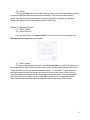
When the Sudoku Application is started, the Main Menu appears and contains six
buttons. They are the following: New Puzzle, Load Puzzle, Import Puzzle, Settings, How to
Play, Best Times and Exit.
1.1 - New Puzzle
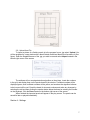
Clicking on the New Puzzle button opens another window, where the difficulty of the
Sudoku Puzzle to solve can be chosen.
The user can choose between easy, medium, hard, expert or insane. If the user starts on some
level and goes through all of the puzzles in that level, the game will automatically increase the
level of the next puzzle. The first few puzzles of the easy level are the easiest and they get
progressively harder as the user continues to complete them. When the user first selects their
choice of level, the game gives the user the easiest puzzle of that level. The screen that allows
the user to select their choice level of difficulty is shown above.
2