1
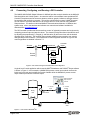
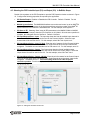
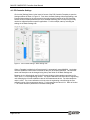
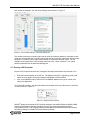
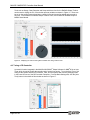
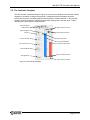
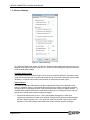
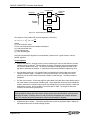
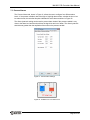
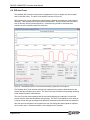
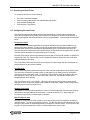
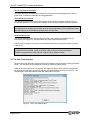
MA1056 MAQ20 PID Controller User Manual Proportional Set point + Process variable Error S KP - S Controller output Integral KI ò Derivative d KD dt Figure 30: The Parallel Controller Algorithm The equation of the parallel PID controller algorithm is as follows: 𝑑𝐸 𝐶𝑂 = 𝐾𝑃 × 𝐸 + 𝐾𝐼 ∫ 𝐸 𝑑𝑡 + 𝐾𝐷 𝑑𝑡 Where: CO is the controller output. E is the error between process variable and setpoint. KP is the proportional gain. KI is the integral gain. KD is the derivative gain. Using the noninteractive algorithm is recommended, unless there is a good reason to use the parallel algorithm. Control Options Gap around setpoint – with gap control, a lower controller gain can be used when the process variable is close to setpoint. This will reduce the extent of controller output movements when the process variable in this area. The Gap around setpoint setting specifies the width of the gap above and below the setpoint. It is specified in the process variable’s engineering units. Gain multiplier inside gap – the controller gain is multiplied by this factor when the process variable is inside the gap. A multiplier of 1.0 will have no effect, and a multiplier of 0.0 will effectively turn off control when the process variable is inside the gap. The latter provides a deadband. PV filter time constant – a first-order-lag filter (also called a low-pass filter) is provided to reduce the noise content on the process variable signal. Large-amplitude noise may cause substantial random movement in controller output which may damage the final control element or affect the downstream process. A time constant of 0 minutes has no effect. The longer the filter time constant, the more filtering will be done. Caution: Filtering negatively affects the control loop’s dynamic performance and should be used only when absolutely necessary. If filtering has to be used, the shortest acceptable time constant should be used. The controller should be retuned after a filter has been added or adjusted. Significant digits to display – This setting specifies the number of significant digits to display on the faceplate and in the controller settings window. Page 28 of 43