1
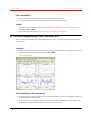
The Unscrambler User Manual Camo Software AS Enhanced Import features: Space is no longer a default item delimiter when importing from ASCII files. Instead it is available as an option among other delimiters. Enhanced Editor functions: 1. You may now Reverse Sample Order or Reverse Variable Order in your data table. It is also possible to Sort by Sample Sets or by Variable Sets. 2. It is now possible to create new Sample Sets from a Category Variable. 3. Sample and Variable Sets now support any Set size, even if the range is non-continuous. Improved Recalculate options: 1. You may now Passify X- or Y-variables when recalculating your PCA, PCR or PLS model. The variables are kept in the analysis but are weighted close to zero so as not to influence the model. 2. A bug fix allows you to keep out Y-variables by using “Recalculate Without Marked”. Improved D-optimal design interface: 1. More user-friendly definition of multi-linear constraints. 2. Better information about the condition number of your design. New function User Defined Analysis: You may now add your own analysis routines for 3D data. This works with DLLs, in the same way as User Defined Transformations. If You Are Upgrading from Version 7.5 These are the first features that were implemented after version 7.5. Look up the previous chapters for newer enhancements. New data structure: It is now possible to import or convert data into a 3-D structure. Work with category variables: Easier importation of category variables. Customizable model size: Save your models in the appropriate size: Full, Compact or Minimum. Loadings: Correlation Loadings are now implemented and help you interpret variable correlations in Loading plots . The Unscrambler Methods If You Are Upgrading from Version 7.5 7