1
US006738065B1
(12) United States Patent
(10) Patent N0.2
Even-Zohar
(45) Date of Patent:
(54)
CUSTOMIZABLE ANIMATION SYSTEM
(76)
Inventor:
(*) Notice:
US 6,738,065 B1
May 18, 2004
FOREIGN PATENT DOCUMENTS
Oshri Even-Zohar, SanderijnStraat 4I,
Amsterdam (NL)
W0
WO 97/40471
10/1997
OTHER PUBLICATIONS
Subject to any disclaimer, the term of this
MOISL Tom a a1> An Animation lmerface Designed for
patent is extended or adjusted under 35
Motion Capture, IEEE Computer Animation 97, Jun. 1997,
U.S.C. 154(b) by 339 days.
pp- 7755
Primary Examiner—Cliff N V0
21
APP 1. No.: 09/637,264
(22) Filed:
(60)
74 Attorney, A gem, or Firm—Maine & Asmus
Aug. 10, 2000
(57)
Related US Application Data
Provisional application NO_ 60/148,032’ ?led on Aug 10’
ABSTRACT
The present invention is a system and method to provide
customizable animation. A motion capture database houses
1999.
a library of human motion that is accessible via a client
(51)
Int. Cl. .............................................. .. G06T 17/00
server connection. Users are alloWed to select motion
Sequences and alter these motions in real time Over a
(52)
(58)
US. Cl. ..................................................... .. 345/473
Field of Search ............................... .. 345/473, 474,
networked Connection to Create new and Original Works of
art In one embodiment, blender Software is used to inter
345/418> 419> 420
polate and extrapolate from existing library data to create the
7
neW and original motion sequences, that are developed to
(56)
References Clted
comply With bio-mechanical laWs, physics and human
U_S_ PATENT DOCUMENTS
4,999,553
570487095
5’375’195
5,561,745
5 623 428
A
A
A
A
A
3/1991
9/1991
12/1994
10/1996
4/1997
anatomy. In another embodiment, users can bypass the
bio-mechanical laWs, physics and human anatomy and cre
ate mutations of the motion capture data. The present
invention not only alloWs real time animation manipulation,
serall
Bhanu et al'
Johnston
Jackson et al.
Kunii et a1
but it is accomplished over a netWork by using a client
application and accessing the motion capture library and
5’625’577 A
4/1997 Kunii et a1:
blending algorithm. The created animation is created is
5:835:693 A
11/1998 Lynch et aL
purchased over the Internet, alloWing a cost-effective means
5,923,791 A
6,088,042 A
7/1999 Hanna er a1,
7/2000 Handelman et al.
6,115,052 A
9/2000 Freeman et al.
to create and purchase animations.
18 Claims, 10 Drawing Sheets
20
2O
f
20
r
LIBRARY
CAPTURE
DATABASES
www.e-motek.com
f
LIBRARY
CAPTURE
DATABASES
160
FILTER
LOCAL
10
[30
HUMAN
TEMPLATE
I40
HARD DISKS
BLEND
ENGINE
UN'CA
ALGORITHM
I
MAIN
SERVER
SITE
LIBRARY
CAPTURE
DATABASES
150» +USER
REGISTRATION
50
60
|
/ I \
70
70
\\
70
80
I-f
SECURITYLAYER
PROXY
3RD PARTY
ONUNE
\
I
l
TRANSACTION
I
‘
SERVICE
\PAYMENT LAYER/90
100
UNICA
COMPRESSED f
BLENDED DATA
11
0”
PRODUCTION sERvER
UNICA
CLIENT
130
U.S. Patent
omM
ck
May 18,2004
Sheet 1 0f 10
US 6,738,065 B1
U.S. Patent
May 18,2004
Sheet 2 0f 10
200
CREATE USER
V
ACCOUNT
210
NO
YES
22°’\ INSTALL CLIENT
APPLICATION
230 \
‘
ACCESS BROWSER
SELECT SEQUENCE
240\/
CUSTOMIZE
SEQUENCE
250
260
\
NO
CHOOSE FORMAT FOR
DOWN LOAD/ PAYMENT
280»
DOWNLOAD
SEQUENCE
FIG. 2
US 6,738,065 B1
U.S. Patent
May 18,2004
Sheet 4 0f 10
US 6,738,065 B1
I,
uVPm=E>: WxoQ:im Z
EA8E6255Qx362:88.2m8%605?.:208 \
Em5C2mm22»:28623
$285- 629Daim$86.5$92.0262G6min
.UEv
f83m/\
U.S. Patent
May 18,2004
Sheet 6 6f 10
US 6,738,065 B1
1
AE5Q88825x$2gmE625%0.:?62508%
GE@
omv
U.S. Patent
May 18,2004
Sheet 7 0f 10
US 6,738,065 B1
omw
y
,
25:6- 629Dgin$86.5w mg?25 .6 2E
Ea8E5$5255:3Xs.8288:28%056.:208
.GIN
2G5C22%:862%3
7i
EIJA
U.S. Patent
May 18,2004
Sheet 8 0f 10
US 6,738,065 B1
__H_
3om
P
5%9%
oUx8;FQmEw:
82m xoa:Iw
EAE8522556B$.8288.m8052?.5%2
amuocw?695%3:5$86. 82 Dwucm ?$2-0
\\\
\\
BEcoz2m6c2ow
T7iEJ A .
U.S. Patent
May 18,2004
Sheet 10 0f 10
US 6,738,065 B1
a
0?B52>FE :
82m xoQ:Im
EAE85“25Q5%88.822.a8652m?.%B \
2m556222%2mm.6256
$65G‘WE D52.5
.@For
US 6,738,065 B1
1
2
CUSTOMIZABLE ANIMATION SYSTEM
the prior art associated With motion capture, namely the
recorded motion data is sometimes limited by the motions of
the recorded subject.
Inverse kinematics (IK) for computer animation has also
CROSS REFERENCE TO RELATED
APPLICATIONS
been used to a limited eXtent. Inverse kinematics processes
This application claims priority under 35 USC §119 to
pending US. patent application Ser. No. 60/148,032 ?led on
a desired position in three-dimensional space and is used to
calculate body joint angles. In this approach the particular
Aug. 10, 1999, Which is incorporated herein by reference for
all purposes.
BACKGROUND OF THE INVENTION
1. Technical Field of the Invention
The present invention most generally relates to computer
animation, and more speci?cally to an animation system that
blends motion capture data into a customiZable Work incor
10
desired positions With animated character movements.
The IK methodology is based upon complex matriX
manipulations that require signi?cant amounts of processing
to determine the joint angles associated With limb move
15
ments. The amount of processing increases as a cubic of the
20
ing times When numerous joints are involved. A human
being has more than 200 degrees-of-freedom, Which makes
it practically impossible to use matrix-based inverse kine
matic methods to interactively animate any realistic human
or animal-like character in real time. And, matrix-based IK
methods may not even Work on certain joint con?gurations
porating motion capture data that produces animation that is
number of joints involved, translating into lengthy process
much closer to real life movements.
2. Background of the Invention
Animation generally refers to the combination of graphics
With the dimension of time. When single images are
sequenced together, it gives the appearance of movement.
Prior to computers, animators dreW hundreds of images to
represent a single cartoon movement. Computers noW auto
mate the draWing of the images to some eXtent and aid in
manipulating the images to portray certain movements.
Computer animation is Well knoWn in the art, and the
knoWn as singular con?gurations. Furthermore, the prior art
notes that With multiple limb and joint movements, the end
25
animator uses the processing poWer of the computer to
create images and motion sequences that represent the
desired animation. While it is relatively simple to create
jagged and unrealistic movements, generating interactive
30
sequences of animation that folloW natural human/animal
an animation program on the basis of the analysis. Anima
tion that perform the motions of a human require observa
tion by the animator. On the basis of the observations, a
program for producing the same motions by the computer
model is formed. But, observations are subjective and based
on the understanding of the animator. Therefore, the anima
tor’s representation alWays incorporate some deviation from
35
45
Keyframing has been used to produce animation that
involves identifying the position of body parts and interpo
lating betWeen the positions of the body parts in successive
key frames to generate the intermediate positions of the
users sensors attached to a subject Which are used to capture
data representing the positions of the joints/body parts over
time during the performance of a desired motion. The result
as video games and virtual reality simulators. The virtual
World of interactive video gives a user total freedom Within
a three dimensional (3D) space. But, the animator typically
employs eXisting animation and Works Within the realm
Besides resulting in poor quality and non-original move
ment sequences, the eXisting technology is time consuming
and laborious. The frames are created for each movement,
and there must be numerous frames With slight movements
or the resulting animation appears to move in a jerky
a line picture representing parts constituting a human or
animal body, and a three-dimensional model of the human or
animal body cannot be displayed realistically on a screen.
to the interpolation techniques. This concept of keyframing
builds motion sequences frame by frame and is fairly costly
and time consuming. In addition, this method requires
eXpertise to generate quality realistic motions.
Another method of computer animation, motion capture,
errors.
in like manner.
40
and torques responsible. Kinematics analysis only generates
body parts over the time interval of the animation. ForWard
kinematic models have generally been discussed in relation
animation. Partially computed results causes unstable, jerky
and oscillatory motion of the limbs, With large positioning
most familiar, producing animated characters that all move
reality.
An animator applies kinematics to the motions, Which
describes the motions only in terms of positions, rotation,
scaling, velocities and accelerations, neglecting the forces
result of the computations Will not appear natural.
In addition, prior IK methods must converge to a solution
before the results of the computation can be used for the
Animation based on keyframing and motion capture is
also not highly successful With interactive applications, such
motion is dif?cult to create.
To produce quality computer animation, it is necessary to
study the motions of the object being represented and form
body part is moved to the desired position resulting from the
computer processing. Inverse kinematics often is sometimes
used With keyframing to in manipulating the subject into the
55
fashion. In order to reduce the Workload, animators usually
limit the number of moving parts. HoWever life-like move
ment is usually the result of multiple joint and limb move
ment and using a lesser degree of movement results in an
unnatural animation.
An alternative to key-framing and motion capture tech
niques to create animation is behavioral animation. Behav
ioral animation refers to movements generated in response
to commands and interaction With the environment. This
method of animation relies more heavily on computer pro
cessing to determine the movement sequence to accomplish
the command. High-level goal-based behaviors are typically
made possible by using a combination of forWard kinematics
and inverse kinematics. One advantage of behavioral ani
mation is that the movements can be created on-line and
60
modi?ed in real-time.
Dynamics provides another method of motion analysis.
Dynamics analyZes motions of objects based on the relation
betWeen movements and forces, as compared to kinematics,
Which provides motion analysis in terms of positions,
is a recorded motion sequence for a particular motion. This 65 velocities and accelerations. Dynamics alloWs more com
recorded motion drives a forWard kinematic model to pro
pleX behavioral or animated results. But, computer analysis
duce a desired animation. There are several disadvantages in
of motions utiliZing dynamics requires data on parameters
US 6,738,065 B1
3
4
such as the moments of inertia, the centers of gravity, joint
tion betWeen computer systems. An additional object is to
provide access anyWhere and anytime to the database and
the tools required to customiZe motion sequences in real
time.
friction and muscle/ligament elasticity of the moving body
being represented by the animation. Dynamics motion
analysis also requires complex dynamics equations of mul
tiple and simultaneous differential equations.
A further object of the invention is a customiZable ani
mation system that permits a user to pay only for the
sequence generated. Payment per frame or per motion
sequence provides an inexpensive means of authoring neW
Solving a problem based on dynamics involves differen
tial equations that describe the relationship betWeen mass
and force and torque. There are a number of equations used
for describing dynamics, but the most familiar formulations
motion sequences at a fraction of the cost of other alterna
is Lagrange’s equation:
tives.
The concept of the blending is the capacity to predict the
Where L is the Lagrangian given by kinetic energy (T) minus
potential energy (P), qi is the ith coordinate, f is a constraint
equation, A is an undetermined multiplier, and Qi is the force
or torque applied to the ith coordinate.
In general, the prior systems and methods have been
15
correct bio-mechanical behavior of the human body, as long
as it is target driven. If for example you are sitting on a chair,
and you decide to get up, it is possible to predict the vector
of your perceived trajectory. There are an in?nite number of
Ways to up from the sitting position, hoWever, all the motion
variances are created to facilitate the optimal force vector
unable to provide realistic and like-like motions that are
that gets your body to an upright standing position.
affordable. The complex processing requires very expensive
and sophisticated equipment, and time-consuming.
The process of going from a seated position to a standing
position can be broken doWn as folloWs according to the
There have been many attempts to alleviate the afore
mentioned problems and create a natural looking animation
that is cost-effective and can be developed quickly and With
mental processes: 1) Observing obstacles (?oor space,
nearby objects) and other objects to evaluate distance and
increased creativity. The invention of PCT/US97/05513
’513 is an animation system involving online computational
methods for coordinating limb movements of articulated
characters by solving associated forWard and inverse kine
matics problems in real time subject to multiple goals and
constraints. The ’513 invention determines hoW the joints of
internally generated motion model of the perceived trajec
assertive elements such as side arms. 2) Comparing an
tory of getting up, relying on learned motion macro that is
learned at an early age by trial and error. 3) Building an
anticipatory force vector and begin activating muscle clus
ters leading to the buildup of perceived vector of optimum
for the required standing motion and 4) Evaluating the next
macro (eg; What to do after standing) before committing to
the perceived vector. Committing to the ‘standing up macro’
an interactive character should rotate as a function of time to
produce goal-directed limb movements.
and continuously evaluating the performance of the body.
The ’513 invention uses an on-line successive approxi
mation method for solving inverse and forWard kinematics
problems concurrently, taking into account multiple goals
and constraints. As a result, the ’5 13 invention is capable of
The underlying premise of the behavioral blender of the
35
present invention is that every human macro can be com
puted. The tWo main modules of the present invention are a
producing fully interactive goal-directed behaviors in real
motion capture library (as compared to the motion memories
time for three-dimensional articulated characters With mul
and ‘learned’ macros) and tWo sets of rules. The tWo rule sets
are internal and external. Internal rules refers to the kine
tiple limbs through the simultaneous satisfaction of position,
alignment, posture, balance, obstacle avoidance, and joint
matic skeletal bio-mechanical conditions of the bones,
limitation constraints.
In order to perform such animation, the ’513 invention
muscles, etc . . . The external rule set refers to the environ
performs separate calculations at each joint using goal-based
dynamic forces.
motion primitives by a process Which produces a set of joint
angle movements that attempt to satisfy a higher-level goal,
such as a positioning, alignment, posture, balance, obstacle
avoidance, or joint limitation constraint. A geometric suc
basic environment that alloWs blending betWeen tWo or
more sets of motion capture data, subject to the correct
mental conditions such as gravity, objects, and other
The blender functions by ?rst implementing the internal
bio-mechanical behavior (eg: reaching the ful?llment of a
set of conditions relating to marker placement based on
skeleton segment length and other variables.
Next, a predictive algorithm is implemented to handle
‘perceived’ optimal motion vector. (When a user is choosing
cessive approximation process simpli?es the problem of
limb coordination.
SUMMARY OF THE INVENTION
One object of the present invention is an animation
system that utiliZes custom blending of motion sequences in
the source and the destination of the blended sequence, the
source’s velocities and accelerations are extrapolated, the
reverse happens With the destination’s acceleration and
real-time. The blending uses motion sequences from com
paratives of a motion capture libraries as a starting point and
customiZes the sequences for the desired effect.
A further object is a system that uses inverse kinematics
55
velocities, The predictive algorithm offers the user the “most
natural” blend interval in time. Finally, the environmental
rule sets are implemented, facilitating realtime simulations
for linear computations of rotation (degrees) of all limbs.
of the velocity/accelerations variances in response to a
ForWard dynamics are used to calculate a blend per limb that
considers the temporal acceleration/velocity at any given
changing conditions in the environment. Those Simulations
make use of Lagrange equations in combinations With the
frame of the source and any given frame of the destination.
(above discussed) velocity base blends.
The blending results in a dynamic velocity based blending.
The present invention has several components, including
An object of the invention is a customiZable animation
system that provides netWork access to a database of
recorded motion sequences and a means for customiZing
a motion database, blender softWare, custom user interface.
A further description of the blending algorithm and template
65
matching as Well as a detailed description of motion capture
motion sequences over the netWork. NetWork in this context
in general is incorporated by reference from the published
is de?ned any Internet, Intranet, and Wireless interconnec
application PCT/US99/21246 to the same applicant.
US 6,738,065 B1
5
6
The motion capture database comprises an entire full
body setup. All the compensatory motions of the body are
Where mutations are created depending on the input selec
captured While isolating one body part for the eventual
from the behavioral data and a set of different mutations are
blends. The database contains many general or standard
created for each behavioral alteration. Applying genetic
algorithms to variances in motion capture data is another
object of the present invention and Will yield very different
results from the blending.
tions. Mutations of the motion capture data get generated
motions such as Walking, running, sitting, standing, falling,
recoveries, gestures, etc . . .
The blender softWare computes the blends betWeen any
matching elements of the motion databases in a manner that
The blender algorithm uses forWard and inverse kinematic
complies With the over-riding bio-mechanical laWs. Blends
equations and Lagrange equations to calculate and deter
mine the joint torque and joint forces at each degree of
animation. Although the human body is susceptible to over
200 degrees of freedom, in reality, the number is closer to 40
for realistic applications.
that result in motion that are not natural or are otherWise
impossible for the human body to execute are extrapolated
to ?t a correct behavior.
Another embodiment of the present invention is through
the use of blender softWare using genetic algorithms. Instead
of looking at blending motion capture databases according
to bio-mechanical laWs, parsing those motion sequences
15
through a genetic algorithm and presenting multiple possi
bilities of variations of theW original motions. The operator
The present invention also describes the use of genetic
algorithms the necessary equations and calculations that are
modeled in the algorithms for the present invention.
In contrast to the PCT application WO9740471 (’471)
sequence through same algorithm to create a neW set of
variations. Each neW selection introduces a neW set of
application, the present invention accomplishes that Which is
described in the ’471 application as “practically impossible”
due to the computationally intensive matrix inverse calcu
lations. The present invention alloWs inverse kinematic
mutations for operator selection.
methods to interactively animate any realistic human or
can then choose the preferred ‘mutation’ and parse that
animal-like character in real time using both forWard kine
The custom user interface is a GUI interface that alloWs
full access of all subsets and blending methods, or as 25 matics and inverse kinematics.
otherWise prescribed by agreement or license.
In distinction, the ’471 invention does not use matrix
loadable for implementation. The motion capture libraries
inverse calculations and has computational requirements
that scale linearly With the number of joints. Scaling linearly
are also accessible via the Internet. A user can obtain any
With the number of joints enables the ’471 invention to
range of motion capture data and then use the softWare of the
present invention to custom tailor the animation for the
desired effect.
For example, if the libraries have a user sequence Walking
interactively animate moderately complex articulated char
acters in real time using commonly available personal
computers.
The present invention is an Internet product that is doWn
Whereas traditional inverse kinematic methods converge
to a solution (usually de?ned as a minimum error condition)
at one pace and another user sequence Walking at a different
pace, the blender can create any subset betWeen those tWo 35 before the results of the computation can be used to animate
the character. In contrast, the ’471 invention is an iterative
data sequences. It is not as simple as an interpolation
computational procedure that alWays produces someWhat
meaningful joint motion (With no singularity conditions)
betWeen data sets—the over-riding laWs of bio-mechanics
must be accounted for in creating the custom set. As a person
after each iteration of the computation. It is not necessary to
Walks, there are many forces at Work and moving parts.
Changing one element of the mix affects all the other
elements.
The motion capture data sequences are obtained using
Wait for the ’471 process to converge to a minimum error
condition. The results of the calculation can be used
‘anytime”, i.e., Within the constraints of a real time anima
tion system. The ’471 methods tolerate more tracking error,
sensors attached to various parts of the body. The move
ments can be plotted a three dimensional space. The blend
ing betWeen tWo sequences is not a simple interpolation
betWeen the plots because the actual trajectory and bio
i.e., greater position, velocity or acceleration error, than
45
mechanical laWs dictate the outcome.
There are current systems of animation that comply With
the bio-mechanical laWs, but the resulting motions do not
appear natural. The introduction and blending of the motion
capture data into the mix creates life-like and natural move
ments.
Custom motion capture also exists, but involves extraor
dinary time and expense to create a sequence for only a 55
particular movement. Clip art Works for generic images or
animation, such as famous landmarks, but does not permit
custom tailoring.
Cost advantages of a clip art library that alloWs you to
customiZe any Work create an original Work. For example, a
Walking sequence can be extracted from the library. The user
matrix inverse methods, but in return provide more natural
motion, and faster calculations. The present invention oper
ates in real-time With less tracking error.
Some of the ’471 animation techniques are interactive and
others are not. The ’471 techniques of keyframing and
motion capture produce ?xed, i.e., scripted and non
interactive motion data. In distinction, the present invention
encompasses more interactive elements. And, the present
invention integrates interactive motion data With interactive
control, Which is not disclosed or mentioned in the ’471
The demand for motion capture has been groWing expo
nentially. Unfortunately it has been too expensive and too
laborious for most applications. The broWser of the present
invention alloWs any person to be an animator and blend
motion sequences on the high speed servers of the Internet
based product. When the sequence is completed, the user
simply pays for the 3D data and doWnloads the data to the
users Workstation. The softWare has been benchmarked and
can then custom-tailor the sWinging arm movement. The
user may then introduce a sWinging head motion—Which in
Works at 15fps on a 56k modem.
turn affects the sWinging arm movement and the Walk. Every
A signi?cant advantage of the present invention is the
tWeak by the user creates a neW and original Work.
65 implementation and method of incorporating the system.
Another method of customiZing animation is through
The present invention has a database of motion capture data
genetic algorithms. It is a separate Way to look at blending
that is accessible on-line over an intranet or the Internet. The
US 6,738,065 B1
7
8
blending algorithms, either inverse kinematics or genetic
tration and description. It is not intended to be exhaustive or
algorithms, can be resident on the user’s computer system
either from purchasing the softWare or downloaded over the
Internet. Afurther feature of the present invention is to alloW
on-line and real-time manipulation of the motion capture
to limit the invention to the precise form disclosed. Many
modi?cations and variations are possible in light of the
above teachings. It is intended that the scope of the invention
be limited not by this detailed description, but rather by the
library on-line. An individual license can be purchased for a
claims appended hereto.
particular animation and a neW Work created by a user
BRIEF DESCRIPTION OF THE DRAWINGS
on-line, making this a cost-effective and speedy transaction.
Accessing a motion capture library, the present invention
FIG. 1 System overvieW shoWing elemental components
FIG. 2 Simpli?ed FloW Chart
alloWs the user to choose and “blend” motion sequences
including individual body parts, until the correct effect is
FIG. 3 Client BroWser
FIG. 4 VieWing mode of a motion sequence (source or
created. The end result is in?nitely more ?exible than
“canned” motion capture sequences, and extremely cost
effective as compared to studio production.
The present invention brings big production motion cap
ture to projects lacking big production budgets, and makes
the motion capture animation project faster, easier, and less
costly to complete. This system provides a breakthrough in
blend) Which shoWs the original marker placement on the
15
FIG. 5 VieWing mode of a motion sequence (source or
blend) Which shoWs the correct skeletal structure under the
markers, including the right offsets and joint rotation values.
FIG. 6 VieWing mode of a motion sequence (source or
blend) Which shoWs hoW a 3D deformation model behaves
in motion.
price/performance for 3D animators. Lifelike sequences are
built in a fraction of the normal time, at approximately
one-tenth the cost of traditional studio production
FIG. 7 Constant decay distribution for leaking.
FIG. 8 Linear decay distribution for leaking.
The present invention alloWs for each human body part
motion to be altered independently. The user manipulates a
huge library of captured data to produce unique sequences.
The blending tools also marries individual sequences to
body.
25
produce smooth, lifelike movements, employing inverse
FIG. 9 Exponential decay distribution for leaking.
FIG. 10 Cutoff decay distribution for leaking.
kinematics.
As a netWorked system, the present invention is accessed
DESCRIPTION OF THE PREFERRED
EMBODIMENT
through the Internet and is available anyWhere and anytime.
In addition, the data sets created by the present invention
To those skilled in the art, the invention admits of many
variations. The folloWing is a description of a preferred
can be directly exported into a Wide range of professional 3D
embodiment, offered as illustrative of the invention but not
packages including products from SOFTIMAGETM,
DiscreetTM, AliasIWavefrontTM and Side-EffectsTM.
One of the unique features of the present invention is that
is alloWs on-the-?y data sets vieWed through the “blender”
35
restrictive of the scope of the invention.
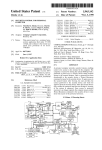
FIG. 1 shoWs a top-level block diagram of the elements of
one embodiment of the invention. There is a main server 10
that acts as the administrator of the system. The various
other components are interconnected to the main server 10
through a netWork, Wherein a netWork is de?ned herein as
WindoW. Selected sequences and movements are revieWed in
real-time before you commit to purchase and doWnload.
Furthermore, the algorithms continually enforces bio
any means of communicating betWeen devices, including
mechanical rules so that sequences maintain the ultimate in
natural physical motion. For even more creativity of move
ments for non-human characters or to deliberately portray
Internet, Intranet, and Wireless means.
Motion capture library databases 20 are connected to the
main server 10 and house the various captured data. The
captured data represents the various motion sequences and
unreal human motion, the rules can be bypassed.
The motion capture data bank is a groWing depository of
motion capture data. As more data is captured the database
Will continue to expand.
Another object of the invention is a simple-to-understand
interface, alloWing the user to quickly select and manipulate
motion sequences, then ?ne tune each body part using slider
actions recorded using the optical and magnetic markers as
is knoWn in the art as Well as a groWing volume of motion
sequences that may have been blended.
A human template 30 is accessible to the main server 10
and is used in conjunction With a template matching algo
rithm as is described in the prior art and published PCT
bars. The graphical user interface permits an untrained user
application PCT/US99/21246.
to begin from basic building blocks and customiZe these
animations according to individual preferences.
There are only a feW simple steps for using the netWork
Also connected to the main server 10 is the blend engine
40 that encompasses the UNICA algorithm 50 As described
herein, the algorithm 50 uses forWard and inverse
based system. First, the user must access the blender doWn 55 kinematics, Lagrange equations and even genetic algorithms
load site and doWnload the client broWser. The user then
to blend the data and produce the realistic motion sequences.
selects one or more motion sequences from the data library.
The blender functions by implementing the internal basic
Using slider bars, the user modi?es and ?ne tunes individual
environment that alloWs blending betWeen tWo or more sets
body parts and manipulates the motion sequences until the
of motion capture data, subject to the correct bio-mechanical
behavior.
desired result is achieved. Once the user is satis?ed With the
sequence, the user selects a format for exporting the data.
The user then selects from the various payment methods and
The algorithm 50 is implemented to handle ‘perceived’
optimal motion vector. When a user is choosing the source
chooses the format for doWnloading the data. Finally, the
and the destination of the blended sequence, the source’s
velocities and accelerations are extrapolated, the reverse
user imports the data to the individual animation tool or
environment.
The foregoing description of the preferred embodiment of
the invention has been presented for the purpose of illus
65
happens With the destination’s acceleration and velocities.
The predictive algorithm offers the user the “most natural”
blend interval in time. Finally, the environmental rule sets
US 6,738,065 B1
9
10
are implemented, facilitating realtime simulations of the
velocity/accelerations variances in response to a changing
links to the UNICA client softWare, 3D application
converters, and free motion data samples.
conditions in the environment. Those simulations make use
The next step 220 is to login to the system. The user
returns to the Website and a prompt appears requesting the
User Name and PassWord. At the prompt, ?ll in the name
of Lagrange equations in combinations With the velocity
base blends discussed herein.
Asecurity layer 60 tries to protect the main server 10 and
from the application form and the passWord received in the
authentication email. The best Way to enter the correct
the other components from various cybercrimes. Aplurality
passWord is to highlight your passWord in the message by
left clicking, holding the button doWn, and dragging the
of proxy servers 70 provide the communication access
betWeen the outside World and the system of the present
invention. The proxy units are basically gateWays for con
necting users to the main server 10, and the more proxy
10
servers 70 the more accessibility. The proxy servers use
login names and passWords to provide secure access once
the user 120 has completed an application and doWnloads
the client broWser 110. As a netWorked based system, this
15
invention is accessible anyWhere and anytime via the Inter
net or other netWork means.
cursor over it. When your passWord is highlighted, press
CTRL-C to copy it to your clipboard. Changing the pass
Word is recommended.
To install the client application 220 onto the local system
it is necessary to doWnload the ?le. The client application
runs on several platforms, and the user selects the appro
priate platform, such as the WindoWs platform.
The ?le is compressed in Zip format, and should be
doWnloaded and saved to a location that Will be remem
In operation, a registered user 120 accesses the client
broWser 110 and gains access to the main server 10, the
libraries 20 and the blending system 40, 50. The user can
20
bered. The ?le siZe is only half a megabyte, so it should not
take that long to doWnload. While on the Website, it is
recommended to doWnload the related ?les such as the data
Work on a motion sequence and even save a sequence for
converters for the most popular 3D applications, including
later use, but the actual motion capture sequence is not
Softimage, Maya, 3D-Studio Max, and LightWave. With
available until the user 120 goes through the payment layer
90 and purchases the sequence. The payment layer is
handled by a 3’d party online transaction service. Once
purchased, the compressed blended data 130 can be stored
by the user 120 in a usable form.
Aproduction server 80 is a speci?c server dedicated to the
registration of neW users. It provides a secure interface for
unregistered users to access the system in a limited envi
ronment. A neW user accesses the Website 160 and is given
limited access through a ?lter 150 block that requires
registration for normal access to the system.
In the preferred embodiment the client computer must
25
each of these is a Text ?le describing the command line
parameters needed to run the converter. Finally, there is a
UMF ?le, or UNICA Motion File, as a free sample to use and
test out. The user can doWnload one or all of the converters,
depending on What 3D application is utiliZed. Uncompress
the ?les doWnloaded, install the local client, and launch the
30
client When ready. It is advisable to create a UNICA direc
tory at the location on the local computer to run the client
from, and uncompress the ?les in that location.
After launching, the client application (client.exe), con
nection to the UNICA server is started automatically as soon
35
as the client application is invoked. The application detects
existing connections, but if no connections are detected
active, the application Will try and start an Internet connec
tion.
have suf?cient resources to successfully access and use the
client broWser and system. The minimum system require
ments are shoWn in Table A.
TABLE A
Minimum System Requirements
Processor Family
PC
SGI
LINUX
80386 or above
R2000 or above
80386 or above
Processor Speed
Processor Quantity
1 or more
1 or more
System Memory
32 MB
Hard Drive Free Space 1 MB
1 or more
32 MB
1 MB
32 MB
1 MB
Video Memory
—
—
—
Internet Connection
Operating System
15 fps at 56 k
15 fps at 56 k
Windows 95/98/NT IRIX 6.2 or higher
or 2000
15 fps at 56 k
Kernal 2.0 or above
(Redhat 6.0 or above)
NOTE: Items With no stated requirements value are not as signi?cant as those that do have
speci?ed parameters. Obviously, operation is improved With more memory or faster proces
sor speed.
FIG. 2 shoWs a How chart representing the basic steps in
the system. The ?rst step 200 is to access the Website and
join the UNICA user group. In order to join the user group,
an application form needs to be completed in order to
receive a startup passWord. Once all the ?elds are
60
this point it is advised to verify the personal data and
consider altering the passWord.
completed, click the “Submit Form” button, and revieW and
accept the License Agreement.
After agreeing to the license, an authentication email Will
be sent to the email address supplied on the email. The
information sent to the user includes a user passWord and
Once the connection is made, a WindoW Will appear,
prompting you to type in your user name and passWord. Use
the user name created When ?lling out the application form
and the passWord received in the authentication email. At
65
Once the User Name and PassWord have been properly
authenticated, the UNICA broWser Will appear 230. The user
can select one or more motion sequences from the data
library.
US 6,738,065 B1
11
12
Tool Bar—MOTION
Get 3D data—This option alloWs the user to enter the
The user can then customize the motion sequences using
the broWser controls 240. Using slider bars, the user modi
?es and ?ne tunes individual body parts and manipulates the
sequence name. A payment/account summary screen is
motion sequences until the desired result is achieved.
presented and the user can proceed to making payment on
At any time during the customiZation, the user can save
the neW creation or can cancel out of the payment segment.
the data for later usage 250. The data is saved locally in a
Play control properties—This option alloWs the user to
customiZe the video con?guration to help optimiZe the
blending experience. For example, With a 56 k connection,
format that is only readable by the client application and
broWser, but alloWs the user to pick-up from an earlier
customiZation job.
Once the user is satis?ed With the sequence, the user
selects a format for exporting the data 260. The user then
selects from the various payment methods and chooses the
format for doWnloading the data 260.
The user then pays according to the desired payment
option 270. Finally, the user doWnloads the data imports the
data to the individual animation tool or environment 280.
10
select 15 frames per second. If more bandWidth, say dual
ISDN or better, is available, then select 30 frames per
second, etc.
Tool Bar—VIEW
15
The broWser of the present invention provides the user
interface and is shoWn in FIG. 3. The blending palette has
numerous elements, including the Tool Bar 300, Blending
Area 310, Status Bar 320, Sequence Selection 330, VieWer
Play Controls 340, Frame Slider 350, Source List Icons 355,
Markers—A VieWing mode of a motion sequence (source
or blend) Which shoWs the original marker placement 410 on
the body FIG. 4.
Skeleton—A VieWing mode of a motion sequence (source
or blend) Which shoWs the correct skeletal structure under
the markers 420, including the right offsets and joint rotation
values FIG. 5.
Geometry—A VieWing mode of a motion sequence
(source or blend) Which shoWs hoW a 3D deformation model
430 behaves in motion FIG. 6.
Tool Bar—HELP
BandWidth Usage Meter 360, VieWing Area 370, Total
Frame Count 380 and Get 3D Data 390.
The Tool Bar 300 (located in the upper left-hand corner)
Help—Brings user to the User manual on the UNICA
is the area Where the user can change general UNICA
Website.
25
broWser settings. The menu breakdoWn is as folloWs: FILE,
About—Brings user to the Website overvieW.
CONNECTION, MOTION, VIEW and HELP.
A default sequence is the natural Walk. To sWitch to
Tool Bar—FILE
another sequence, the user can simply click on the Sequence
NeW—Select this option to start a neW blend.
Selector 330 in the upper right-hand corner of the broWser
Open—AlloWs you to open a previously saved blending
WindoW. Sequences are continuously being added to the
session from your hard drive.
Save—Saves your current blending session to the hard
drive. If a ?le name has not been previously de?ned, then
you Will be prompted for a neW ?le name.
Save As—Saves your current blending session to the hard
library and posted on the server. Sequences such as
Wrestling, gol?ng, ?ght scenes, and animals provide an array
of possibilities for the creative animator.
The VieWing Area 370 (located in the left-hand side) is the
drive. You may select a preexisting ?le name or create a neW 35 area that alloWs the user to change general broWser settings.
The VieWing Area menu breakdoWn is as folloWs:
name for this session.
For example, once a blend is ?nished or the user Wants to
1) VieWer Play Controls 340 (located beloW the VieWing
area) alloW the user to play, pause or stop a blending
loop. This is useful if a single frame is to be focused on
discontinue blending, simply save the blend to the local hard
drive or local netWork. From the FILE menu on the tool bar,
select Save or Save As, Which produces a pop-up WindoW
during the blending process.
2) Frame Slider 350 (located to the right of the VieWer
With various options, including:
play controls) shoWs the frame id currently being
Up one directory: This sets the current directory to one
level above.
~/Home: Brings you to your home directory.
/Root: Brings you to the root directory of the current
vieWed in the VieWing area. Frames can be individually
selected by simply dragging this slider to the left or
45
drive/partition.
right.
3) Total Frame Count 380 (located to the right of the
Frame Slider 340) shoWs the total number of frames in
this blending sequence. The number shoWn here Will
Current dir: Displays the current directory in the path
?eld.
*.upf: Displays all Parameter Files in the current location.
* All ?les: Displays all ?les and folders/directories in the
vary depending on the sequence that is being blended.
By clicking on any of the Source List Icons 355 user is
requesting from the server to add the selected source to the
current location.
.Hidden ?les: Displays hidden ?les in the current location.
display list. If a source is already open (default head source)
*/Directories: Displays only the directories available in
a blend betWeen the default and the neW selected source Will
be seen. To vieW sources Without any blending make sure
55 that you are vieWing one source only. (e.g.: remove the
the current location.
OK: Executes the save process.
Cancel: Stops the save process and brings you back to the
BroWser.
Exit—Exits the broWser.
Tool Bar—CONNECTION
Change Server—As the usage groWs, more servers Will
default source ?rst.)
The Status Bar 320 provides process information to the
animator. Such items displayed here are: number of frames
received from the UNICA server, starting ?le paths, etc . . .
option alloWs the user to select the best server to achieve
The Blending Area 310 alloWs the user to make changes
to the data in the blending process. This is done using sliders
and blend types in the Blending Area 310. The model is
maximum performance.
broken doWn by area of the body (i.e. head, shoulders,
likely be installed globally for optimum performance. This
Change User—If multiple users access the client broWser
on the same Workstation, the user id can be changed using
this option. This is useful in separating blending sessions of
multiple users.
hands, feet, etc.). Within each area of the body a further
65
breakdoWn can be accomplished.
The slider bar and value display are the key interfaces in
the blending process. The user can change the values of each
US 6,738,065 B1
13
14
characteristic by clicking or dragging on the associated
slider bar. Note that the numerical value to the right adjusts
accordingly. The lock checkbox, to the right of the slider and
value display, holds the value of the slider. This is useful
When you do not Want this value to be modi?ed by any of
the other characteristic value changes.
With the client application of the present invention the
user can blend in real-time, intuitively building a full body
motion sequence. And, the user can do that by Working on
blending motions from different body parts. The body parts
5
Shoulders, Chest, Hips, ElboWs, Knees Hands and Feet.
The blending type controls the amount of “leakage” of
motion from the active (currently under editing) body part,
The Blending Type controls the amount of “leakage” of
motion from the active (currently under editing) body part,
to the rest of the body. Since all the sources are made from
to the rest of the body. Since all the sources are made from
full body motion capture sequences, the amount and the path
of the leakage Will create different blends.
In operation, once the client is successfully installed and
run, there should be a moving character shoWing the frames
full body motion capture sequences, the amount and the path
of the leakage Will create different blends.
By clicking on the leakage icon of the particular item that
you Want to modify, a pop-up WindoW of leakage blend
types appears. Simply click on the desired type to select.
There are four blend types, Constant, Linear Decay,
Exponential Decay, and Cutoff. Constant refers to a full
leakage, similar to average mix and is illustrated in FIG. 7.
The leakage icon 450 shoWs the representation for constant
Which are generic to the present structure are: Head,
sent at a rate of 15 fps from the server. The client application
does not render any frames, it only sends neW (blend)
15
parameters. UNICA has been benchmarked to run at 15 fps
on a 56 K modem connection. A feature that detects the
connection speed and optimiZes display speeds is Within the
Linear Decay, Wherein depending on the active body part,
scope of the invention.
The default sequence is typically a source pertaining to
the Head. The name of the sequence is printed next to the
motion Will “leak” doWn the skeleton hierarchy so that the
blend slider. At any time the user can remove, change or add
body parts furthest aWay from the active body part Will be
compensated minimally is shoWn in FIG. 8. The leakage
icon 450 shoWs the representation for linear decay under the
other sources. If you click on other body parts from the list,
you should see the referring body part changing color on the
decay under the blending type.
blending type.
moving ?gure, corresponding to the selected body part.
25
There is Exponential Decay, resulting in less leakage
along the body depicted in FIG. 9. This is developed to
variable decay (velocity based). The leakage icon 450 shoWs
the representation for exponential decay under the blending
type.
At any time the user can save a UPF (UNICA Parameter
File). This ?le contains the last blend parameters you have
created, and it is saved locally on your computer. If you are
happy With the result and decide to buy the data, click on
“Submit”, and your installed Web broWser Will take you
through the payment process. Once completed and
Finally, Cutoff equates to No leakage at all and is shoWn
authoriZed, you Will ?nd the data in a directory at your
in FIG. 10. The Cutoff can cause unrealistic results, and be
members section on our Web server. You can doWnload the
used in developing unrealistic modes or “down modes”.
Using cutoff blend type for multiple sources for the same
body part, Will result in linear blend betWeen them. The
leakage icon 450 shoWs the representation for cutoff under
?le directly from there, or store it for later use.
Once you have purchased motion data, your ?les Will be
35
the blending type.
Week you Will be charged only a % of the price in case you
modify the data and Want to buy the neW result. That is very
useful When you are dependent on production modi?cations.
You can alWays save a blend parameter ?le (UPF). This
?le contains the blend parameters only and not the ?nal 3D
capture data. UPF ?les are good for reference if you hit upon
A BandWidth Usage Meter 360 (located at the loWer
right-hand corner of the broWser) is a gauge of hoW much of
the available bandWidth is being used by the broWser during
the blending process. Acceptable levels are shoWn in green.
As less bandWidth is available, the meter indicator turns
yelloW. At poor levels, the meter turns red. The BandWidth
Usage meter is located in the loWer right-hand corner of the
broWser, next to the “Get 3Ddata” button 390.
When you are happy With your blend, you are ready for
the next step—getting your 3D data. To start this process,
click on the “Get 3D data” button 390. You Will be brought
a blend you like to save, but Want to go further blending.
45
this process. On the loWer right portion of the client WindoW,
to the payment screen, folloWed by your doWnload options
in Which case it Will use the save name. Click OK, and your
Web broWser Will load and you Will be asked to input your
UNICA Username and PassWord. Type these in and hit OK.
Once logged in, you Will see a small table With your
the sources from Which the motion sequences to blend are
selected. This can be analogiZed by looking at one page from
a book that has many pages, Wherein this book is on a
55
environment (for example; strong headWind), the motion
Will change totally.
able for motion blending, through the Internet.
information in it, as Well as the sequence you created, a
transaction number, and the amount it Will cost you. From
here you can Cancel your order, or hit Pay NoW and continue
on.
speed, inside one environment. If the same character Would
execute the same motion in the same speed but in a different
Inside this one page you are looking at (Book 1, generic
motions/Walk) are all the possible motion variances that a
person is able to execute While moving in a speci?c speed in
a speci?c environment. The motion variances are all avail
Once you have the motion blend sequence you’re looking
for, it’s time to submit your payment and doWnload your
motion data. You’ll need a credit card for the ?nal portion of
is a button called “Get 3D Data”. Clicking this Will prompt
you to submit a name for your sequence. By default, the
name Will be Untitled, unless you have saved your settings,
via Internet broWser.
The motion capture databases of the present invention are
bookshelf containing many different books, and there are
many bookshelves.
The page in the book you are looking at currently is
dedicated to one motion, generated by one character, in one
still on the server for a period of one Week, in this Week you
can still enhance or edit the blend you have created. In this
65
Next you Will be brought to a payment screen, Where it
again gives you a summary of your order. Here you Will have
to enter your credit card number and expiration date to
obtain your motion data. Once you have these entered, you
can hit Pay to obtain your data. After your payment has been
submitted, you Will be brought to a ftp area that contains a
single .UMF ?le, or UNICA Motion File, With the name you
supplied for the sequence. Click on it and choose Save
File . . . and save it to any location you like.
US 6,738,065 B1
15
16
motion capture library, and Wherein the server is connected
to the local computer system by the netWork means, a means
of selecting a motion sequence by the local computer
system, a means of customiZing said motion sequence, and
UNICA Motion Files (UMF) are the result of the blends.
They contain the capture marker positions and the joint
rotation values of the skeleton. Those ?les can be converted
to formats used by most 3D Vendors. Currently in the
UNICA Beta UMF output ?les are compatible With SOFTI
a means of storing the motion sequence into a useable form
MAGE 3D SP2, SOFTIMAGE SUMATRA (Beta), Maya,
onto the local computer system. The means of blending
LightWave, and 3D-MaX. The user can doWnload the con
verters from the Website for different operating systems, and
incorporates environmental information, and is a blending
algorithm, Wherein the blending algorithm uses inverse
use them locally. Installation instructions are available at the
kinematics and/or genetics algorithm.
converter doWnload page. UNICA Motion File, With the
name you supplied for the sequence. Click on it and choose
10
Save File . . . and save it to any location you like.
UNICA Motion Files (UMF) are the result of the blends.
construed as in any Way limiting.
What is claimed is:
They contain the capture marker positions and the joint
rotation values of the skeleton. Those ?les can be converted
to formats used by most 3D Vendors. Currently in the
UNICA Beta UMF output ?les are compatible With SOFTI
15
system, Wherein said host system is interconnected to a
motion capture library;
LightWave, and 3D-MaX. The user can doWnload the con
verters from the Website for different operating systems, and
selecting a motion sequence from said motion capture
20
A typical converter command Will look like:
Umf2soft<umf ?lename><output ?lename>(in case of
SoftImage ?les a .dsc scene ?le) The UMF ?le conversion
Will result in a scene ?le containing a hierarchy of nulls 25
representing the motion capture markers, and a skeleton
containing joint rotation values.
As an eXample of one method of purchasing the custom
30
strating the price in comparison to the thousands of dollars
normally associated With customiZed animation.
TABLE B
35
F amnle of Pricing Policy (not actual pricing)
Price Per Frame (USD)
Average No. Frames
Cost
Walk
Run
Fall
$2.50
$2.50
$4.00
40
22
60
$100
$55
$240
Squat
$4.00
60
$240
Shot
Wait
$4.00
$2.00
60
50
$240
$100
Jump
$2.00
50
$100
time input by an operator to generate a customiZed
motion sequence;
vieWing said customiZed motion sequence in real time
purchasing said customiZed motion sequence; and
doWnloading said customiZed motion sequence onto said
local system.
2. The method according to claim 1, Wherein said step of
blending is accomplished using the types selected from the
group comprising: constant decay, linear decay, exponential
decay, and cutoff.
3. The method according to claim 1, Wherein said step of
blending is selected from the group comprising: forWard
Average
Motion Type
library, Wherein said motion sequence is comprised of
a plurality of frames of motion capture data;
accessing a blending system residing on said local system;
customiZing said motion sequence in real time, Wherein
said customiZing is a blending of said frames With real
during said step of customiZing;
iZed animation is by the frame. For example, the folloWing
table shoWs a purchasing methodology, as Well as demon
1. A method for creating customiZed animation in real
time over a netWork, comprising the steps of:
establishing a connection from a local system to a host
MAGE 3D SP2, SOFTIMAGE SUMATRA (Beta), Maya,
use them locally. Installation instructions are available at the
converter doWnload page.
The invention is susceptible of many variations, all Within
the scope of any potential claims. The preferred embodiment
described herein and illustrated in the ?gures should not be
kinematics, inverse kinematics, Lagrange processing and
40
genetic algorithms.
4. The method according to claim 1, further comprising an
application step, Wherein said step of establishing said
netWork connection further comprise logging on With a
passWord.
45
5. The method according to claim 1, Wherein said step of
doWnloading comprises a step of converting said customiZed
motion sequence into a user selected format.
As part of gaining access to the server, there is an
application step, Wherein a user completes and application
6. The method according to claim 1, further comprising a
on-line and receives a passWord to login to the server. When
step of saving said motion sequence on a local system in a
the user is done and has paid, the doWnloading comprises a
step of converting the motion sequences into a user selected
50
format readable only by said host system.
55
establishing is selected from the group comprising: Wireless,
internet, and intranet.
8. The method according to claim 1, further comprising
the step of compressing said customiZed motion sequence.
9. The method according to claim 1, further comprising
the step of doWnloading said blending unit to said local
system.
10. The method according to claim 1, Wherein said step of
7. The method according to claim 1, Wherein said step of
format. Furthermore, there is a step of saving the motion
sequence on a local system in a format only readable by the
server.
The invention also has a method of purchasing animation
in realtime over a netWork, comprising the steps of opening
a client application on a local system, establishing a netWork
connection to an animation server, selecting a motion
sequence from the server, customiZing the motion sequence
in realtime, purchasing the motion sequence on-line, doWn
loading the motion sequence onto the local system.
Additionally, a method, Wherein the step of purchasing is
based upon the number of frames.
Additionally the invention is a customiZable animation
system, comprising a local computer system With a memory
means and netWork means, an animation server With a
netWork means, Wherein the server is interconnected to a
60
purchasing is based upon a number of said frames of said
customiZed motion sequence.
11. An animation system for customiZing a motion
sequence, comprising;
a local computer;
a main server, Wherein said server is interconnected to a
motion capture library, and Wherein said server is
connected to said local computer by a netWork;
US 6,738,065 B1
17
18
kinematics, inverse kinematics, Lagrange processing and
a means for selecting a motion sequence by said local
genetic algorithms.
computer;
15. The system according to claim 11, Wherein said means
for doWnloading converting said motion sequence into a
a blend engine for customizing said motion sequence,
Wherein said blend engine has a means for interactive
user selected format.
control, and Wherein said blend engine resides on said
16. The system according to claim 11, Wherein said blend
engine is selected from the group comprising: forWard
local computer;
a means for purchasing said motion sequence; and
a means for doWnloading said motion sequence to said
local computer.
12. The system according to claim 11, Wherein said blend
kinematics, inverse kinematics, Lagrange processing and
genetic algorithms.
10
17. The system according to claim 11, Wherein said means
for doWnloading converting said motion sequence into a
engine incorporates environmental information.
user selected format.
13. The system according to claim 11, Wherein said blend
engine uses the types selected from the group comprising:
18. The system according to claim 11, Wherein said means
for purchasing is based upon a number of frames of said
motion sequence.
constant decay, linear decay, exponential decay, and cutoff.
14. The system according to claim 11, Wherein said blend
engine is selected from the group comprising: forward
15