1
108
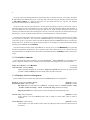
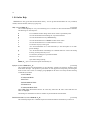
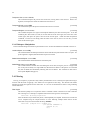
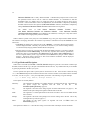
Netnews Go to Next Group (bound to g in News-Headers and News-Message modes.)
[Command]
This command goes to the next group in your Netnews Group File. Before going on, it sets the group
pointer in Netnews Database Filename to the last message you read. With an argument, the
command does not modify the group pointer for the current group.
Netnews Quit Starting Here (bound to . in News-Headers and News-Message modes)
[Command]
This command goes to the next group in your Netnews Group File, setting the netnews pointer for this
group to the message before the one under the current point, so the next time you read this group, the
message indicated by the point will appear first.
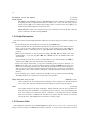
Netnews Group Punt Messages (bound to G in News-Headers mode)
[Command]
This command goes on to the next bulletin board in your group file. Without an argument, the system
sets the pointer for the current group to the last message. With an argument, Hemlock sets the pointer to
the last visible message in the group.
Netnews Exit (bound to q in News-Headers mode)
[Command]
Netnews Exit Confirm (initial value t)
[Hemlock Variable]
This command cleans up and deletes the News-Headers buffer and all associated News-Message
buffers. If the value of Netnews Exit Confirm is nil, then Hemlock will not prompt before exiting.
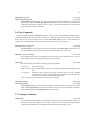
11.5. Replying to Messages
The Hemlock Netnews interface also provides an easy way of replying to messages through the Hemlock Mailer
or via Post mode.
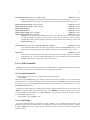
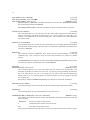
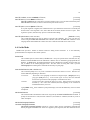
Netnews Reply to Sender
[Command]
When you invoke this command, Hemlock creates a Draft buffer and tries to fill in the to and subject
fields of the draft. For the to field, Hemlock looks at the reply-to field of the message you are replying
to, or failing that, the from field. If the subject field does not start with Re:, Hemlock inserts this string,
signifying that this is a reply.
Netnews Reply to Sender in Other Window (bound to r in News-Headers and News-Message.) [Command]
This command splits the current window, placing the message you are replying to in the top window and
a new Draft buffer in the bottom one. This command fills in the header fields in the same manner as
Netnews Reply to Sender.
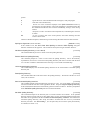
Netnews Reply to Group
[Command]
This command creates a Post buffer with the newsgroups field set to the current group and the subject
field constructed in the same way as in Netnews Reply to Sender.
Netnews Reply to Group in Other Window (bound to R in News-Headers and News-Message.) [Command]
This command splits the current window, placing the message you are replying to in the top window and
a new Post buffer in the bottom one. This command will fill in the header fields in the same manner as
Netnews Reply to Group.