1
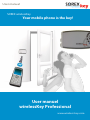
User manual
2. Table of contents
Page
1. Security data for your wirelessKey Professional2
. Table of contents
3
. Introduction
4
4. Safety instructions
4
5. General assembly instructions
5
6. Description of operating modes
7
7. Description of user configuration
7
7.1
Addition of mobile phone
7
7.2
Removal of mobile phone
10
7.3
Deletion of all users (Reset) 11
7.4
PC software set-up
12
8.
Opening procedure with authorized mobile phones
12
9.
Summary of adaptable locks
13
10.
Combination with wall pushbuttons
16
10.1
Summary of adaptable pushbuttons
16
10.2
Application overview
17
11.
Care and maintenance
17
12.
Electronic connection specifications
18
13.
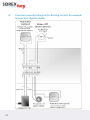
Terminal connection diagram: Simons Voss digital cylinder
20
14.
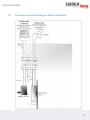
Terminal connection diagram: Electric latch bolt
21
15.
Tested mobile phones
22
16.
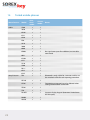
Error sources
24
17. Technical specifications26
17.1
SOREX wirelessKey26
17.2
Bluetooth26
18.
Warranty and liability27
19.
Certifications27
20. Overview pushbutton operation28
21.
Support28
www.wireless-key.com