1
Contents
Contents .................................................................................................................................... 2
FCC Compliance ....................................................................................................................... 3
Declaration of Conformity – FCC............................................................................................... 4
Declaration of Conformity – CE ................................................................................................. 5
Introduction ................................................................................................................................ 6
Specifications: ........................................................................................................................ 6
Vantage4 Models ....................................................................................................................... 7
Hardware Installation ................................................................................................................. 9
System Requirements ............................................................................................................ 9
Unpacking .............................................................................................................................. 9
Installing the Master Vantage4 Card ................................................................................... 10
Installing the Display Drivers for the Master Vantage4 ........................................................ 12
Installing the Slave Vantage4 Cards .................................................................................... 13
Address Space ..................................................................................................................... 13
Power ................................................................................................................................... 13
Connecting up to 64 Screens............................................................................................... 14
Connecting the HDTV-S-Cable ............................................................................................ 15
Supported Display Resolutions for Standard TV Output, S-Video and Composite ............. 16
Supported HDTV Resolutions .............................................................................................. 16
Clock Sync ........................................................................................................................... 17
Multi Screen Configuration ...................................................................................................... 18
Video Overlay Tab ............................................................................................................... 22
Accessories ............................................................................................................................. 25
Video Input Modules ............................................................................................................ 25
How to Connect Video Inputs to the Vantage4-PRO Card .................................................. 26
Video Inputs ......................................................................................................................... 27
Troubleshooting ................................................................................................................... 29
Datapath Limited...................................................................................................................... 31
Technical Support ................................................................................................................ 31
Copyright Statement ............................................................................................................ 31
Index ........................................................................................................................................ 33
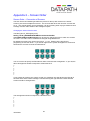
Appendix 1 – Defining Custom Modes .................................................................................... 34
Appendix 2 – Screen Order ..................................................................................................... 35
Screen Order – Connection of Screens ............................................................................... 35
2
10/02/2011