1
Section 1 - Introduction
Welcome Message
Welcome to our Merchant Operating Guide. We would like to take this opportunity to
thank you for selecting Elavon as your Card payment processor and assure you that
we will endeavour to provide the most efficient and professional service at all times.
We want you to be totally comfortable and familiar with your Card acceptance
programme to allow you to maximise its value to your business.
This Merchant Operating Guide (the “Guide”) forms part of your Agreement with us. It
has been designed with particular reference to point-of-sale procedures. It is important
that all of your staff whom accept Card payments are familiar with the point-of-sale
procedures in this Guide.
We have produced this Guide, which sets out to answer the questions most frequently
asked by Merchants. If you have requested a Terminal, you will also receive a terminal
user manual (“Terminal User Manual”).
If you have any queries not covered by either the Guide or the Terminal User Manual,
please do not hesitate to contact us – our contact details can be found on the back
cover of this Guide.
Unless specifically defined in this Guide (including in Section 12 – ‘Glossary’),
capitalised words and phrases used shall have the same meaning as set out in the
Terms of Service forming part of your Agreement with us.
Section 2 – Authorisation
2.1 Automated Authorisation Service
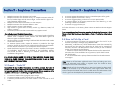
Authorisation can be sought by telephoning the Authorisations centre (on the number
appearing on the back cover of this Guide). Once connected you will hear the following
options;
FOR AUTHORISATION – Press 1
FOR CODE 10 – Press 2
Enter Merchant ID
Enter Merchant ID
Enter Card Number
Enter Expiry
Enter CVV2 (Last 3 digits on signature line on back of Card. For American
Express Cards, enter the four digits printed on the face of the
Card to the right hand side above the Card Number.)
Enter Amount (e.g. for €/£10.00 transaction type in the pence amount also being
1000)
Press 1 To Continue At this point the transaction will either be:
Approved, Declined or Referred.
Press 2 To Verify Details
Press 1 To Verify Merchant number
Press 2 To Verify Card number
Press 3 To Verify Expiry
Press 4 To Verify Amount
Press 5 To Speak to an Agent
Press 3 To Change Details
Press 1 To Change Merchant number
Press 2 To Change Card number
Press 3 To Change Expiry
Press 4 To Change Amount
Press 5 To Speak to an Agent
Authorisation Code:
Please key this back into your Terminal, or write it in the box if using a paper voucher.
2
3