1
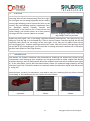
Image by Zoran Gorski
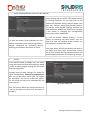
THEA FOR CINEMA4D
www.thearender.com/cinema4d
Thea for Cinema4D v1.5.04.199.1413
Copyright © Solid Iris Technologies
1.
INTRODUCTION
Thea for Cinema4D is an integrated version of Thea Render inside Maxon Cinema4D application. With
the use of Thea Material Lab, Material Libraries, Interactive Render and Instancing Support you are
able to render your scene directly inside Cinema4D. With the Export to Thea Studio functionality you
can also stage your scene inside Thea Studio application and benefit of the advanced tools present
there. At this manual all the basic installation and getting started steps are explained, along with
Thea plugin settings panels and options inside Cinema4D.
For seeing the Getting Started video, find Material Libraries and Download links, please visit Thea for
Cinema4D landing page at www.thearender.com/cinema4d
Note: this manual is covering the plugin settings and options only, so for a deeper and more detailed
explanation of Thea Render settings, materials, engines etc., you can refer to Thea Render User
Manual.
2.
APPLICATION PREREQUISITES
While the plugin can be used as a standalone application there are still dependencies of the plugin
from the main Thea Render application. These dependencies are typically the need to open Thea
default material editor but also to be able to access Thea data folder (materials, rooms, sample data,
etc.).
This means that Thea Render should be already installed on your computer (it doesn't matter
whether you have installed the 32-bit or 64-bit variant though). On MacOSX platform, make sure that
you have also run Thea application at least once (after your drag & drop it typically to your
Application folder) in order to complete the installation process. Note that the plugin will work on
OSX 10.6 and above.
Cinema4D version should be R12, R13, R14, R15 or R16. The plugin won't run in previous Cinema4D
versions. Note that the plugin is incompatible with the developed Thea plugin for R11/R11.5, so it
won't be possible to transfer your work between the plugins.
2
Copyright © Solid Iris Technologies
3.
INSTALLATION
3.1
Windows
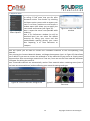
The plugin comes with an installer that helps you define the
version of Cinema4D to which you want to install the plugin
and also its directory.
The installer guides you through all the necessary steps of
installation.
Figure 1: Installing Thea for
Cinema4D
3.2
MacOSX
3.3
Installing Material Library
Thea for Cinema4d for MacOSX comes with a dmg file. Inside
this dmg file you will find the Thea Render folder. Drag and
drop this folder inside plugins folder of Cinema4D installation
(or user preferences folder). Then, within this folder, you will
find four separated zip folders; one for each Cinema4D version.
Select the needed one, according to your version, and simply
double click on it to be extracted. Plugin is ready for use just
afterwards (rest unused files can be deleted).
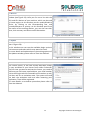
It is recommended to install also the corresponding version of Figure 2: Thea Render is available at
Thea Render standalone as well.
Cinema4D plugins
The next time that you will start Cinema4D, the plugin should
be there, under the Plugins menu (see Figure 2).
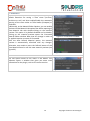
Additionally, you can download a material library that allows
easier and more direct use of Thea materials (note that this
library is platform independent).
For installing the Materials library, you should simply extract
the library to Cinema4D content browser user libraries.
Tip 1: if you face problems to locate the correct folder where
Cinema4d stores its material libraries (lib4d format) you can
find the correct path by going to Cinema4D Edit > Preferences
and see that path at the bottom. At this location, inside the
“library” folder, you can find the “browser” folder where the
Thea Library can be added.
3
Figure 3: Thea Material Libraries
inside Content Browser
Copyright © Solid Iris Technologies
Tip 2: if you have successfully installed Thea Materials library, you should be able to access it in the
Cinema4D content browser (see Figure 3). With right click on one of the appearing materials, you can
select the Show in Explorer (for Windows) or Show in Finder (MacOSX) for seeing the installation
directory of the library.
You can now drag and drop the selected material on a Cinema4D model or on your materials window.
4.
LICENSING AND ACTIVATION
To run the plugin in a no demo mode (meaning without
resolution limitation and watermarks), you will need to activate
your license. This is done by going to Plugins > Thea Render >
License (see Figure 4). A new dialogue box opens to help you
add your full name, email address and serial number for
activating the plugin (see Figure 5).
Do not forget to add also the Thea for Cinema4D plugin serial at
the plugins tab (see Figure 6). Afterwards restart your
application for the changes to be applied.
For finding more details on licensing, please refer to Thea
Render User Manual corresponding chapter.
Figure 4: License Menu
Figure 5: License Input Form window – Main tab Figure 6: License Input Form window - Plugins tab
5.
GETTING STARTED – MAIN WINDOWS
After installing correctly the plugin, you will be able to find its main options at the Plugins list (as we
have seen in Figure 2), from where you can open the Darkroom and start an Interactive or a
Production rendering. Thea Render can be also found at the Renderers list at the Render Settings
window of Cinema4D. You can go to Render > Edit Render Settings (or press CTRL+B) and at the
available Renderers list select Thea Render (see Figure 8). From this menu you can define the settings
for Output, Save and Multi – Pass (in the same way as for the native renderer) and for Thea Render
specifically. At the next paragraphs we will see the available options for both Plugins menu and
Render Settings window.
4
Copyright © Solid Iris Technologies
Figure 7: Thea Render appearing at the Plugins
list
6.
Figure 8: Render Settings window
THEA PLUGIN MENU OPTIONS
As we see in Figure 9 user can select to open Thea Darkroom for
rendering interactively or normally inside Cinema4D, Export the scene
for open it later at Thea Studio, Convert Cinema4d materials to the
corresponding Thea ones, define the used CPU and GPU devices for
Presto engines, check for existing plugin and resources Updates,
activate Thea License, edit the main plugin Preferences and see some
main information at About window.
Figure 9: Plugin Menu
options
6.1
Thea Darkroom
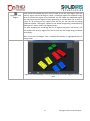
The Darkroom command opens a window
that resembles Thea Darkroom, as we see it in
Figure 10. Thea Darkroom consists of several
menus which help you render and post
process your rendered image (which appears
in the middle of the window - Area C).
At this window, you can render the current
scene inside Cinema4D using the defined
Thea engine or make an interactive render.
At the next paragraphs all the available
buttons and functionality are explained.
Figure 10: Thea Darkroom inside Cinema4D
5
Copyright © Solid Iris Technologies
6.1.1
File and Window Menus (Area A)
Figure 12: Send to
options
Figure 11: Save options
Window: from this menu as seen in Figure 13,
user is able to show/hide the Render View
(Area C), the Interactive Info (devices details
at the bottom of Area C), the Progress Toolbar
(Area D) and the Display Controls (Area E).
Figure 13: Show Windows
6.1.2
Render Settings and Tools (Area B)
6.1.3
Interactive Mode
On top left, on area A, we can see the menus
File and Window.
File menu: opens the submenus Save, which
saves the rendered image in one of the
available formats (see Figure 11), and the
Send to menu, which opens the rendered
image at Thea Studio Darkroom (Image Editor)
or opens the Cinema4D scene at Thea Studio
Viewport (Scene Editor) or opens the
rendered image at Cinema4D Picture Viewer
(see the available option in Figure 12).
At the right top of the Darkroom window user is able to select among Interactive or Production
modes, select the render engine and find some useful tools. According to Interactive or Production
mode selection, different options appear on this bar.
Figure 14: Render Settings and Tools for Interactive Mode
When Interactive Render option is selected user is able to see the rendered image interactively
updated inside Darkroom window. The following options are now enabled:
6
Copyright © Solid Iris Technologies
With this button you are able to start Interactive Render.
Figure 15: Start IR
Pause button allows pausing the rendering. Upon clicking it a message box
Figure 16: Pause IR appears to inform you that rendering is paused and prompt you to press OK for
continuing it.
Stop button helps you to stop completely the rendering.
Figure 17: Stop IR
This drop down list presents the available render engines that can be used for
Interactive Rendering. You can simply click and select the one you prefer.
Tip 1: for more details on render engines please refer to Thea Manual.
Tip 2: for more settings of each render engine you can go to Render Settings
window.
Figure 18: Select IR
Engine
At the next drop down list you can
select among the available resolution
presets for your Interactive Rendering.
Custom value uses the resolution that
is given at Render Settings window
(see Figure 20) at Output, so any
resolution values and ratio can be
added there and Thea will use them
Figure 19: Select IR respectively.
Resolution
7
Figure 20: Render Settings Custom
Resolution
Copyright © Solid Iris Technologies
Figure 21: Pick
Region
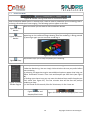
Once Interactive Rendering starts you are able to use the Pick Region tool and
select a region (click and drag to create a rectangle) upon the rendered image
(Area C) and let this region to be rendered. You can select any additional region
you need and see the regions history appearing at a drop down list as seen in
Figure 22. By clicking on any region from the list you can see this one being
rendered instead. “No region” option let the whole image being rendered while
“Remove All” option clears the regions history.
Tip: after stopping the rendering the list of regions selected is still active; you
can double click on any region from the list and see the image being refreshed
accordingly.
Note: once the Pick Region Tool is enabled the button is highlighted with an
orange color.
Figure 22: Selected Region is being rendered and available Regions List can be
seen
8
Copyright © Solid Iris Technologies
Figure 23: Pick
Material
Figure 24: Pick
Focus
With Pick Material you are able to select any material from the rendered image
(simple click on it with the Pick material enabled – icon will be in orange color)
and see its properties appear at the Cinema4D attributes panel. You can then
make any changes to the material and see them being applied interactively.
Note: as already mentioned, once the Pick Region Tool is enabled the button is
highlighted with an orange color.
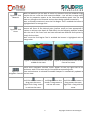
Pick Focus tool helps you define the focus point of your scene so that your
camera will focus to the desired point (camera needs to have appropriate fnumber to achieve nice depth of field effect). At the following example renders
with the use of Pick Focus tool we have selected two different focus points by
simply click on them.
Note: once the Pick Region Tool is enabled the button is highlighted with an
orange color.
Figure 25: Selected Focus Point at the
middle of the scene
Figure 26: Selected Focus Point at the
front of the scene
These three navigation controls, which appear on the top right side of the
Darkroom, work in the same way as Cinema4D corresponding ones.
Once mouse button is released Cinema4D Viewport is automatically updated to
Figure 27:
Navigation Controls the new view.
Left Click on this button +
Drag pans the scene.
Right Click + Drag zooms
in and out the scene.
Left/Right Click on this
button + Drag zooms in
and out the scene.
9
Left Click on this button +
Drag rotates the scene.
Right Click + Drag rolls the
scene.
Copyright © Solid Iris Technologies
6.1.4
Production Mode
Figure 28: Render Settings and Tools for Production Mode
When Production Mode option is selected user is able to make a production (final rendering) that is
not being refreshed upon scene staging. The following options appear at this bar:
With this button you are able to start Production Render.
Figure 29: Start
Render
Pause button allows pausing the rendering. Upon clicking it a pause icon is
Figure 30: Pause appearing on the rendered image showing that the rendering is being paused.
By pressing it again you can continue rendering it.
Render
Figure 31: Paused Render
Stop button helps you to stop completely the rendering.
Figure 32: Stop
This drop down list presents the available render engines that can be used for
Production Rendering. You can simply click and select the one you prefer before
start rendering.
By selecting a Progressive engine two additional options appear that help you
define Termination Criteria: Time Limit and Samples per Pixel Limit (see Figure
34).
By clicking upon these icons you can enter the desired time and/or Samples per
Pixel values (see Figure 35). The first criterion that will be met will prompt
Figure 33: Select rendering to stop.
Render Engine Tip: 30s stands for 30 seconds, 30m for 30 minutes, 1h for 1 hour etc.
Figure 34: Time and
Samples/Pixel Limits
Figure 35: Define Time and Samples/Pixel limits
10
Copyright © Solid Iris Technologies
By selecting the Preset option a new menu appears
Figure 36: Presets showing the available render presets at a drop
Option
down list (see them in Figure 37).
The name of each preset indicates the engine that
will be used for rendering. For Adaptive BSD engine
several presets exist for both exterior and interior
scenes, with a variation to the final quality (from
preview to fine).
Figure 37: Available Presets
List
At the next drop down list you can
select among the available resolution
presets for your Production Render.
Custom value uses the resolution that
is given at Render Settings window
(see Figure 39) at Output, so any
resolution values and ratio can be
added there and Thea will use them
Figure 38: Select respectively.
Render Resolution
6.1.5
Figure 39: Render Settings Custom
Resolution
Rendered Image and Interactive Info (Area C)
As we have already mentioned this area not only hosts the rendered image for both Interactive and
Production rendering but is also active during Interactive Rendering, as user can perform the
following actions:
- Alt + Left Click + Drag is used for rotating the scene.
- Alt + Right Click + Drag is used as Dolly (zooming in out the selected point).
- Alt + Mouse wheel scrolling zooms in and out the scene.
- Alt + Middle click +Drag is used for panning.
- As mentioned already with the Pick tools user can select regions (by clicking and dragging
for defining the region) and select materials and focus points (by clicking once on the
rendered image desired material/focus point).
In all the above cases the rendered image is being interactively updated. After mouse release,
Cinema4D viewport is automatically updated to current view.
11
Copyright © Solid Iris Technologies
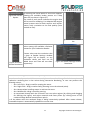
For Interactive Rendering option, if a Presto
engine is selected an additional table appears
below the rendered image presenting
information of the devices used for rendering,
their frames per second, samples per pixel,
memory used and total memory.
For hiding this window you can go at Window
menu of the Darkroom and unselect the Show
Interactive Info option.
Tip: you can define the devices used by Presto
engines, by going to Plugins menu > Thea
Render > Devices (see details at paragraph 15)
or by the Devices panel at Render Settings
window (see Figure 41).
Figure 40: Presto Engines Info during Interactive
Rendering
Figure 41: Devices settings at Render Settings
window
6.1.6
Render Status Bar (Area D)
At area D of the Darkroom, we can see the Render Status Bar.
Figure 42: Render Status Bar
This bar shows the main information on rendering process and helps us start/pause/stop it, save the
rendered image or send it to Cinema4D Picture Viewer.
In more detail:
Figure 43: Send to
Picture Viewer
Figure 44: Save
Image
Send to Picture Viewer button sends the rendered image directly to Cinema4D
picture viewer window.
The Save button is used for saving the image with the given format – you need
to include the desired extension along with the name (it can also be *.img.thea
for saving the whole buffer or *.clm for Colimo project files).
12
Copyright © Solid Iris Technologies
Figure 45: Elapsed
Time
Figure 46: Refresh
Image
At this area user can get information on the time elapsed since Production
rendering started.
Refresh button is used for refreshing the image once a change at the Exposure,
Filtering or Channels selection has been made.
Phase info box shows the main information regarding rendering progress. For
Figure 47: Phase Interactive Rendering, the Rendering message appears while for Production
Rendering the phase of the process (for example Building Environment, number
info
of passes/samples etc.).
Start button starts either the Interactive Rendering (IR), which allows seeing any
movement, material change or light addition interactively (button is as seen in
Figure 48: Start IR Figure 48), or in case of Production Rendering (PR), starts the rendering process
(button is as seen in Figure 49).
Figure 49: Start PR
Figure 50: Pause
Pause and Stop buttons are used for pausing the rendering or stopping it and
have the same functionality as those at the top right bar.
Figure 51: Stop
For Production Rendering the Progress bar shows visually the progress of each
Figure 52: Progress rendering phase (for example for each render pass).
info
6.1.7
Display Options (Area E)
Below, at area E, all the available Display option such as Exposure, Filtering, Channels and
Photometric Analysis options appear. They work in the same way as inside Thea Studio Darkroom,
so for additional details please refer to Thea User Manual corresponding chapter.
Figure 53: Darkroom Display options
13
Copyright © Solid Iris Technologies
6.2 Export to Thea
The Export (see Figure 54) command prompts
for saving a Thea scene that you can open
afterwards within Thea Studio. By selecting
the Export option you are able to export your
scene in scn.thea, pack.thea or xml format. A
window opens that allows you to specify the
scene name and location (see Figure 55).
Figure 54: Plugin Note 1: export the scene is not possible while
Menu Options rendering.
Note 2: at Preferences window (as will be
described later) you can select the default
extension for saving your scene and also
enable/disable opening directly your scene
after exporting it at Thea Darkroom or
Viewport.
Figure 55: Save Thea Scene
window
6.3 Convert Materials
With this option you are able to convert the Cinema4D materials to the corresponding Thea
Materials.
After pressing the Convert Materials button, a dialogue box appears (see it in Figure 56) that allows
you to define if you want to convert the selected or all the materials of your scene or simply cancel
the procedure. After converting a material to a Thea one, from now on the Thea materials attributes
will appear for editing the material.
Note: Cinema4D materials are automatically read as Thea materials when rendering starts (even if
you have not converted them) without affecting your materials settings and type.
Figure 56: Convert Materials dialogue box
Figure 57: Cinema4D materials and the converted
Thea ones
14
Copyright © Solid Iris Technologies
6.4 Devices
The Devices option, allows you to open the Select Devices
window (see Figure 58). Here you can see a list with the
GPU and CPU devices of your machine, which can be used
by Presto engine. At this window, you can enable/disable a
device, by clicking to the corresponding box, and
increase/decrease its priority. At this window apart from
the names of the existing devices, you can also see their
cores, their memory and other useful information.
Figure 58: Select Devices window
6.5 Update
The Update button opens the Install Updates window (as
seen in Figure 59).
At this window user can see the available plugin versions
and resources and select which ones wants to install.
For more details and explanation of the existing options of
the Updates window, please refer to Thea User Manual.
Figure 59: Thea Updates window
6.6 License
The License option, as we have already described, allows
an easy activation of your license from within Cinema4D.
The first time you want to activate the license, you need to
add here your full name, email address, your serial number
and at the Plugins tab the Cinema4D serial number as well,
and then ask for an activation code. The system will send
you back the activation code and after restarting your
application, Thea will be registered.
For more details on activation procedure please refer to
Thea User Manual.
Figure 60: License Input Form window
15
Copyright © Solid Iris Technologies
6.7 Preferences
The Thea Preferences window allows you to specify the
Default Extension for saving a Thea scene (scn.thea,
pack.thea or xml) and also enable/disable the automatic
opening of the scene either at Thea Studio (Viewport) or
Darkroom.
Additionally, at the Material Editor Options, you can enable
the Auto Invoke Material Lab option that allows opening of
Thea Material Lab with double-clicking on the material
preview. This option is by default disabled and so doubleclicking on the material preview opens the Cinema4D
Material Editor window. Note that this change in order to
be applied requires a restart of Cinema4D.
With the Auto Refresh Material option, the material
preview is automatically refreshed with any changes.
Otherwise, one needs to press the Refresh button of the
Thea Material Panel to see the new material preview (see
Figure 62).
Figure 61: Preferences window
Figure 62: Refresh Material button
6.8 About
The last option found at this menu is the About. This
submenu opens a window that gives you some main
information for the plugin, such as its current version.
Figure 63: About Thea Render window
16
Copyright © Solid Iris Technologies
7.
THEA RENDER SETTINGS WINDOW
As we have already said, by going to Render > Edit
Render Settings we can select Thea Render among
the existing renderers. At the right side of the
window the available settings panels appear (see
Figure 64): General, Baking and Shadow Catcher.
The settings inside Render Settings window and
inside Darkroom window are linked, and a change
to one option is changing the corresponding
option to the other window too.
Figure 64: Thea Render Settings window
Tip: with the button “Render Setting…” at the
bottom, by selecting the New option, you can
create and save the needed render presets, for
faster selection at the Render menu.
Tip: with the button Clean Videopost we can
remove unnecessary time consuming effects /
settings, computed by Cinema4D during
rendering initialization (like Sketch or Toon).
7.1
At the next tables we see the options that exist at
each panel and their main functionality. Please
refer to Thea manual for the parameterization and
more detailed explanation of the existing settings.
General
At the General Panel, at Mode, user can select
among the Interactive and the Production Mode
in order to adjust engine settings for these two
cases (see Figure 65).
Although most of these settings are meant for
engine configuration, Execute Preceded Passes
refers to hair animation inside C4D. To support
hair animation, one has to enable this option.
This will cause the hair to be calculated for the
current frame.
Figure 65: Mode tab
Note: This option affects the conversion time, so
it has to be used only when hair animation is
necessary.
17
Copyright © Solid Iris Technologies
7.2
Interactive Mode
Figure 66: Interactive Mode Settings
7.3
With Interactive Mode selected the settings as see in
Figure 66 are appearing.
At Main panel, user can define at first the engine that will
be used for rendering (Presto AO, Presto MC or Adaptive
AMC) and below adjust the corresponding settings that
appear per engine. For example, for all engines user can
define the Tracing Depth, enable/disable Displacement and
Motion Blur, for Presto AO there is also the option to
enable or disable Ambient Occlusion and define its
Distance and Intensity, and for Adaptive AMC, the Adaptive
Bias percentage can be also specified.
For Presto engines, the Devices options also appear, in
order to define the use of only GPU devices, or only CPU or
both for rendering and set priorities for each one of them.
Production Mode
Once the Production Mode option is selected
(see Figure 67) all the needed settings for the
final rendering appear within the General tab.
Note that a new tab named Channels appears
now on top.
At the Presets list, you can select among the
available presets and use its settings of the final
rendering. Note that by selecting a preset and
press the Apply Preset button it actually
overrides all the other settings. By selecting the
Manual option, the settings as defined manually
will be used for rendering.
At the Main panel, user can select for rendering
among the available render engines: Adaptive
BSD, Unbiased TR1, Unbiased TR2, Presto AO,
Presto MC or Adaptive AMC.
Figure 67: Production Mode tab
Several other options exist to enable/disable at
this tab, depending once again on the engine
that is used for rendering. You can enable for
example relight, displacement and repaint
options. At Termination you can define time or
samples/pixel limits for the progressive engines.
18
Copyright © Solid Iris Technologies
For the case of the Adaptive BSD engine two extra tabs appear on top that help you edit Ray Tracing
and Global Illumination Settings (see the next figures).
These tabs, Biased RT (Ray Tracing) and Biased GI (Global Illumination) show all the needed settings
for the Adaptive BSD engine so that all the necessary adjustments can be made.
At the Biased Ray Tracing panel, you can specify the Antialiasing options, enable Clay Render and
adjust any settings related to Blurred Reflections, Ambient Occlusion and Termination Criteria.
At the Biased Global Illumination panel, you can enable Field Mapping technique, Caustics, Final
Gathering and adjust the needed Irradiance Cache settings.
For more detailed explanation of these settings please refer to Thea User Manual and Adaptive
(BSD) engine pdf tutorial.
Figure 68: Biased RT Panel
Figure 69: Biased GI Panel
Tip: by pressing the on the Advanced option triangle button, a new menu appears with more
advanced settings. In this way you can show/hide the needed/unneeded panels.
19
Copyright © Solid Iris Technologies
7.4
Thea Channels – Multi Pass Option
At the Channels tab, a list with all available
channels (depending on the engine that we have
selected) appears (see Figure 71).
For cases of a single frame rendering, you will be
able to see the rendered channels inside
Darkroom, at the Channels list (see Figure 70).
Figure 70: Channels inside Thea Darkroom
window
Figure 71: Channels Tab
As we will also mention later, for rendering
animations one needs to use Cinema4D Picture
Viewer (with Thea Render engine enabled). For
cases we need to render multiple channels
during an animation, we need to enable apart
from the render channels in Channels tab, the
Multi-Pass option (see Figure 72).
At the Save menu, the Multi-Pass image options
will appear to let you define the path of saved
channels and their format.
In this way Thea can be used for rendering
animations along with their rendered channels.
20
Figure 72: Multi-Pass enabled
Copyright © Solid Iris Technologies
7.5
Baking
At the Baking panel, user can select to enable,
disable or disable by default texture baking for the
selected scene.
Figure 73: Baking tab
By enabling Baking, all textures will be baked,
according to Normal and High resolution given
below, except if specified differently by a Thea tag
for baking (as we will describe later, at the Thea
Tags section). Normal resolution affects all kind of
channels textures while High resolution those used
for bumping and background. Note that according
to these resolution settings (if values are quite big,
a delay before rendering starts may occur).
By selecting to disable baking, no textures will be
baked at all.
The next option, Disable by Default, will disable
baking, except if one adds a special baking tag to a
certain object, where baking is enabled (see Figure
75). In this way, texture baking will be generally
disabled, but enabled for the tagged objects only.
Figure 74: Baking Modes
Figure 75: Thea Bake tag
7.6
Shadow Catcher
At the Shadow Catcher panel, user can modify the
settings of the camera's default ground plane.
By enabling Shadow Catcher, an infinite ground
plane is added to the camera on the selected
Ground Plane Level for shadow capturing.
By enabling Reflection, a Glossy BSDF is added to
the ground plane. That way the shadow catcher
can also capture the reflection of the rendered
objects. Strength (0-100%) corresponds to the
index of refraction (1-10) of the Glossy Material.
Roughness (default 10%) can be used to modify
the roughness of the ground plane's surface.
Figure 76: Shadow Catcher tab
21
Copyright © Solid Iris Technologies
8.
CINEMA4D MATERIALS (NATIVE)
Cinema4D materials are automatically converted to Thea materials when rendering begins (without
affecting your materials inside Cinema4D). There are special heuristics that are used in the
conversion process; nevertheless, the result may look quite different from how the material looks
using Cineam4D internal renderer.
With the Convert Materials (as we saw previously) you are able to convert the Cinema4D materials to
the corresponding Thea ones for allowing editing with the Thea Materials settings.
Other materials (from other plugins) are not supported. In this case, Thea will render them black.
Cinema4D (procedural) shaders are supported only through texture baking. Texture baking can be
controlled using Thea Render settings and Thea Bake tag.
9.
THEA MATERIALS
Thea for Cinema4D can make full use of Thea Material Lab but also allows editing of materials from
within Cinema4D. With the use of the Material Library you can also simply drag and drop a Thea
material at your model. At the next paragraphs, we will see the available ways to create, edit and use
a Thea Material inside Cinema4D.
9.1
Editing a Thea Material within Cinema4D Material Editor
The first step is to create a Thea Material.
For this you have to follow one of the
following ways:
Version R12: Top Menu > File > Thea
Material (or from the Materials window)
Version R13: Top Menu > File > Shader >
Thea Material (or from the Materials
window)
Version R14 and R15: Top Menu >
Create > Material > Thea Material or at
the Materials window Create > Shader >
Thea Material (see Figure 77).
The material created in these ways, will
be initially a white basic material and will
be added at the Materials window (see
Figure 78).
Figure 78: Thea Material
(initially)
Figure 77: Create a Thea
Material
Another way to create a Thea material is the conversion of the Cinema4D material to the
corresponding Thea material, with the use of the Convert Materials button.
22
Copyright © Solid Iris Technologies
After creating the material, it is possible to edit it inside
Cinema4D. By clicking once on the material the custom
material editor for Thea materials inside Cinema4D appears
at the Attributes panel (see Figure 81). This editor is a
simplification of the standard Thea material lab. Here you
can edit a material that has at most two or three
components of the same type: at most 3 coatings, 3 glossy,
3 basic substrates, or 2 thin films, 2 SSS substrates. Initially,
the empty material comes with the General and Matte
components.
Below we see what options exist at each tab.
Tip: By enabling a component, the corresponding tab also
appears where the component available settings exist.
Note 1: below the material preview window, the material
schema exists (Figure 79), which allows the user to add
substrates and coatings in the material and also modify the
existing material properties (Clipping, Displace, Emitter,
Medium).
Figure 81: Thea Material Settings
(Attributes panel)
Figure 79: Material Schema
Note 2: below the material preview window, three extra
buttons for Refreshing the preview (in case Auto Refresh at
Preferences is disabled), for opening the material inside
Thea Material Lab and for saving the material exist (Figure
80).
Figure 80: Refresh and Material Lab buttons
Note 3: for more details on Thea materials and their
settings, please refer to Thea User Manual, at the Material
Lab chapter.
23
Copyright © Solid Iris Technologies
At the Basic tab you are able to add/remove components to
the material (as we said the maximum is 3 or 2 components
of each type). At our example, as seen in Figure 83, we have
enabled the Matte and Thin Film components.
Click the corresponding substrates or coating to switch
between their attributes (Figure 82).
Figure 82: Material Schema Panels
Figure 83: Basic information
At the General panel you can edit some basic material
settings (such as Repaintable, Tracing Depth etc.) and you
can also alter the material room used for the material
preview and its quality (passes).
Note: Matte, Thin Film, SSS (Subsurface Scattering), Glossy
and Coating are the five basic Thea Materials components.
Each comes with different set of special settings, which are
presented at the corresponding panels.
To enable the animated textures, go to General Component
of Thea Material and enable the "Animated Textures"
checkbox. Then go to any texture parameter in this material
and add an image with a number in its name (e.g.
effect_0000.jpg). Of course, the rest of the frames have to
be in the same folder (effect_0001.jpg, effect_0002.jpg ,
effect_0003.jpg etc). Click the shader for more options and
in "Animation" tab click "calculate".
Figure 84: General Panel
Note: The mode "Ping-Pong" is not supported yet. Also,
animated textures are refreshed in every frame in the
Darkroom's IR and in Picture viewer but not in the viewport
(unless you refresh the material manually).
24
Copyright © Solid Iris Technologies
At the Description panel we can see and add a description
for the Thea material and at the Assign tab we can see on
which model(s) the material is applied.
Figure 85: Description and Assign panels
By double clicking on the material preview (inside the
Materials panel) the Material Editor window opens as seen
in Figure 86 (floating dialogue window).
In the same way as we have described above, we can adjust
here material components and layers, and once we click on
each layer, see all the available settings appearing at the
right side of the window.
Note 1: Due to C4D restrictions, layer switching via Material
Schema is not responsive in Material Editor.
Note 2: in case the option “Auto Invoice Material Lab” at the
Preferences panel is enabled, Thea Material Lab will open
instead of Cinema4D Material Editor.
9.2
Figure 86: Material Editor
Editing a Thea Material with the Thea Material Lab
Editing the material using Thea standard material lab is
either possible by double clicking on the material icon
(inside Materials window) in case the option “Auto
Invoice Material Lab” at the Preferences panel is
enabled or by pressing the button Material Lab that
can be found below the material preview.
Figure 87: Thea Material Lab
Either of these ways will employ Thea Material Lab as
an external application and Cinema4D will freeze until
you exit the application. The material will then refresh
with the changes that you have made in the material
lab.
Accept or close button apply any changes made inside
Thea Material lab while Reject button ignores the
changes.
25
Copyright © Solid Iris Technologies
9.3
Adding a Thea Material from the Content Browser
As we have already mentioned, additionally to the plugin, you can download a material library with
ready-to-use materials (please visit www.thearender.com/cinema4d for more details).
After installing the library at the browser folder of Cinema4D, you can find the library inside the
content browser (see Figure 88) or load the material from the materials window (Create > Load
Material Preset > Thea Materials – see Figure 89).
Tip 1: as we have already mentioned, if you face problems to locate the correct folder where
Cinema4d stores its material libraries (lib4d format) you can find the correct path by going to Edit >
Preferences and see that path at the bottom. At this location, inside the “library” folder, you can find
the “browser” folder where the Thea Library needs to be added.
Figure 88: drag and drop a material from the
content browser to your model
9.4
Figure 89: Thea Libraries can be accessed too from
the Materials window
Color Shaders in Thea Materials
The same material can be reused in different objects. That way it is
transferred only once into Thea Render engine.
Nevertheless, if a color effector (random , shader) is used in a cloner,
Cinema4D will produce different color for each object generated by
the cloner. In this case, a new material has to be created for each
object and transferred to engine.
To prevent a material from being reused, a "Retransferred Materials"
object has to be added in the scene from the Material Menu (Figure
90).
It contains a material list that indicates which materials will be
retransferred to engine.
The "Retransferred Materials" object should contain only the
materials that have Mograph Color Shader in any of their texture
parameters.
Figure 90: Retransferred
Materials
Note: The number of the different materials converted affects the
total transferring time. That means in a scene with a high number of
cloned objects that use mograph color shaders, the total transferring
time will be affected as well.
26
Copyright © Solid Iris Technologies
10.
LIGHTS
Cinema4D point lights are automatically supported by
converting them to the corresponding Thea point light.
The area lights are also being supported and are always
emitting light following inverse square law (note: at the
moment, only the following types are supported: Area,
Disc, Rectangle, Sphere, Cylinder, Cylinder and
Perpendicular). If you want to use a Thea custom area
emitter though, you should create it as a Thea material
and assign this like a normal material to a model.
Figure 91: dragging a light with a Thea Sun
tag changes Thea sun position
Besides the point lights, Sky is also being supported enabling automatically Thea physical sky (by
adding the Thea Sky tag on a Cinema4D sky). There is also the custom Thea Sun tag that we will see
analytically later, which you can assign to any point light; in this way you can adjust Thea sun-sky
easily by dragging this common point light around the scene. With the use of Thea light tag, which
you can add to any Cinema4D light, you can override its settings and make it behave like a Thea point
light (see more details to Thea Tags section).
11.
ANIMATION
Thea Render can support animation from Cinema4D by rendering the desired key frames of the
animation bar. After setting up your animation you can go and select as render engine Thea Render
(at Render Settings), then at Output panel define the needed frames that will be rendered (see Figure
93). At the Save panel, specify also the Output folder, where the rendered image sequence will be
saved (see Figure 94). If channels need to be rendered, enable the Multi-Pass option and define path
for saving too
Important Note: currently, for animations, you need to start your rendering from the Picture Viewer
of Cinema4D, as Thea Darkroom will only render the current frame.
Figure 92: setting up the
animation
Figure 93: select the desired
frames
27
Figure 94: define the output
folders
Copyright © Solid Iris Technologies
12.
TEAM RENDER SUPPORT
Thea Render can be also used by the Team
Render of Cinema4D which allows using other
machines for network rendering. You only need to
setup Team Render as always (enable it, run
clients and add machines). Select Thea Render as
render engine and start rendering with Team
Render at the Team Viewer. The rendering of the
frames will be split among the server and the
clients. Thea client or Studio should be enabled to
the client machines as well. Note that co- Figure 95: Frames rendering is split to server and
operative rendering on the same frame using
client
Team Render is not yet supported; currently, you
can only use Thea Render network rendering for
co-operative rendering on still images and not
Figure 96: Thea Server is disabled (Network set to
Team Render.
None) when Team Render needs to be used
Important Note: for allowing Team Render to set
up the network rendering and not Thea server
itself, at the Network settings of Thea (see
Distribution at General panel) Network should be
set to None to avoid any network conflicts.
13.
THEA RENDER TAGS
Thea Render gives you the possibility to add some additional
tags to the Cinema4D objects. These are the following: Thea
Bake, Thea Camera, Thea Light, Thea Sky and Thea Sun. At the
following tables we analyze each of these tags.
As seen in Figure 98 each tag can be applied to a Cinema4D
object and give it specific Thea features.
Tip: Cinema4D Composition tag is also partially supported. The
options Cast Shadows, Receive Shadows (only for Adaptive BSD
engine) and Seen by Camera options are supported by Thea.
Figure 97: Thea Render Tags
Note: for more detailed explanation of Thea Cameras and Lights
settings, please refer to Thea manual.
Figure 98: Thea Tags; Sun, Camera,
Light and Bake
28
Copyright © Solid Iris Technologies
13.1
Thea Bake Tag
As we have already mentioned at the Preferences Settings
window, texture baking can be either enabled to the scene by
default, be disabled or be disabled by default. With this tab, the
enable and disable by default options can be overridden to the
selected materials.
For the certain material, there is the option to enable baking,
disable it or leave the default option (which follows the hierarchy
selection of the option or general settings).
Below, there is the option to select different resolutions and
override the default ones by checking the corresponding box.
13.2
Figure 99: Thea Bake tag
Thea Camera Tag
The next tag that we can use is the Camera tag.
This tag can be added at a Cinema4D camera and
allow usage of Thea Camera settings for it (if the
option Override C4D Physical Camera is enabled).
Projection dropdown allows the user to switch
between thea camera's projections. Inherit option
should be used to inherit the C4D camera object
projection. Camera object's zoom value is used to
control the view area of Thea camera parallel
projection.
By enabling the Override Thea Display option,
some different settings than the general ones can
be set for this selected camera. This means that
once this camera is used, at Darkroom, Display
options will be changed. Animation of these
settings is also available; this allows easy camera
display settings change and adaption, during an
animation, where lighting conditions may change.
Figure 100: Thea Camera tag
29
Copyright © Solid Iris Technologies
13.3
Thea Light Tag
Figure 101: Thea Light Tag
Thea Light tag can be added at a
Cinema4D light and make it behave
light a Thea point light (if the
Override C4D Point Light option is
enabled).
At the Type drop down list we can
select to change the Thea Light type
among Omni, Spot, IES and
Projector. This allows easy change
of the lights type without the need
to re insert it.
For
each
selection
the Figure 102: Thea Lights
corresponding options appear
per Type
which allow you to control each
light settings (see Figure 102).
13.4
Thea Sky Tag – Setting Up Environment (Sky and IBL)
Thea Sky tag can be added to Cinema4D Physical Sky. As seen in
Figure 103, Thea Sky tag is added as an extra tab and gives user
the possibility to add and edit Thea Sun, Thea Sky and Image
Based Lighting Illumination.
Figure 103: Thea Sky Tag
At the General tab, at Illumination drop down list user can select
to enable Sun+Sky option, IBL, Sky Only or IBL+Sun for the scene.
Note: in case a Thea sun tag is added to any light source of the
scene, the sun position coordinates defined at this tab (see
Physical Sky tab – Sun Position in Figure 105) will be ignored.
Figure 104: Illumination Drop Down
List
Depending on this selection, extra tabs appear with the corresponding set of settings. User can
define here Sky and Sun properties (see Figure 105) as well as load a map for Image Based Lighting
(see Figure 106). In case both Sun and IBL are enabled, both tabs will appear (see Figure 108).
30
Copyright © Solid Iris Technologies
Figure 106: IBL Option –
Image Based Lighting tab
Figure 105: Sun + Sky
Option – Physical Sky
tab
Figure 107: Sky Only
Option – Physical Sky tab
Figure 108: IBL + Sun
Option: Physical Sky and
Image Based Lighting
tabs
If user needs to have different maps for Background, Reflections and Refractions, the options
appearing at the General tab (Background Mapping, Reflection and Refraction Mapping) need to be
enabled too. This will open the additional tabs with map settings (see Figure 109, Figure 110 and
Figure 111). By enabling Global Medium the corresponding tab with Medium options appears too
(see Figure 112).
Figure 109: Background
Mapping tab
Figure 110: Reflection
Mapping tab
Figure 111: Refraction
Mapping tab
Figure 112: Global
Medium tab
13.5
Thea Sun Tag
Thea Sun tag can be added to any Cinema4D light source and
make it behave like Thea Sun. In this way Thea sun position can
change by dragging the light source accordingly.
If this tag is added to any light in the scene, Sun position defines
at the Sky tag will be ignored and only this one will be taken into
account.
31
Figure 113: Thea Sun Tag
Copyright © Solid Iris Technologies
13.6
Thea Section Cut Tag
The last tag, Thea Section Cut, can be added to any Cinema4D
Object. By using the object's origin and Y axis as direction, a
clipping plane is created in the main camera.
The object with the section cut tag will not be rendered as well
as all of the geometry starting from clipping plane's position
towards its direction (Y axis).
Figure 114: Thea Section Cut Tag
An object carrying the Section Cut Tag will not be displayed even
if the tag is disabled.
For more plugin details, download links and resources please visit
http://www.thearender.com/cinema4d
32
Copyright © Solid Iris Technologies