1
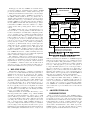
When starting VarEMU, users provide a configuration file
that sorts instructions into different classes and parameters
to a model that is used to determine power consumption for
each of the classes. These parameters are subject to dynamic
change during runtime according to an aging model. Users
may change parameters for the power model dynamically
(e.g. to emulate variations in power consumption due to
changes in temperature, the user would periodically change
the temperature parameter of the power model). Users may
also query the VM’s cycle counters and energy registers.
Whenever an instruction is executed in the virtual machine, the cycle counter for its instruction class is incremented. Energy expenditure for a class of instruction is
determined as a function of accumulated execution time for
all instructions in that class and power consumption for the
class as determined by a power model.
For instructions configured by the user as susceptible to
faults, the execution of translated code may be preceded,
succeed, or replaced with alternative, faulty operations. These
operations may, in turn, cause changes to cycle counting
(e.g. due to a less precise version of the instruction taking fewer cycles to complete) or change parameters in the
power model (e.g. voltage or frequency). Faults are injected
only when explicitly activated by emulated software. A runtime parameter passed from emulated software to the fault
module when enabling faults allows users to configure which
faults are enabled and/or the nature of faults (e.g. precision of a numerical operation). This allows users to study
the effects of faults in instruction execution on individual
applications phases, without compromising the stability of
the runtime system. The remainder of this section describes
the architecture and implementation of VarEMU.
3.1
Cycle and Time Accounting
We account time in VarEMU on an instruction class basis.
Each instruction is associated with a user-defined class. A
data structure holds total number of cycles and time spent
executing instructions of each class. To associate instructions with classes, each instruction in a translation block is
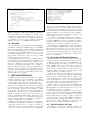
augmented with an information structure (vemu_instr_info)
containing fields for the instruction operation code (opcode),
instruction name, instruction class, number of cycles, fault
status, and the instruction word itself.
When a new instruction word is found, its opcode is decoded, and the instruction information structure is filled
with its corresponding default values. An input file in JSON
format allows users to change the default number of cycles,
class, and fault status for any instruction. The number of
cycles may also be altered by the fault module at runtime.
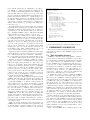
A helper function in QEMU allows calling arbitrary functions from translated code. We use one such helper to perform a call to a function that increments the number of
cycles for a given instruction class after each instruction
is executed (vemu_increment_cycles). This function adds
the number of cycles in the instruction’s information structure to the total number of cycles for its instruction class.
Likewise, it increments total active time for that instruction
class, based on current (virtual) frequency. In processors
where the number of cycles taken by an instruction is not
constant, information from the instruction word (e.g. input
registers used, immediate values) could be used to accurately
determine the number of cycles.
We must also account for cycles spent in standby or sleep
Hardware timing:
Active
WFI
Sleep
50 M Cycles
IRQ
0.5 s
Emulation timing:
Active
WFI
Sleep
50 M Cycles
IRQ
?
1 second
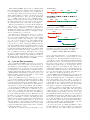
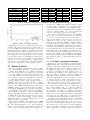
(a) Problem: emulation runs as best-effort, so execution and sleep times do not match hardware.
Active
Accounted: cycles/f
Emulation
WFI
Sleep
Emulation
IRQ
δ
Accounted
Time
(b) Solution: keep track of accounted and actual execution times, adjust sleep time interval accordingly.
Figure 2: Sleep Time Accounting
modes. In many architectures, a special instruction (e.g.
WFI in ARM, or HLT in x86 processors) puts the processor
in standby mode. After this instruction is issued, the processor will not execute other instructions until an interrupt
(typically from a timer or an external device) is fired. Keeping track of real sleep time (i.e., reflecting hardware timing)
is important for applications (e.g., in energy-aware duty cycling), as well as for circuit aging models. When we encounter such an instruction, we store a timestamp with current VM time. When an interrupt occurs following standby
we read a new timestamp, and add the time difference to
the counter for total time spent in sleep mode.
Because QEMU runs virtual machines as best-effort, the
actual execution frequency of emulated instructions may not
match the (virtual) frequency of the hardware. If the VM
never enters standby mode, there will be no adverse effects other than a discrepancy between total virtual time accounted with the cycle counters and wall clock time elapsed.
If the VM does enter a standby mode, time spent in that
mode must be adjusted to reflect hardware behavior.
Consider, for example, a system with periodic tasks where
processor utilization is less than 100%. After the system
completes tasks, it goes into standby mode, and waits for
a timer interrupt corresponding to the next period. Figure 2(a) illustrates such a system, where processor frequency
is 100 MHz, timer frequency is 1 Hz, task execution takes 50
M cycles (0.5 seconds), and time spent in standby mode is
0.5 seconds. If emulated execution is faster than hardware,
sleep time in the VM would be greater than in hardware.
Conversely, if emulation is slower than hardware, sleep time
in the VM would be smaller than in hardware.
In order for sleep time accounting in VarEMU to reflect
hardware timing, we keep track of emulated execution time
for each active time cycle. When a sleep cycle is initiated,