1
User Interface.
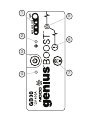
1. Internal Battery Level
Indicates the charge level of the internal battery.
2. Error LED
Illuminates Red if reverse polarity is detected, or blinks
“On” and “Off” when the internal battery temperature is
too high.
3. Power Button
Push to turn unit “On” & “Off”.
4. Power LED
Illunimates White when unit is “On”.
5. Boost LED
Illuminates White when Boost is active. If the unit is
connected properly to a battery, the GB30 will automatically
detect a battery and go into Boost mode (LED flashes White
when Manual Overide feature is active).
6. Manual Override Button
To enable, push and hold for three (3) seconds.
WARNING: Disables safety protection and manually
forces Boost “On”. Only for use when a battery is too
low to be detected.
7. Light Mode Button
Toggles the ultra-bright LED light through 7 light modes:
100% > 50% > 10% > SOS > Blink > Strobe > Off