1
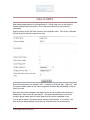
Score” and/or “Legs Replace Team Score”. If you select this then in the above example
Carl will receive 4 points for the legs he won and Ian would receive 1 point. If you chose
“Yes” for the team then their respective teams would get the same points, 4 for Carl’s
team and 1 for Ian’s team. If you choose “No” then the leg score is just there for viewing
and the amount you entered in the “Player Point Value” and the “Team Point Value” will
be used as the player and team scores for this game.
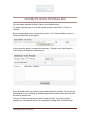
After you have added the game you should be taken to that game’s page:
Here you can edit or delete the game (if it has not been used). More importantly on your
set-up you will need to assign the game to the division and the season you are building.
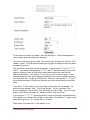
For each division in the season you need to assign the games played. So at the bottom
of this page you should see buttons pertaining to the season and the divisions you have
already built. In the example here you can see this game can be assigned to “Summer
2009”, division “C”. By clicking on each button you will assign this game to this division
for this season.
YourLeagueStats.com Page 21