1
CTI – SOFTWARE DEVELOPMENT GROUP
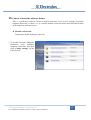
2. Click ‘Configure Settings’
next to ‘Antivirus and
Antispyware
Protection’.
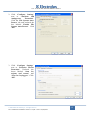
Click the ‘File System AutoProtect’ tab and uncheck the
box labeled ‘Enable File
System Auto-Protect’. Click
‘OK’.
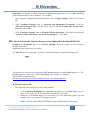
3. Click ‘Configure Settings’
next to ‘Proactive Threat
Protection’. Uncheck the
boxes labeled ‘Scan for
trojans and worms’ and
‘Scan for keyloggers’. Click
‘OK’.
© 2009 Electrolux Italia S.p.A, All rights reserved
File: SidekickPC Installation Issues v1.0.pdf - Date: 19/05/2009
11