1
Database contents
Chapter 3 - 17
Modify a record
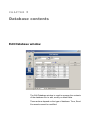
Database Manager must be open in the Edit Database
window.
1 Click on the data you want to modifiy
2 Enter the data required
3 Click Apply
Sort a series of records by alphanumerical order
Database Manager must be open in the Edit Database
window. There must be at least two records in the table.
1 Click on the name of the field required