1
Appendix
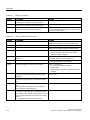
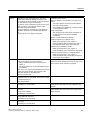
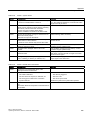
A.2 System alarms
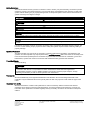
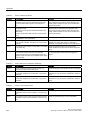
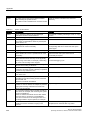
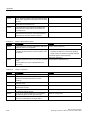
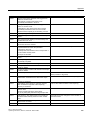
Number
Effect/causes
Remedy
140010
No S7 communication partner found because the
PLC is shut down.
DP/T:
The option “PG/PC is the only master” is not set in
the Control Panel under “Set PG/PC interface.”
Switch the PLC on.
DP/T:
If only one master is connected to the network,
disable "PG/PC is the only master" in "Set PG/PC
interface".
If several masters are connected to the network,
enable these. Do not change any settings, for this will
cause bus errors.
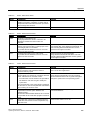
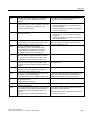
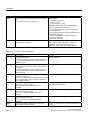
140011
No tag updating or writing is executed because
communication is down.
Check the connection and that the communication
partner is switched on.
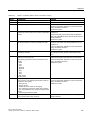
140012
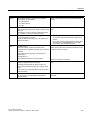
There is an initialization problem (e.g. when WinCC
flexible Runtime was closed in Task Manager).
Or:
Another application (e.g.STEP7) with different bus
parameters is active and the driver cannot be started
with the new bus parameters (transmission rate, for
example).
Restart the HMI device.
Or:
Run WinCC flexible Runtime, then start your other
applications.
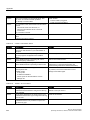
140013
The MPI cable is disconnected and, thus, there is no
power supply.
Check the connections.
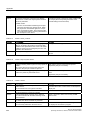
140014
The configured bus address is in already in use by
another application.
Edit the HMI device address in the PLC configuration.
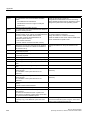
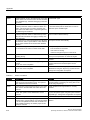
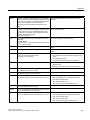
140015
Wrong transmission rate
Or:
Faulty bus parameters (e.g. HSA)
Or:
OP address > HSA or: Wrong interrupt vector
(interrupt does not arrive at the driver)
Correct the relevant parameters.
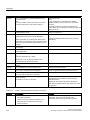
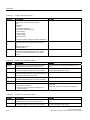
140016
The hardware does not support the configured
interrupt.
Change the interrupt number.
140017
The set interrupt is in use by another driver.
Change the interrupt number.
140018
The consistency check was disabled by SIMOTION
Scout. Only a corresponding note appears.
Enable the consistency check with SIMOTION Scout
and once again download the project to the PLC.
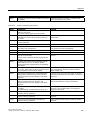
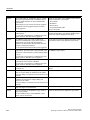
140019
SIMOTION Scout is downloading a new project to the Wait until the end of the reconfiguration.
PLC. Connection to the PLC is canceled.
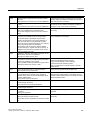
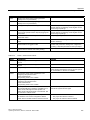
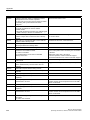
140020
The version in the PLC and that of the project (FWX
file) do not match.
Connection to the PLC is canceled
The following remedies are available:
Download the current version to the PLC using
SIMOTION Scout.
Regenerate the project using WinCC flexible ES,
close WinCC flexible Runtime and restart with a new
configuration.
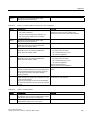
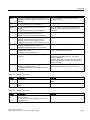
Table A-14
150000 - Connection alarms chnAS511: Connection
Number
Effect/causes
Remedy
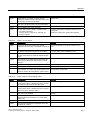
150000
No more data is read or written. Possible causes:
• The cable is defective
• The PLC does not respond, is defective, etc.
• The wrong port is used for the connection
• System overload
Ensure that the cable is plugged in, the PLC is
operational, the correct port is being used.
Restart the system if the system alarm persists.
274
MP 377 (WinCC flexible)
Operating Instructions, 09/2007, 6AV6 691-1DR01-0AB0