1
PAMGUARD V 1.2.00 Tutorial
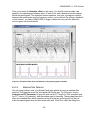
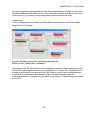
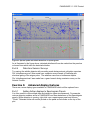
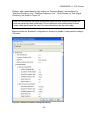
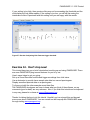
If your setting is too high, then genuine clicks may not be exceeding the threshold and the
click display will look rather sparse. If the setting is too low, you will still be seeing the
interference clicks. Experiment with this setting until you are happy with the results.
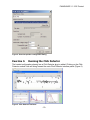
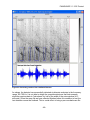
Figure 57. Results of adjusting Click Detector trigger threshold
Exercise 12. Don’t stop now!
This tutorial has given you a brief introduction to setting up and using PAMGUARD. There
are more PAMGUARD plug-ins and features for you to try out.
Here’s some ideas to get you going:
Set up a Sound Recorder module and trigger recordings from click trains.
Use a decimator to provide lower sample rate data to a second spectrogram.
Display smoothed spectral data on a spectrogram.
Try these out with the other example sound data files.
The PAMGUARD developers are keen to know what you think of the software, so any
comments (good or bad!) are very welcome. Also, if you think this tutorial can be improved
in any way, please let us know at [email protected].
Thanks for taking the time to do this tutorial. Hopefully you’ve enjoyed this and learned
some more about PAMGUARD. You can contact us and keep up with PAMGUARD news
through visiting www.pamguard.org.
- 51 -