1
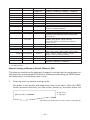
● Power switch operation error
If you turn power on again just after powering off, an error may occur.
Before turning power on again, wait till POWER LED goes off completely after
powering off.
Lighting and blinking status of each error including the above is shown below.
Status
Paper-end
POWER LED
Lights
Lights
Paper near-end
Lights
Lights
Cover open error
Lights
Lights
Cover open error *1
Lights
Cutter lock error
Lights
Head overheat error
Lights
Motor overheat error
Lights
Memory check error
Low voltage error
ERROR LED
Buzzer
Lights
Lights
High voltage error or Lights
Power switch operation error
Macro execution
wait *2
Lights
*1: When the printer is printing.
*2: The ERROR LED may blink even in the execution of macro function.
5. OTHER
5.1 External Views and Dimensions
147
(Unit: mm)
207
147
— 24 —