1
3.1
Utility Overview
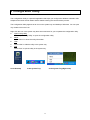
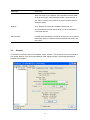
There are several parts in the utility screen. Please refer to the following table for the description.
A
E
B
E
C
D
Parameter
A
B
C
Description
Refresh – Refresh adapter list in the “B“ block.
Mode – There are two modes: Station and Access Point. If
“Station“ is selected, the adapter works as a wireless adapter. If
“Access Point“ is selected, the adapter will works as a wireless AP.
View – Enable “Status Bar“ and the “D“ block in the utility will
display the current status of the utility.
About – To check the version of the utility, select this item.
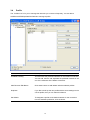
This is a list for you to configure several adapters in your PC from
the utility.
Show Tray Icon – To show the icon in the system tray, select the
item.
Disable Adapter – This function is for you to disable or enable the
adapter.
Windows Zero Config – To configure the adapter from Windows
XP Zero Configuration, check the item.
Radio Off – This function is for you to turn off or turn on the radio
of the adapter. If the radio is turned off, the adapter will not work.
14