1
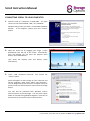
Scroll Instruction Manual CONNECTING TO A WIRELESS NETWORK 1. Go to Settings Wireless & Networks Wi-Fi Settings 2. Touch the “Network Notification” option to enable (a green tick will appear in the checkbox) 3. A list of the available wireless networks will appear under “Wi-Fi Networks”. 4. Touch the network you want to join and input the appropriate security key (you may need to refer to your router’s user manual for the key). You will now be connected to your wireless network and can use Internet-based services on your Scroll. It will remember your network key and automatically connect you to your wireless network when powered on and in range. PLAYING VIDEO ON YOUR TV VIA HDMI 1. Connect the HDMI cable to your output device (TV, monitor) 2. Connect the HDMI cable to your Scroll 3. Go to Settings Sound & Display Output Select 4. Choose HDMI Can also choose the output resolution by going to “HDMI Setting”. You have the following options. Refer to your Television’s user manual for correct resolution selection. 1920x1080p 60Hz 1280x720p 60Hz 1440x576p 50Hz 1440x480p 60Hz 720x576p 50Hz 720x480p 60Hz 640x480p 60Hz For the latest, up-to-date manual, please visit www.storageoptions.com