1
H) Adjusting the LCD Contrast
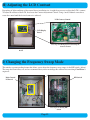
Depending of light conditions of the control boxes installation site, it might be necessary to adjust the LCD’s contrast.
To adjust the contrast of the LCD, first locate the Contrast Adjustment Control. Using a small, flathead screwdriver,
rotate the control until the desired contrast is achieved.
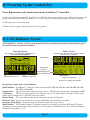
LCD Contrast Control
LCD Display
Board
Close-up of LCD Display Board showing the
Contrast Control
Back of door showing the LCD Display
Board
I) Changing the Frequency Sweep Mode
This unit has a patent-pending feature that allows you to adjust the frequency sweep range via the DIP switch ( below).
The range has been factory set, and we recommend that you do not change this without first consulting ClearWater’s
engineers.
Main Control
PC Board
DIP Switch
Close-up view showing DIP
Switch
View of Main Control PC Board
Page 12