1
E6GOLF
TRUGOLF
INSTALLATION
BALL PLACEMENT
INSTALLATION
BALL PLACEMENT FOR TRUGOLF SYSTEMS
SYSTEM REQUIREMENTS
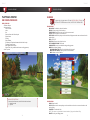
Your system must meet these requirement in order to run E6golf or E6Golf Lite. Before
installing, check the System Requirements:
FULL SHOTS & CHIP SHOTS
E6GOLF PC/LAPTOP
i3, i5, i7 – 2.0Ghz or faster
4GB RAM | Windows 7, Windows 8, or 8.1
25GB free hard drive space
nVidia dedicated graphics
PC GTX 460 or higher with 1GB RAM video memory.
LAPTOP GT 520 or Higher with 1GB RAM video memory.
DVD drive
E6GOLF LITE
i3, i5, i7 – 2.0Ghz or faster
2GB RAM; Windows 7, Windows 8, or 8.1
25GB free hard drive space
ATI or nVidia dedicated graphics with 256MB video memory.
DVD drive
E6GOLF SOFTWARE INSTALLATION
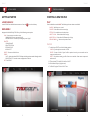
STEP 1: Insert E6Golf Disc 1
STEP 2: AutoPlay
SELECT: Run e6_full.exe or e6_lite.exe for E6Golf Lite
User Control Access
SELECT: Yes
STEP 3: Welcome to the E6Golf / E6Golf Lite Setup Wizard
SELECT: Next >
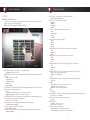
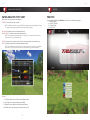
STEP 4: Manufacturer – Select Device
1. TruGolf
2. Accusport
3. Creatz
4. Flightscope
5. GSA
6. iGolping
7. Pro Tee United
8. Trackman
9. Visual Sports
10. XGolf
11. FullSwing
12. Sports Coach
SELECT: Next >
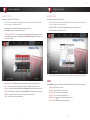
STEP 5: Auto Start
UNCHECK IF YOU DON’T WANT IT TO AUTOSTART.
SELECT: Next >
STEP 6: Ready to Install Program
SELECT: Next >
STEP 7: Installation Complete
SELECT ‘FINISH’
1
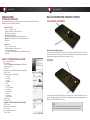
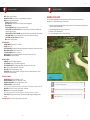
DRIVER, WOODS, HYBRIDS & IRONS
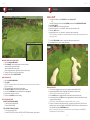
Place the ball on a tee behind the FRONT row of sensor holes closest to the screen. As your club
passes over the sensors on its way to make contact with the ball, critical information is gathered
helping determine the speed, path, and face angle of the club.
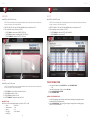
PUTTING
For a putt, place ball BEHIND the back row of sensor holes (3-4”), and then follow through to hit
the putt. The speed and direction of PUTTS are determined exclusively by the movement of the
ball over the THREE ROWS of sensor holes.
TEES
Rubber tees should be used just as one would use them in outdoor
golf. The use of tees does not change ball placement specifications.
2