1
7. Basic Operations
Once program search is completed, you can start to watch digital terrestrial TV
channels and radio broadcasts. Some typical operations are given in this chapter.
Switching On and Off
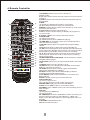
Whenever you are not using the receiver, press the STANDBY key on remote
control to put it into standby mode.
Changing Channels
To switch between different channels, you can:
- Press OK to switch the speediness program list, press LEFT/RIGHT to select
different program class, press UP/DOWN to select Program.
- Press the CH+/CH- key to go to the previous/next channel.
- Use the numeric keys to select a channel number.
- Use the EXIT/RECALL key to return to the previous viewed channel.
Watching Favorite List
You can press FAV to watch your preset favorite channels.
To create your favorite list, Refer to “Channel Organizer” for detailed information.
Choosing Subtitle
You can press the SUB-T key to select or close subtitles on the screen. The available
subtitles depend on the broadcaster.
Freezing
When watching a channel, you can freeze the current screen by pressing the PAUSE
key. Pressing it again disables the freeze Function.
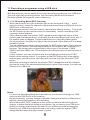
Displaying Text
Press the TEXT key to open a teletext page (if teletext is transmitted).
Press TEXT key again to close it.
Selecting Sound Mode
To switch the sound mode between left,right and stereo, press the AUDIO key.
11