1
11. Recording a programme using a USB stick
With this receiver you can easily record your favourite programs on your USB stick.
This unit offers two recording modes: Live Recording Mode and Scheduled
Recording Mode (to be used in case of absence).
1) Live Recording Mode (REC Function)
- When the receiver is on (the indicator light on the front panel of the
unit is
green in colour), select the channel to be recorded and insert a USB stick into the
USB Port 2 of the receiver.
- Wait three seconds so that the receiver can read and identify the key. Then press
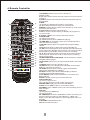
the REC button on the remote control to immediately launch recording of the
currently viewed channel.
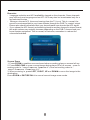
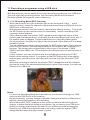
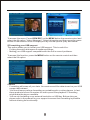
- After a few seconds, the symbol "REC" appears in the upper left corner of the
screen (see illustration below). It indicates that the recording is well under way. If
the symbol does not appear, it means that there is no recording taking place.
During recording, the indicator light on the front panel of the receiver is in orange,
instead of green.
- You can now set recording time by pressing the REC button again. Each time you
press the REC button, the recording duration is increased by an increment of 15
minutes. The chosen term is displayed on the corner of the screen: 15MIN,
30MIN, and then 45Min, etc. The maximum recording duration of each session is
4 hours.
- At any moment, you can choose to stop the recording by pressing the STOP
button on the remote control. If you press on the REC button only once without
selecting any recording time, recording will continue until you press the STOP
button.
- When the recording is finished, the symbol "REC" disappears and the indicator
light on the front of the camera switches back to green from orange. You can now
remove your USB stick.
Notes:
- For the Live Recording Mode described above, you should only plug your USB
stick into the USB Port 2 of the receiver.
- During recording, you may change to another channel and watch a different one
without causing any impact on the recording.
- When the symbol "REC" appears on the screen or that the indicator light is in
orange, it means that a recording is in progress. Do not remove your USB drive
during recording; otherwise the content of your USB drive could be damaged.
Remove your USB stick only at the end of recording, when the symbol "REC"
disappears and when the light returns to green.
27