1
SCANNING WESTERN BLOT/COLORIMETRIC STAINED GEL:
1. In “Scanning Mode”
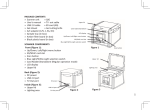
, lift the lid to open scanner.
2. Place the sample to the center of the viewing area. Close the lid.
3. Slide the Light Selection Switch on the front side of the scanner to select the white light
source for stained gel scanning.
4. Set “White Epi” or “White Back Light” item through Functional Menu (Please check “LED
Lighting” of “Functional Descriptions” section for details of turn-on of “White Epi” or “White
Back Light” application ).
5. Adjust the desired image quality through the Functional Menu if necessary (Please check
“Functional Descriptions” section for the details of all functions).
6. Press SCAN button, green LED will flash and “CAPTURING” will be displayed on the screen. If
thermal printer had connected with FAS-BG LED BOX, “Printing Yes/No” will be displayed on
the screen. The scanned image will automatically be saved to USB flash drive.
Scanning of the blot is now complete.
*: “White Back Light” mode is to scan the SDS-PAGE gel stained with coomassie blue and
preserved in a transparent media.
5