1
Function Test
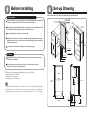
1. Checking after installation
■ Test the product as follows after the installation is complete.
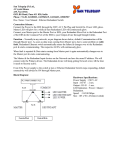
Wiring Diagram
Sensor
・First peel off the seal on the filter.
(The seal is used to protect the filter from scratches during
shipment; it is no longer needed.)
P6
W
P7
W
P2
Air nozzles
Peel off the seal
1. Check the circuit breaker
Control
Assembly
Power
Connector
・Turn the circuit breaker ON.
2. Check the functionality
・Place your hand under the outlet nozzles to see if air blows out.
・After you check the functionality by trial run, give the user manual
(with warranty) to the customer, and explain how to use and maintain the
product.
B
P1-2
B
Power Fuse
15A
Motor
P3
Motor
W
G
G
■ After trial run
P1-1
W
Body Case
B=BLACK
R=RED
W=WHITE
Bu=BLUE
G=GREEN