1
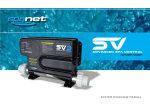
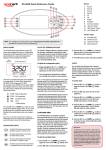
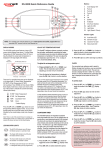
SV2.T Keyad Overview
Buttons and indicator LEDs
UP BUTTON
Short single presses toggle through the three
display modes: W.TMP = Water Temperature,
S.TMP = Set Temperature, TIME = Clock.
Holding the button will force the controller to
begin adjusting the set temperature and will raise
the set temperature point.
Also used for adjusting settings.
AUTOMATIC INDICATOR LED
SANITISE BUTTON
This LED will turn on whenever the
filtration pump is in automatic mode.
Press once to activate a 20 minute sanitisation
and clean up cycle to refresh water quality after
spa use. A second press will cancel the cycle if
already running.
HEATER INDICATOR LED
This LED will turn on when the
heater or heat pump (if fitted)
is operating.
OK BUTTON
Used to confirm and save setting adjustments
or to enter setting adjustment menus.
SANITISER INDICATOR LED
This LED will turn on to indicate
that the ozone or uv sanitiser unit
is operating (if fitted).
WATER TEMP / TIME BUTTON
A shortcut key designed to quickly toggle
between actual water temp and time display
modes.
SLEEP TIMER
INDICATOR LED
This LED will turn on
when the controller is
in a sleep mode.
SV Series Spa Controls
DOWN BUTTON
PUMP A BUTTON
PUMP B BUTTON
BLOWER BUTTON
LIGHT BUTTON
Used to toggle the
filtration pump
on / off / auto
Used to toggle any
additional jet pump
on / off (if fitted).
Press to toggle blower
on/off. A single press
turns blower on in
vari-speed mode. Use
up & down buttons to
vary speed. A double
press activates the
ramping mode.
Press to toggle spa
lights on / off. When
light is first turned
on the user has the
ability to adjust the
light effect mode or
colour via the up,
down & OK buttons.
4
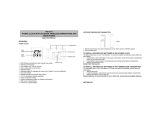
Short single presses toggle through the three display
modes: W.TMP = Water Temperature, S.TMP = Set
Temperature, TIME = Clock.
Holding the button will force the controller to begin
adjusting the set temperature and will lower the set
temperature point.
Also used for adjusting settings.