1
Table of Contents
Introducing VMware P2V Assistant ________________________________7
Cloning for GSX Server and Workstation ______________________________10
Creating a Cloned Disk using a Third Party Image ____________________10
Creating a Cloned Disk using the P2V Assistant ______________________11
Reconfiguring an Existing Cloned Disk into a Bootable Disk ____________13
Clones for ESX Server ____________________________________________14
Create a VMware ESX Server Cloned Disk Using the Direct to Disk Device
Mode ______________________________________________________14
Reconfigure an Existing ESX Server Cloned Disk into a Bootable Disk _____16
Convert a Third Party Image to an ESX Server Formatted Cloned Disk ____17
Convert a .vmdk Disk File to VMware ESX Server Format _______________18
Using the Cloned Disk in a Virtual Machine ___________________________19
About the New Virtual Machine __________________________________19
Application Compatibility _________________________________________21
About This Manual ______________________________________________22
Intended Audience ___________________________________________22
Additional Resources __________________________________________22
Document History ____________________________________________22
VMware P2V Assistant Requirements and Resources ________________ 23
What’s New in Version 2.0? ________________________________________24
P2V Assistant Requirements _______________________________________25
VMware P2V Assistant Helper Machine Requirements ___________________26
Source Machine Operating System Requirements for Reconfiguration ______28
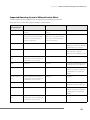
Supported Operating System to VMware Product Matrix ______________29
Additional Resources ____________________________________________30
Technical Support Resources ____________________________________30
Troubleshooting Resources _____________________________________31
3