1
Chapter 1: Welcome to Dr.Web® Enterprise Security Suite
Dr.Web Security Control Center extension to use Dr.Web Security Control Center in full. The
extension is distributed with the Server installation package. It installs by browser request when you
use elements of Dr.Web Security Control Center which require the extension (for instance, for
anti-virus components remote updater or Network Scanner). The extension can be installed on
Windows Internet Explorer 8 and later or Mozilla Firefox 25 and later web browsers.
For operation of Dr.Web Security Control Center extension at the Network Scanner page,
under both Windows and GNU/Linux OS, you must have administrator (root) rights.
Under Mozilla Firefox web browser, Dr.Web Security Control Center extension is available under
Windows OS and Linux system-based OS only.
Recommended screen resolution to use Dr.Web Security Control Center is 1280x1024 pt.
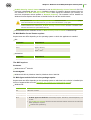
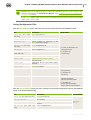
Dr.Web Mobile Control Center requires:
Requirements are differ depending on the operating system on which the application is installed:
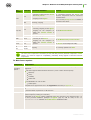
iOS:
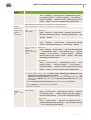
Component
Requirement
Operating system
iOS® 7 and later
Device
Apple® iPhone®
Apple® iPad®
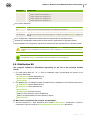
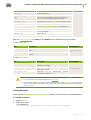
Android OS:
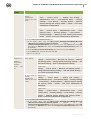
Component
Requirement
Operating system
Android 4.0 and later
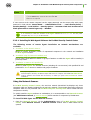
The NAP requires:
For Server
Windows Server® 2008 OS.
For the Agents
Windows XP SP3 OS, Windows Vista OS, Windows Server 2008 OS.
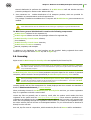
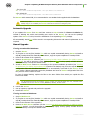
Dr.Web Agent and the full anti-virus package require:
Requirements are differ depending on the operating system on which anti-virus solution is installed (the
full list of supported OS see in the Appendix A. The Complete List of Supported OS Versions):
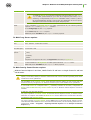
Windows OS:
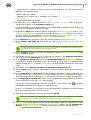
Component
Requirement
CPU
1 GHz CPU or faster.
Free RAM
Not less than 512 MB.
Free disk space
1 GB for executable files + extra disk space for logs and temporary files.
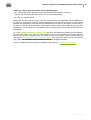
Other
1. Dr.Web Agent for Windows context help requires Windows® Internet Explorer® 6.0
or later.
2. For Dr.Web for Outlook extension the the Microsoft Outlook client from the Microsoft
Office package is required:
Outlook 2000 (Outlook 9),
Installation Manual
17