1
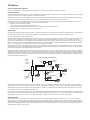
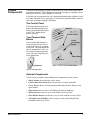
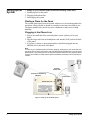
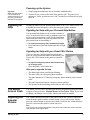
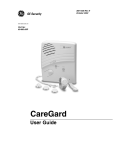
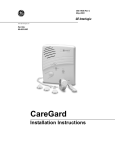
Powering up the System Important ! 1. Simply plug the transformer into an available standard outlet. 2. Turn the Power switch on the back of the panel to ON. The panel voice announces “Hello, system one two is OK” and the Power/Home/Away light turns on. Signaling for Help Pushing the button on your portable help button or the CALL button on the control panel places an emergency call to your emergency phone numbers. Make sure the outlet is not controlled by a switch and that it is not part of a ground fault interrupt circuit (GFIC). Signaling for Help with your Personal Help Button Your personal help button can be used in a number of ways. It can be worn like a watch, a pendant or on a belt. It can even be mounted on a wall. See the Installation Instructions that came with your help button for complete instructions on assembling it. ¾ To signal an emergency with a portable help button Press and hold in your help button until the red light blinks. Signaling for Help with your Panel CALL Button If you are near the CareGard panel during an emergency or your personal help button is unavailable, you can use the CALL button on the panel to signal for help. ¾ To signal an emergency with the CALL button setup up for single press: Press the panel CALL button once. After you’ve signaled for help • The Status light on the panel begins blinking. • The panel calls your emergency phone numbers. • The panel announces “Contacting emergency phone number, please remain calm.” • The panel reports an alarm to emergency phone numbers. • The operator at the monitoring station can now talk with you. The Master Access Code The Master Access Code is needed when entering programming mode and when using the Check-in feature. (Default Master Access Code is 1234). If you wish to change your Master Access Code, contact your dealer or installer. Adjusting the Speaker Volume The Volume button on the front of the panel controls the volume of announcements from the speaker and the volume during a 2-way talk session. Simply press the volume button to increase the volume. Each time the volume button is pressed, it increases the speaker volume one level. Note If you press your personal help button or the panel CALL button the volume automatically changes to the highest level. Signaling for Help 3