1
3. settings
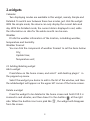
You can control the system through customized settings. To access to
the setup interface, you can use either of the two ways said below: Click
the app icon on Dock(in default state,the setup app is acaliable on Dock);
Or teturn to the home screen and click on Dock to enter the app interface.
And then click the app icon.
In the table below are the details of all settings:
Item
Function
Wireless
operation and
network
with it you can set the wireless Wi-Fi,virtual
network and mobile netwoke. For details,
please refer to the part“setting for network
connection”
Cable network
To enable or disable the cable network, It
supports static IP.
Sound and
display
With it you can set the system’s sound
effect, screen brightness and standby time.
Location and
safety
You can locate yourself through the wireless
network and GPS too. To ensure the safety of
the information you can also set a password.
App
To manage the apps and install new apps.
Account and
sychrony
To synchronously set the Google app between
product and the network.
Privacy
To manage the information on position and
personal data.
10