1
A. Well then, the “WiFi Seeker,” a
keychain-sized device for instant WiFi
signal finding, does exactly that.
We all, by now, surely are
aware that there are similar devices
available in the marketplace, but the
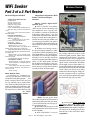
“WiFi Seeker” Wireless Hotspot Detector has a particularly strong set of features. With the push of a single button,
it literally senses (“Sniffs out”) WiFi
networks. The red light emitting diodes
(LED) lights begin to sweep back and
forth. If there is a wireless Access Point
within 300 feet, the “WiFi Seeker” will
find it! When the red lights stop sweeping, and remain lit, you’ve located
an (802.11 b/g) Access Point. If the
red lights don’t stop sweeping, simply
“point” the “WiFi Seeker” in a different
direction, and “keep on sweeping,”
or “Truck’en,” if that’s your “thing?” In
addition to identifying a WiFi network’s
signal strength, by illuminating anywhere from one (1) to four (4) LEDs on
the small, hand-held, battery-powered
device, it also uses a directional antenna, which makes it easier to “pinpoint”
specific hotspot locations. If there are
multiple signals, it locks in on the strongest. If you continue to hold the button
down, it becomes, in effect, a directional
WiFi dowser, allowing you to continue
to move around and see immediate
response(s) to different available AP
signal strength(s). Note. The more
LED lights that stay lit after a search,
the stronger the WiFi signal is.
Q. Why do I Need a “WiFi
Seeker”?
A. First of all, you can locate a WiFi
Hotspot, right from your keychain,
before you even bother unpacking and
booting up your laptop. “WiFi Seeker”
is small, easy to use and fast. As such,
“WiFi Seeker” quickly and easily detects
a Wireless Network AP and indicates the
best place to connect wirelessly to the
internet. Caveat. A laptop should be
able to communicate on a Wireless
Network that registers as few as one
red light on the “WiFi Seeker,” assuming that you have access rights on that
network.
Secondly, “WiFi Seeker” is definitely compact, cheap and convenient.
You can easily attach it to your car key
ring, a laptop bag fastener, or anywhere
else you might find convenient and/or
handy.
Thirdly, and best of all. Know
well, that WiFi shares the 2.4GHz band
spectrum with other wireless devices.
However, unlike other AP detectors,
the Chrysalis “Wifi Seeker” claims to
be able to tell the difference between a
true WiFi network and the interference
caused by other 2.4GHz devices. That’s
what makes the “Wifi Seeker” so unique,
“It’s able to differentiate between an
802.11b/g network, cordless phone, microwave oven, (Bluetooth transmitter),
and baby monitor,” says Eric Seedman,
president of Chrysalis.
Q.
So
What’s It All
About Alfie?
A. While
WiFi may not be
ubiquitous yet,
give it time - it’s
getting there
fast. Scattered
worldwide
from airports
to hotel lobbies;
to “Java” hot
spots; to libraries; to “Old Taipei (which
is being Wired For WiFi On Trains”); to
even Mauritius, a remote, mountainous
island in the South West Indian Ocean,
which is slated to get a 100-square-mile
broadband wireless network; even to my
backdoor neighbor’s unsecured “default”
network, a great many “public” and “private” places have become home to WiFi
signals. The “WiFi Seeker’s” main purpose in life is to (completely?) eliminate
any User’s need to: 1) Needlessly turn on
their Laptop, or PC Tablet computer, or
PDA, or What-ever(?), or 2) Force them
to use a program like NetStumbler to
“sniff out” any wireless Access Point(s)
and its related Signal Strength.
Comment: Chrysalis comes
pretty close to succeeding there.
Sadly however, the “WiFi Seeker” cannot discern whether a WiFi network
Page 13
Blue Chips Magazine —March 2005
has been left “Open” for public use
(whether accidentally - or possibly
even on purpose – nor, even if it has
been locked by its owner with an (WEP
or WAP) encryption key). Such is life
in the fast, fast, frugal lane. Your
best bet with the “WiFi Seeker,” being
used in the wild, may be to limit your
expectations to only determining
whether a WiFi network is available,
or not. However, “WiFi Seeker’s” are
truly great for doing a quick security
scan around the place, just to see how far
your WiFi signal may actually be traveling, and quite possibly, completely
unbeknownst to you.
Q. So, are you properly worried now
about your wireless network’s default
security?
A. You should be. Wireless networks send their data through walls
and ceilings, and can be picked up with
sensitive antennas miles away. With
this kind of transparency, you need to
protect the data on your network, even
if, and especially if, you’re a casual
home User. “WiFi Seeker” is living proof
of that statement, to be sure. And, it is
not the only “Sniffing” kid on the block,
and I don’t mean cold-like “Sniffles”
either.
Interesting FAQ about the
“WiFi Seeker”
Q. “WiFi Seeker” is detecting a signal, but the PC cannot access it.
A. If the Wireless Access Point has
Wired Equivalent Privacy (WEP) encryption enabled, then the PC wireless
card also must have WEP encryption
enabled with the same identical key.
Other possibilities are:
1) “WiFi Seeker” has detected an
802.11g signal and the PC wireless card
is only capable of connecting to 802.11b
Access Points, or 802.11g is disabled in
the software for the PC wireless card.
2) PC card is set to only communicate with an 802.11g Access Point and
the Access Point located only supports
802.11b.
3) “WiFi Seeker” has detected an
802.11b/g signal and the PC wireless
card is only capable of connecting to
802.11a Access Points.
Note. Please refer to the wireless card’s user manual for more
information.