1
User manual Triathlon
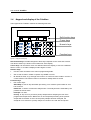
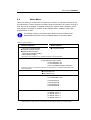
<SYR_VALVE>
to control the connections of the syringe to one of its three tubes:
<NEEDLE>: connection to sample needle
<WASH>: connection to wash solvent bottle
<WASTE>: connection to syringe waste tubing.
<SYR>
to control the movements of the syringe.
<LOAD>: the syringe with the programmed volume
<UNLOAD>: the syringe with the programmed volume
<HOME>: the volume previously aspirated will be dispensed to the last
programmed position, and the syringe will be initialized again.
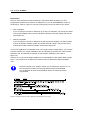
<WASH>
to execute a needle wash; the content of the buffer tubing is not rinsed
to waste before the start of the wash. The programmed volume of
wash solvent is used to wash the needle at the wash position.
The wash position may be contaminated with the contents of the buffer
tubing, which may generate cross-contamination. To prevent
contamination of the wash position, program a dispense to waste action
before programming a wash action.
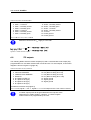
<VALVES>
to program positions of high pressure valves (ISS, injector valve,
SSV). The injector valve has two positions: <INJECT> and <LOAD>.
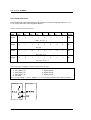
The ISS optional valve has positions 1-6 and 1-2 (see figure 5.2).
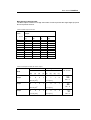
<WAIT>
to program a pause (max. 9 hours, 59 minutes, 59 seconds).
During the pause, the needle will move to home position (if the
previous step is an aspirate or dispense action). If you want the needle
to stay in the same position, an aspirate or dispense step of 0 µL must
be programmed at the desired position.
<COMPRES>
to activate the compressor to put air pressure on a sample. The
compressor will stay active until it is switched off (in a next
programmed step). The compressor will be automatically switched off
at the end of the needle wash routine if a needle wash is used.
<AUX>
to control the four standard auxiliaries (contact closures). Refer to
Chapter 6.
<WAIT-IN>
to program a pause in which the Triathlon waits for one of the four
inputs to become <HIGH> or <LOW> before continuing with the next
step. Refer to Chapter 6.
<PROG-OUT>
to define two programmable outputs (contact closures). These are
similar to the auxiliaries, but only available in the user program. Refer
to Chapter 6.
0060.123-21
41