1
R E D D S M C M E D I A O P E R AT I O N G U I D E
06
OFFLOAD
MEDIA
CONNECT A RED MINI-MAG TO YOUR COMPUTER
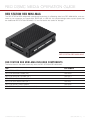
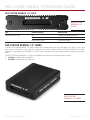
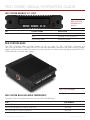
This section explains how to connect a RED MINI-MAG ® to your computer using a RED STATION RED MINI-MAG.
NOTE: You can daisy-chain most FireWire storage devices, including the RED STATION RED MINI-MAG and the
RED STATION (for REDMAG™ 1.8" SSD).
1. Place a RED STATION RED MINI-MAG on a firm, flat surface.
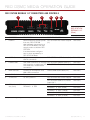
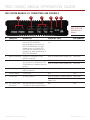
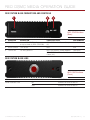
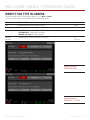
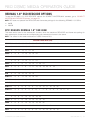
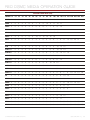
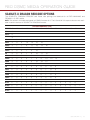
2. Connect the RED STATION RED MINI-MAG to a computer using one of the following data connectors:
WARNING: DO NOT connect more than one (1) data cable between one (1) RED STATION RED MINI-MAG
and the computer.
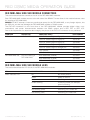
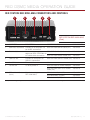
CONNECTOR
CABLE (INCLUDED WITH
RED STATION RED MINI-MAG)
NOTES
eSATA
RED STATION eSATA Cable (24")
After connecting via eSATA, it may take up to 15
seconds for the media to display on the computer.
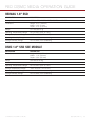
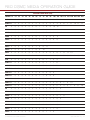
FireWire 800
RED STATION FW800 Cable (2")
The computer supplies power to the
RED STATION RED MINI-MAG via the FireWire
RED STATION FW800 Cable (24")
800 connection, so it is not necessary to use
the RED STATION AC Power Adaptor. RED
recommends using the power adaptor for optimal performance.
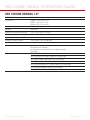
You can use the 2" FireWire 800 cables (included with each RED STATION) to daisychain the RED STATIONs. Then, use one (1)
FireWire 800 cable to connect one (1) RED
STATION to the computer. The computer then
recognizes each RED STATION through a single FireWire connection.
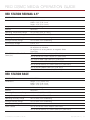
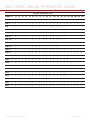
USB 3.0
RED STATION USB 3.0 Cable (24")
If connecting to the computer using a different MINI USB cable than provided, power the
RED STATION RED MINI-MAG with the RED STATION AC Power Adaptor.
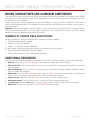
3. If using an eSATA connection, power the RED STATION RED MINI-MAG with one of the following cables:
‒ ‒ RED STATION AC Power Adaptor
‒ ‒ RED STATION USB to DC Power Cable (24")
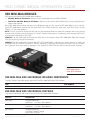
4. Set the On/Of Switch on the back of the RED STATION RED MINI-MAG to on.
5. Install the RED MINI-MAG in the media slot on the front panel of the RED STATION RED MINI-MAG.
The computer recognizes the inserted RED MINI-MAG and displays the RED MINI-MAG as a new drive.
NOTE: To offload data from the SSD, go to “Offload Data From Media to Your Computer” on page 46.
COPYRIGHT © 2015 RED.COM, INC 955-0047, REV-H |
43