1
GC-TBZ48
BATTERY POWERED Z-WAVE THERMOSTAT
INSTALLATION INSTRUCTIONS
The Z-Wave Thermostat (GC-TBZ48) is a programmable, Z-Wave communica ng thermostat.
It can be powered using 24VAC (if both “R”&”C”wires are available at the thermostat), or
using four (4) AA ba eries. Using Z-Wave technology, end users have the ability to use the
2GIG Go!Control panel to control the thermostat, configure programming se ngs, as well
as to display current condi ons in the home or office.
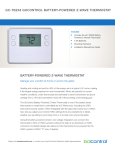
Figure 1. Z-Wave Thermostat Front View
GC-TBZ48 THERMOSTAT
MODE
FAN
ANCHORS (2)
Y
BATTERIES (4) PHILLIPS ADHESIVE WIRING LABELS SHEET
SCREWS (2)
Features Include:
• A fixed format display with white backlight
• Hea ng and cooling setup display op ons
• System mode (OFF, Heat, Cool, Auto,
E-Heat)
• Fan mode control and display (Auto, ON)
• Changeover type for Heat Pump (HP)
systems
Compatible with 24 VAC gas, oil, or
electric heating and air conditioning
systems; or gas millivolt heating
systems
DO NOT USE ON 120VAC SYSTEMS!
Standard Systems
• 1 Stage Hea ng and Cooling
• 2 Stage Hea ng and Cooling
• On-screen setup of HVAC type, Fan type
Heat Pump Systems
• 1 Stage Hea ng and Cooling
• F/C mode, and sensor calibra on
• 2 Stage Hea ng and Cooling
Box Contents
• 1─Z-Wave Thermostat
• 2nd or 3rd Stage Aux Hea ng (Electric Heat
Strips
Installation Outline
• Step 1 Remove Exis ng Thermostat
• 1─Sheet Adhesive Wiring Labels
• Step 2 Install GC-TBZ48 Thermostat
• 2─Plas c Wall Anchors
• Step 3 Setup Thermostat to match System
Type
• 4─AA Ba eries
• Step 4 Install into Z-Wave Network
Copyright © 2015 Nortek Security & Control LLC
1