1
Table of Contents: REG-1 User Guide
WELCOME! ..............................................................................................................5
PART I: BACKGROUND........................................................................................6
THE PEAR STORY..................................................................................................6
THE PEAR METHOD .............................................................................................8
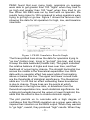
Figure 1: PEAR Cumulative Results Graph ..................................9
THE PEAR LEGACY ............................................................................................11
PART II: GETTING STARTED WITH THE PSYLERON REG-1.................12
HOW THE REG-1 WORKS..................................................................................12
HARDWARE AND SOFTWARE INSTALLATION .........................................14
Figure 1: Driver Destination Location.........................................15
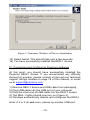
Figure 2: Summary Window of Drivers Installation ...................16
Figure 3: REG-1 Correctly Connected.........................................17
Figure 4: Found New Hardware Wizard......................................18
Figure 5: Driver at Specific Location (Advanced) .......................18
Figure 6: Search for Driver Location...........................................19
Figure 7: Driver File Not Found..................................................19
Figure 1: Reflector Licensing Agreement ....................................21
Figure 2: Psyleron Games Directory ............................................22
Figure 3: Install Summary ...........................................................22
GETTING STARTED WITH REFLECTOR......................................................24
Figure 1: Reflector User Login.....................................................25
Figure 2: Reflector Main Screen..................................................26
Figure 3: Reflector Module Selection Screen ..............................27
MODULES: PEAR CLASSIC.....................................................................28
Figure 1: PEAR Classic Main Screen..........................................28
Figure 2: PEAR Classic Intention Selection................................29
Figure 3: PEAR Classic Session Running ...................................29
Figure 4: PEAR Classic Settings..................................................30
Figure 5: PEAR Classic Require Balanced Series.......................31
Figure 6: PEAR Classic Results Graph .......................................32
Figure 7: PEAR Classic Analysis .................................................33
MODULES: RED/GREEN GAME ...............................................................34
Figure 1: Red/Green Main Screen ...............................................34
Figure 2: Red/Green Session Running ........................................35
Figure 3: Red/Green Analysis ......................................................39
MODULES: SLIDER APPLICATION ............................................................40
Figure 1: Psyleron Slider..............................................................40
-2-