1
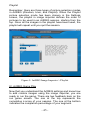
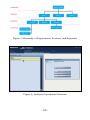
After launching Analysis, you must first select an experiment
(Figure 1). Experiments are listed in the panel on the left
side. Click on an experiment and then click Select This
Experiment.
You may also rename or delete an experiment or merge two
experiments together. To merge two experiments, select one
of the two experiments you want to merge together, and click
Merge Experiment. Then, in the right panel of the dialog box
that pops up, choose the experiment into which the selected
experiment should be merged.
After selecting an experiment, you must next select a
session. An experiment comprises one or more sessions.
Click on a session and then click Select This Session to
proceed to the Analysis window. You may also rename or
delete a session or move a session into a different
experiment.
III. Understanding the Analysis Window
Analysis allows you to examine an entire session, or
individual segments from a session. In most Reflector game
modules, the direction of intention is specified by the user.
User intentions may change from segment to segment
during a session. Analysis allows you to display your results
for an entire session, or individually by segment. Note that
Red/Green sessions and FieldREG sessions do not have a
recorded direction of intention.
When you first enter the Analysis window, the graph and
statistics for your entire session are displayed. In the upper
right of the Analysis window, you will see the segment
selection box. You may select an individual segment in this
box. Once you make a selection, the graph and statistics
display the data for the segment you have selected.
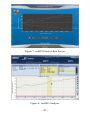
In the illustration below (Figure 2), the session consists of 3
segments, labeled Initial Segment, AutoSegment1, and
AutoSegment2. The session is using a trial size of 20 bits.
- 69 -