1
x
x
x
x
x
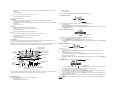
Press and hold for 2 seconds to enter manual setting modes: LCD contrast, DST ON/OFF, manual time setting
and calendar
To stop the alarm sound
To exit alarm setting mode and country/city setting mode
Manual time setting
Calendar setting
Press and hold the SET key for about 2 seconds to advance to the setting mode:
LCD CONTRAST SETTING
+ key
x
To increase/change values in setting modes
x
To stop the alarm sound
MIN/MAX key
x
To switch among the display of MIN/MAX outdoor temperatures and MIN/MAX indoor temperatures
x
To decrease/change values in setting modes
x
Press and hold the key for 2 seconds to reset ALL indoor/outdoor minimum/maximum temperature recordings to
current readings
x
To stop the alarm sound
Digit flashing
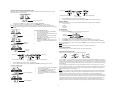
The LCD contrast can be set within 8 levels, from LCD 0 to LCD 7 (Default is LCD 4):
1.
The digit will flash.
2.
Press the + or MIN/MAX key to select the level of contrast desired.
3.
Press the SET key to confirm and enter the “Daylight Saving Time setting” or exit the setting mode by pressing
the ALARM key or SUN key.
ALARM key
x
To activate/deactivate the alarm and display alarm time
x
Press and hold for 2 seconds to enter the alarm setting mode
x
To stop the alarm sound
x
To exit manual setting mode and country/city setting mode
DAYLIGHT SAVING TIME SETTING
SUN key
x
To switch among the display of date (normal mode), seconds, sun duration and city
x
Press and hold for 2 seconds to enter country/state/city setting mode
x
To stop the alarm sound
x
To exit manual setting mode and alarm setting mode
Flashing
The daylight saving time (DST) function can be set ON/OFF. Default setting is “ON”:
1.
“ON” will flash on the LCD with "dSt" displayed.
2.
Use the + or MIN/MAX key to turn the daylight saving time function ON or OFF.
3.
Confirm with the SET key and enter the “Manual Time setting” or exit the setting mode by pressing the ALARM
key or SUN key.
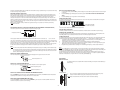
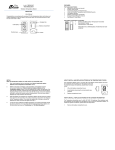
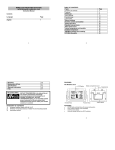
LCD SCREEN
The LCD screen is split into 2 main sections displaying the information for indoor/outdoor temperatures, time, moon
phase, calendar, sunrise/sunset time, weather forecast and air pressure history.
MANUAL TIME SETTING
Note: When the weather station does not have batteries installed the sunrise icon, moon phase icons, and sunset icon
will continue to show on the display that is blank in all other areas. These icons are painted on the screen.
Hour (flashing)
Time
Weekday
Low battery indicator
(Outdoor transmitter)
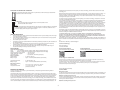
To set the clock:
1.
The hour digit will flash.
2.
Use the + key to increase or MIN/MAX key to decrease the value. Keep holding the key allows the value to
advance faster.
3.
Confirm with the SET key and enter minute setting.
4.
The minute will flash. Use the + key to increase or MIN/MAX key to decrease the value. Keep holding the key
allows the value to advance faster.
5.
Confirm with the SET key and enter the “Calendar Setting” or exit the setting mode by pressing the ALARM key
or SUN key.
Alarm icon
Outdoor data signal
reception indicator *
Indoor
temperature
in °F
Outdoor temperature
in °F
Moon phase
indicator
Minutes
Sunset time
Sunrise time
CALENDAR SETTING
Air pressure history
bar graph
Weather
tendency
indicator
Weather
forecast icon
Weekday
Year
Month. Date
Calendar, seconds, hours of
daylight, or city location are
Low battery indicator displayed. Toggle the SUN
(weather station)
button.
1.
2.
3.
*When the signal is successfully received by the weather station, the Outdoor reception icon will be flash about every 4
seconds as the temperature updates. (If not successful, the icon will not be shown in LCD).
4.
5.
MANUAL SETTINGS
The year digits will flash. Use the + key to increase or MIN/MAX key to decrease the value. The range runs from
2011 to 2025 (default is 2011). Keep holding the key allows the value to advance faster.
Press the SET key to confirm and enter the month setting mode.
The month digit will flash. Use the + key to increase or MIN/MAX key to decrease the value. Press the SET key
to enter date setting. Keep holding the key allows the value to advance faster.
The date digit will flash. Use the + key to increase or MIN/MAX key to decrease the value. Keep holding the key
allows the value to advance faster.
Confirm with the SET key and go back to normal mode, or exit the setting mode by pressing the ALARM key or
SUN key.
Note: Weekday is displayed accordingly above the time in short form (from Monday to Sunday): MO / TU / WE / TH /
FR / SA / SU
The following settings can be changed when pressing the SET key:
x
LCD contrast setting
x
Daylight Saving Time (DST) ON/OFF
2