1
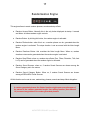
5 7. Drag all the folders that you find inside SEQui2R snapshot folder: The file INIT and the folders, Electronic, Organic, Guitars and Rhythms. 8. Now check the snapshot list again and you should see all presets snapshots. Installing the Update only (for owner of SEQui2R 1.1). In order to update SEQui2R, please follow these simple instructions: 1. Back up temporarily the files SEQui2R.nki, SEQui2R_rsrc.nkc , SEQui2R_rsrc.nkr and INIT.nksn (from the snapshots folder, see above). 2. Put in the SEQui2R folder the new SEQui2R.nki, SEQui2R_1_2.nkr and SEQui2R_1_2.nkc. 3. If you want to preserve the 1.1 Snapshots, copy them in another location and change their filenames (including the folders name) and replace them in their location after step 4. 4. If you have created User snapshots (and folders), do not delete them and go to the “Version Converter” page below in this addendum. 5. Replace all version 1.1 folders in the snapshots location with the folders you’ll find in the “Updated Snapshots” folder. AUDIOFIER SEQui2R User Manual