1
vv
arts|UNMUTED artsys
USER GUIDE
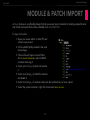
The entries in Control Name column correspond to patch numbers
in artsys. By default, each patch
pad in artsys sends MIDI CC on
Lemur Target 7 and MIDI channel
1 that corresponds to its patch number, e.g. patch 25 sends CC25. To
assign a track, check the patch number of your track in artsys, locate
the corresponding entry in Control
Name column in Device Setup>Generic Remote window in Cubase and
select the desired track in Channel/
Category column. Unassigned entries have 1000 value in Channel/
Category column.
IMPORTANT!
IMPORTANT!
IMPORTANT!
Some artsys modules provided
by arts|UNMUTED have their own
Generic Remote files that correspond to the provided Cubendo projects (with VST or MIDI tracks). To
enable track selection/tracing, import the respective GR file with all the tracks already assigned.
There should be only one artsys GR file active at the given moment - if you have several GR files imported as Generic Remote 1, 2 and 3, disable MIDI Input/Output for the files that are not currently
used.
Generic Remote script has got some limitations. It is based on track number and any changes in track
order (adding, deleting or rearranging tracks) will mess with your assignments. Therefore, it should be
used for templates or project parts that are staple and don’t change.
-20-