1
CAUTION: use only a new battery of the size and type required.
Instructions for the installation of a battery
1/ Slide the lid of the battery compartment in the direction of the arrow to open it.
2/ Place the battery in the compartment and over the ribbon, as indicated by the
markings of the polarity (+ and -) symbols inside it.
3/ Put the lid back in place. As soon as the low-battery warning appears or the distance
measurer does not work correctly, the battery must be replaced.
CAUTION
Worn out batteries must be disposed of rapidly and cleanly. Do not burn or bury
them.
At the end of its travel, the laser beam should always encounter a diffuse reflection
material (examples: a wooden plank).
Class 2 Laser Radiation When open, do not stare into the beam.
Do not direct the beam in the direction of people or animals around you.
Precautions
If you do not plan to use your distance measurer for a month or more, remove the
battery. Batteries may spill chemical products that can destroy electronic parts.
Setting of distance measurer
Your distance measurer is sensitive to temperature and humidity changes. Before use,
wait about 15 min to allow it to adjust to room temperature.
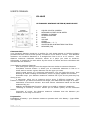
Summary
Foot
Meter
Clear
Area
Volume
Memory
M1
M2
+
-
M3
Measure
ON
Light
Switching on of the distance measurer
For switching on the distance measurer, set LD/NORMAL/OFF located on the side of the
distance measurer to LD or Normal position, the laser will light up, and you can fix the
target with the laser point. The distance measurer switches off automatically after 4 min.
For switching off by hand, set LD/NORMAL/OFF to OFF position, the laser will black out.
REMARK
When you set LD/NORMAL/OFF located on the side of the distance measurer, to OFF, all
measures stored in the memory are deleted.
Measuring
1/ If the distance you want to measure is 10.67m or less, set LD/NORMAL/OFF to Normal
(normal range). Otherwise, set LD/NORMAL/OFF to LD (long distance range).
2/ Press the Foot/Meter button until the Foot sign appears (for a foot measure) or the
Meter sign appears (for a meter measure).
3/Keep the bottom of the distance measurer flat against a wall, equidistant from the floor
to the ceiling. Ensure that there is no obstacle towards the point you want to measure
and that your head or your hands do not induce the distance measurer into error.
4/ Press the Measure/ON key. The distance measurer beeps, then the distance between
the distance measurer and the point you are measuring appears.
Page : 2 / 4