1
CHAPTER 3. RESULTS
21
assembler routine start.S.
In order to quickly recognise the start point of the kernel during the debugging phase, the word
“boot” compares at the beginning of the code. With the purpose of avoiding the interpretation of
this label as an instruction, a jump instruction is needed to automatically skip this not-instruction.
This trick could seem a bit complicate at the beginning, but it resulted to be a great help during the
assemblage of the kernel, thus it has not been removed.
The code of start.S is well documented, it makes no sense to discuss it deeply here, so only a short
description of the main functions will follow. Five are the main things this assembler-code does before
the memory configuration (second stage):
1. It sets some processor-specific registers, for example it turns off the watchdog. Some registers are memory-mapped differently in the newest MC68EZ328 processor: A rough support is
included here, but still not tested.
2. It sets the serial in order to give the possibility to send immediately informations in case of
errors. The transmission parameters are 9600 baud, 8 bits of data, no parity and 1 stop-bit
(9600/8N1).
3. It sets the LCD dimension and address of the logo (Sec. 2.1.1). The logo is displayed on the
Palm LCD.
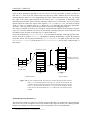
4. It copies the chunk of kernel variables from the address given by the label placed at the end
of the .logo section to the memory address 0x10000400. For more informations about the
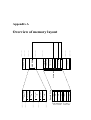
memory layout, please refer to Sec. 3.2.2.
5. It copies the user data and user code to the RAM, starting at 0x10100000 and 0x10200000.
The procedure used to locate the beginning and the dimension of the user portion in the ROM
is explained in Sec. 3.2.1.
The second stage: Memory configuration
The C-function setup() invoked as last operation by start.S, is responsible of the setup of the
memory layout.
The description of the system memory is available by the header-file MemoryLayout.h. The main
task of the setup() function is to set the values of the structure segmap, values needed to correctly configure the memory regions. Before passing the control to the topsyMain() routine, the
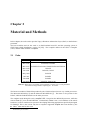
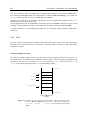
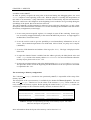
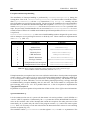
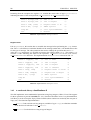
second stage prompts on the console the memory division, as shown in Tab 3.1.
kernelCodeSize
0x00010000
kernelCodeStart
0x10c10000
kernelDataSize
0x000e1000
kernelDataStart
0x10002c00
userCodeSize
0x00100000
userCodeStart
0x10100a6e
userDataSize
0x00200000
userDataStart
0x10200000
Table 3.1: Example of output during the setup of the memory layout. The values
reflect the description on Appendix A
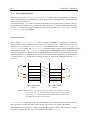
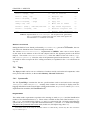
More informations about the layout of the memory can be found at 3.2.2.