1
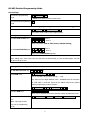
Quick Programming Guide
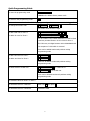
To enter the programming mode
*
Master code
#
888888 is the default factory master code
To exit from the programming mode
*
Note that to undertake the following programming the master user must be logged in
To change the master code
0
New code
#
New code
#
The master code must be 6 digits
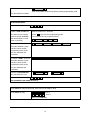
To add a PIN user for Zone 1
1
User ID number (1-1100)
#
To add a Pin user for Zone 2
1
User ID number (1101-1200) #
PIN #
PIN #
The ID number is any number between 1 & 1100 for Zone
1 and any number between 1101 & 1200 for Zone 2
The PIN is any 4-8 digits between 0000 & 99999999 with
the exception of 1234 which is reserved
Users can be added continuously without exiting
programming mode
To add a card user for Zone 1
1
Read Card
#
To add a card User for Zone 2
5
Read Card
#
Cards can be added continuously without exiting
programming mode
To delete a PIN or a card user
2
User ID number
2
Read Card
#
# for a PIN user or
for a card user
Users can be deleted continuously without exiting
programming mode
To Unlock the door for Zone 1 or Zone 2
To unlock the door for a PIN user
Enter the PIN then press #
To unlock the door for a card user
Present the card
5