1
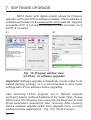
The Messages information window displays information concerning upgrade process. If the port is opened correctly, a Port
opened message appears. Upgrade mode may be entered
using either of the two methods: remotely via LU (using LPCon
settings: address, mode, speed, COM port) or by switching on
a meter with a button
pressed (while entering bootloader
mode, upgrade button is used to set default communication settings of the meter). Meter display shows the „boot” message and
the software version while the LU program displays Device
found message along the name and version of the software
of connected device. Click the ... button and browse to
the meter upgrade file. If the file is opened correctly, a File
opened message is displayed. Press the Send button.
When upgrade is successfully completed, meter reverts to the
default settings and begins normal operation while the information window displays Done message and upgrade elapsed time.
After the LU window is closed, click the Save icon to save all
initially read parameters. Current software version can be
checked by reading Device information from LPCon software.
Important! Turning the meter off during upgrade process may
result in permanent damage!
31